Your robot’s chassis is the foundation everything else depends on. Get it wrong and you spend the whole build bodging mounts and shimming gaps. Get it right and the rest of the build just clicks into place.
What is Chassis Design?
A chassis is the structural frame of your robot — the skeleton that holds motors, batteries, electronics, and sensors in the correct positions relative to each other. Chassis design is the process of working out what that frame looks like, what it’s made from, and how it’s assembled.
For small hobby robots, the chassis is almost always 3D printed. That means you design the frame in CAD software, export an STL file, and print it on any FDM printer. Typical materials are PLA (light and easy to print), PETG (tougher), and TPU (flexible — handy for shock-absorbing feet).
Key things a chassis design has to get right:
- Wheelbase and track width — how far apart the wheels are, front-to-back and side-to-side. This affects stability and turning radius.
- Motor mounts — precise hole positions so motors sit square and don’t wobble.
- Electronics bay — enough room for the microcontroller, driver boards, and wiring, with cable routes planned in.
- Battery compartment — accessible enough to swap cells, secure enough that nothing shifts mid-run.
- Sensor positions — clear sight lines and the right mounting angles.
A chassis from above
Here’s a typical two-wheel-drive chassis seen from the top. Everything has a planned home, the heavy battery sits low and central to keep the robot stable, and the sensor faces forward with a clear line of sight:
              FRONT
        ┌───[ sensor ]───┐
        │                │
   ╔════╪════╗      ╔════╪════╗
   ║ L  ║    │      │    ║  R ║   ← motors +
   ║motor    │      │    motor║     wheels
   ╚════╪════╝      ╚════╪════╝
        │   ┌──────────┐    │
        │   │ battery  │    │   ← low & central
        │   │ (heavy)  │    │     = low centre
        │   └──────────┘    │      of gravity
        │  [ controller +   │
        │    driver board ] │   ← electronics bay
        └───────────────────┘
              REAR
Track width is the side-to-side wheel spacing; wheelbase is front-to-back. Widen the track and the robot is harder to tip; shorten the wheelbase and it turns in a tighter circle.
Why robot builders care
A poorly designed chassis causes headaches that no amount of clever code can fix. Motors that aren’t properly aligned create steering drift. Electronics crammed in with no airflow run hot. A frame that flexes under load makes sensor readings noisy.
Conversely, a well-designed chassis makes everything easier:
- Parts slot in without hunting for a bigger drill bit.
- The robot’s centre of gravity sits low and central, so it doesn’t tip.
- You can swap out components — upgrade a motor, add a sensor — without redesigning everything.
- The whole thing is repeatable: print another one and it’s identical.
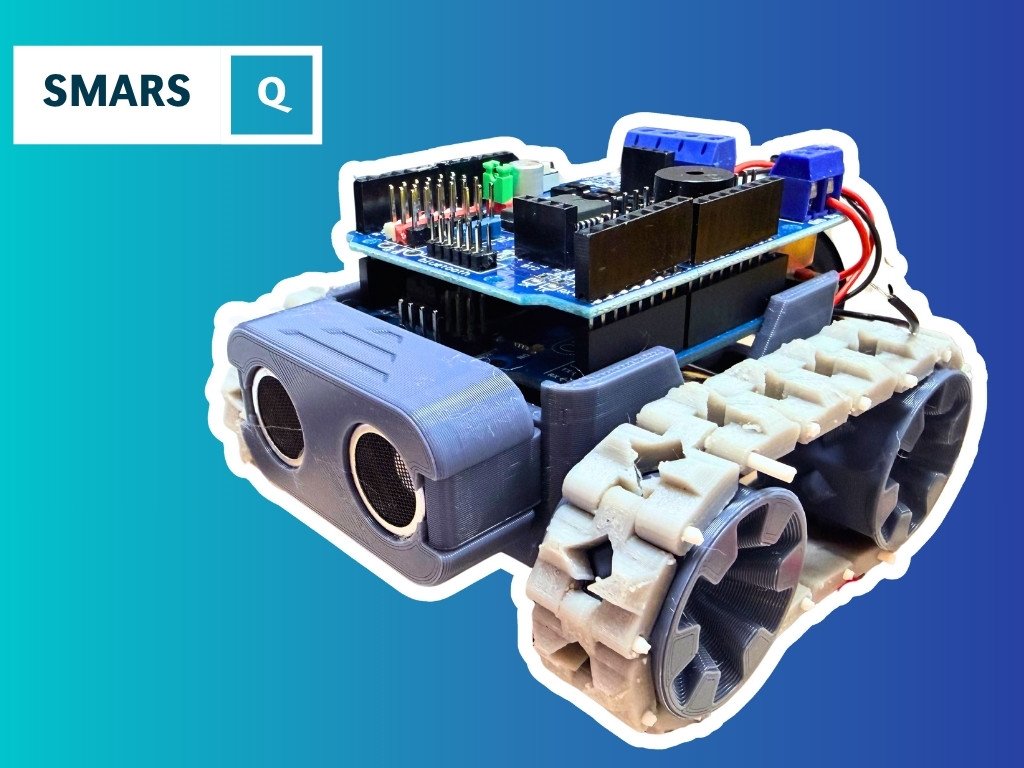
This is why modular designs like SMARS (Screwless, Modular, Assemblable Robotic System) became popular. The chassis is parametric — change the wheelbase in one sketch and all the dependent features update automatically.
Get started
The best way to learn chassis design is to build a real one. Start with Building SMARS with FreeCAD — a hands-on course that walks you through designing a 3D-printable robot chassis from scratch using FreeCAD. You’ll learn parametric modelling and motor mount geometry while producing something you can actually print and drive.
The SMARS project page shows a finished design and how all the printed parts fit together.
Once your chassis is printed, check out the Wheels and DC Motors elements for what to bolt on next.
A solid first mini-project: design a flat base plate in FreeCAD with four motor mount holes and a central cutout for a battery holder. Sketch it, extrude it to 3mm, print it. That one part teaches you most of the fundamentals.
Reacts well with
More Making & Design
- GrGears
- WhWheels
- Pr3D Printing
- CdCAD
- FuFusion 360
- FcFreeCAD
- LcLaser Cutting
- TkTank Tracks
- LeLEGO Robotics
- WeWearables
Learn more on KevsRobots
Articles to read




Share this element
This page is awesome? Show some love!Did you find this content useful?
If you found this high quality content useful please consider supporting my work, so I can continue to create more content for you.
I give away all my content for free: Weekly video content on YouTube, 3d Printable designs, Programs and Code, Reviews and Project write-ups, but 98% of visitors don't give back, they simply read/watch, download and go. If everyone who reads or watches my content, who likes it, helps fund it just a little, my future would be more secure for years to come. A price of a cup of coffee is all I ask.
There are a couple of ways you can support my work financially:
If you can't afford to provide any financial support, you can also help me grow my influence by doing the following:
Thank you again for your support and helping me grow my hobby into a business I can sustain.
- Kevin McAleer
Comments