Installing Packages
Find and install MicroPython libraries onto your board with mip from Snakie's Packages panel, and manage what is already there
By Kevin McAleer, 5 Minutes
Page last updated November 21, 2026

Half of programming is not writing code that someone else has already written. MicroPython libraries are called packages, and the tool that installs them is mip. Snakie puts a friendly face on it.
The Packages panel
Click Packages in the activity bar on the left.
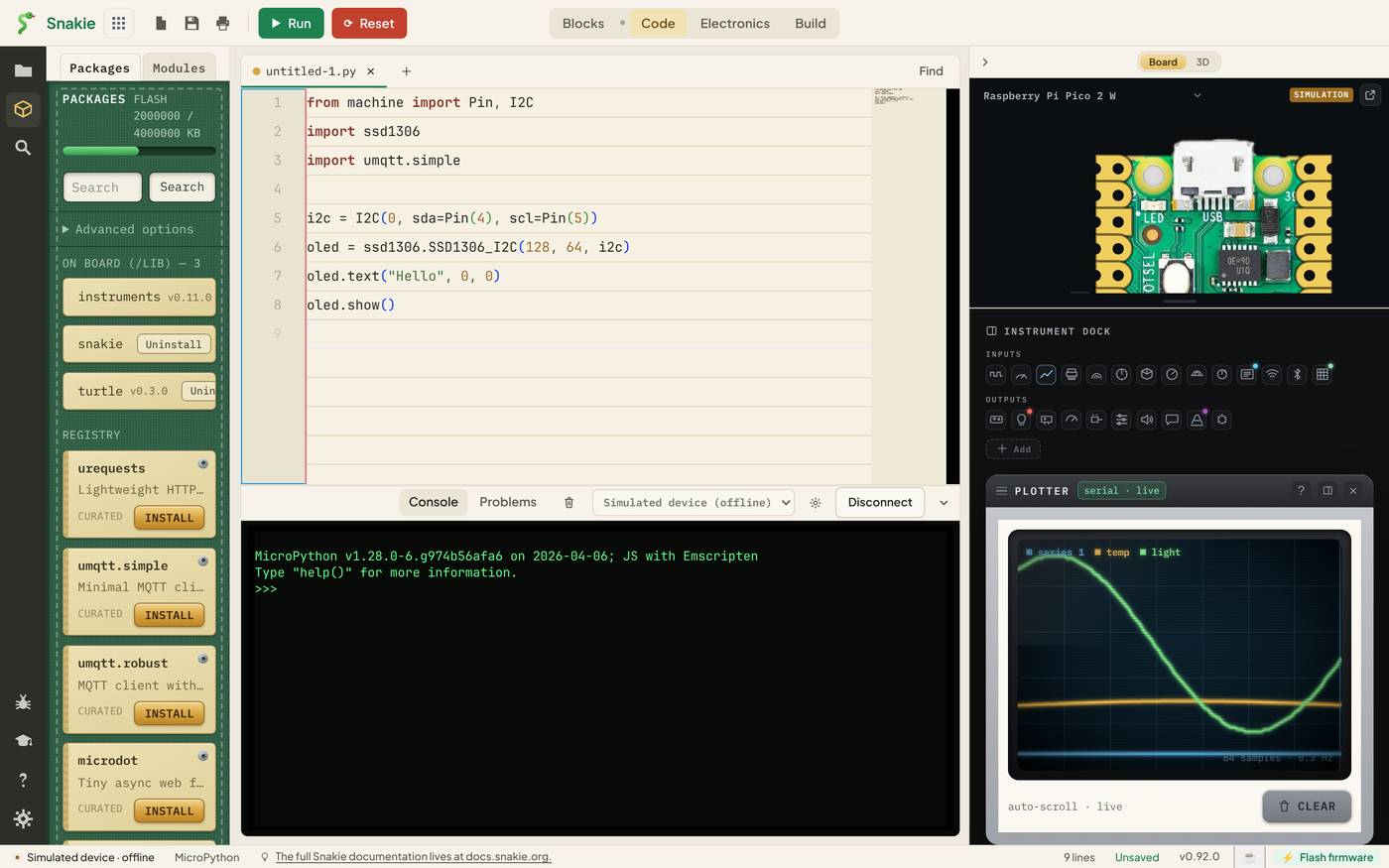
From top to bottom:
| Part | What it shows |
|---|---|
| Packages and Modules tabs | This lesson, and the next one |
| FLASH meter | How much of the board’s storage is used |
| Search | Find a package by name |
| Advanced options | Install from somewhere other than the standard index |
| ON BOARD (/LIB) | What’s installed now, with version numbers and an Uninstall button |
| REGISTRY | Packages you can install, each with an INSTALL button |
Packages marked CURATED are a short list of well-known, widely used libraries: urequests for web requests, umqtt.simple for MQTT, ssd1306 for OLED displays, neopixel, bme280, dht and more.
Installing one
- Connect a board. Installing copies files onto it, so there has to be one. The INSTALL buttons say Connect a board first until there is
- Search. Type
ssd1306and press Search - Click INSTALL
Snakie runs mip for you and shows the progress. The files land in /lib on the board, which MicroPython searches automatically, so your program can use it straight away:
import ssd1306
The package then appears under ON BOARD (/LIB).
Boards without Wi-Fi
mip normally runs on the board and downloads over the board’s own internet connection. A plain Pico has no Wi-Fi, so that can’t work.
Snakie handles it. It downloads the package on your computer and copies the files across the USB cable. From where you sit, INSTALL works the same on every board.
What does my program need?
When you’ve opened a project folder, the panel can read your code for you. Scan imports looks through the project’s .py files, lists every import that nothing on the board or in your folder satisfies, and offers to install each one.
It’s the quickest fix for the most common error of all:
ImportError: no module named 'ssd1306'
Parts bring their own drivers
If you wire up a part in the Electronics workspace that needs a driver, Snakie offers it in a banner above the editor: 1 part needs a driver. That’s the same machinery, started from the other end. The Electronics course covers it.
Advanced options
Open Advanced options to install something that isn’t in the list:
- A package from GitHub, written as
github:user/repo - A package from a different index, by giving its URL
- Whether to overwrite files that are already there
Only install from sources you trust. A package is code that runs on your board with full access to its pins.
Keeping the board tidy
Flash storage is small. A Pico has about 1.4 MB for files. Watch the FLASH meter, and use Uninstall on libraries from old experiments. Each row’s button tells you exactly which file it will remove, such as /lib/turtle.py.
Try it Yourself
- Open Packages with the simulated device connected. What’s already in
/lib? - Search for
mqtt. How do the two results differ, according to their descriptions? - Find a package for a sensor you own. Read its description before you install it.
Common Issues
Problem: The INSTALL buttons are greyed out. Solution: Connect a board, or the simulated device. Why: Packages are installed onto a board’s file system.
Problem: The install fails part-way. Solution: Check your computer is online, and that the board has free space on the FLASH meter. Why: Snakie downloads the files first, then copies them over. Either step can fail.
Problem: I installed a package but import still fails.
Solution: Check the name you import matches the module’s file name in /lib, and press Reset on the board.
Why: The package name in the registry and the module name you import are sometimes different.
Check your understanding
Quick quiz 1 of 3
Where do installed packages go on the board?
Quick quiz 2 of 3
How does Snakie install onto a board with no Wi-Fi?
Quick quiz 3 of 3
What does Scan imports do?
You can use the arrows ← → on your keyboard to navigate between lessons.
Comments