Find and Replace
Search a MicroPython file and change many places at once with Snakie's Find and Replace, and learn when whole-word matching saves you from a bug
By Kevin McAleer, 4 Minutes
Page last updated November 21, 2026

Sooner or later you’ll want to change the same thing in six places. Doing it by hand means missing one. This is what Find and Replace is for.
Opening it
Click Find at the top right of the editor, or press Ctrl+F. To go straight to replacing, press Ctrl+H. In the desktop app it’s also under Tools ▸ Find & Replace…, and it opens as a small window of its own that you can park beside your code.
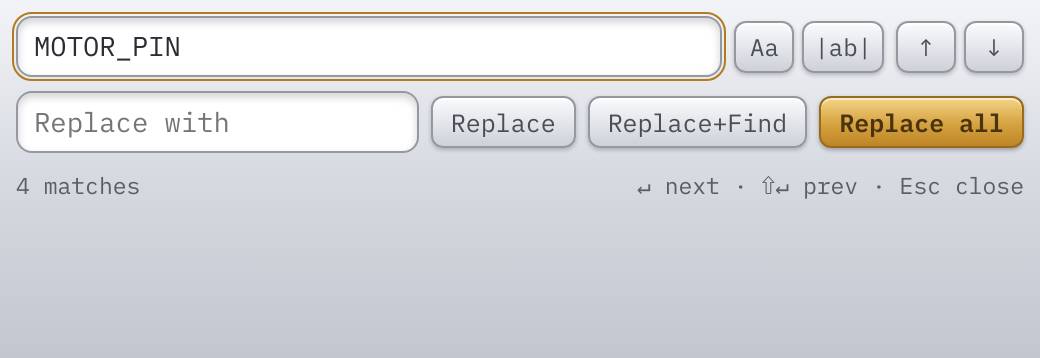
Type MOTOR_PIN in the Find box. Every match in the file is highlighted, and the window counts them: 4 matches.
The controls
| Control | What it does |
|---|---|
| Aa | Match case. pin no longer finds Pin |
| |ab| | Whole word. left no longer finds left_speed |
| ↑ ↓ | Previous and next match |
| Replace | Change the current match |
| Replace+Find | Change it and move to the next |
| Replace all | Change every match at once |
The keyboard does the same: Enter for the next match, Shift+Enter for the previous one, Esc to close.
Why whole word matters
Say you want to rename the variable left to left_motor. Our file has these lines:
left = PWM(Pin(LEFT_MOTOR_PIN))
left.duty_u16(duty)
Search for left with nothing switched on and you might expect two matches. But a search that ignores case also finds the LEFT in LEFT_MOTOR_PIN. Replace all would turn that into left_motor_MOTOR_PIN, and your program would stop with a NameError.
Switch on Aa and |ab| before any Replace all. Then check the match count is what you expect. If you thought there were two and it says five, stop and look.
Replace one at a time
When you’re not sure, don’t use Replace all. Use Replace+Find. It changes the highlighted match and jumps to the next, so you see every change as it’s made. Press ↓ to skip one you want to keep.
And remember Ctrl+Z. A Replace all that went wrong is one undo away.
A quicker way for one name
If you only want to change a name everywhere in the file, there’s a shortcut that needs no window. Put the cursor on the name and press Ctrl+F2 (Change All Occurrences in the right-click menu). Every occurrence gets a cursor, and whatever you type is typed in all of them at once.
It matches the text, not the meaning, so the same care applies.
Find is also for reading
Search isn’t only for changing things. Ctrl+F, type sleep, and step through with Enter: you’ve just found every place your program pauses. That’s often the first step in working out why a robot feels sluggish.
Try it Yourself
- In the robot’s
main.py, finddrive. How many matches are there with whole word on, and what are they? - Replace
TOO_CLOSE_MMwithSTOP_DISTANCE_MMusing Replace+Find, one at a time. - Use Ctrl+F2 on
dutyinside thedrivefunction and rename it tolevel. Undo it afterwards.
Common Issues
Problem: Replace all changed things I didn’t mean to change. Solution: Press Ctrl+Z, then switch on Aa and |ab| and try again. Why: Without them, a short search term matches inside longer names.
Problem: It says no matches, but I can see the word.
Solution: Check Aa isn’t on when the capitals differ, and that there’s no stray space in the Find box.
Why: With match case on, Pin and pin are different words.
Problem: I lost the Find window. Solution: Press Ctrl+F again. Why: On the desktop it’s a separate window, and it can slip behind the main one.
Check your understanding
Quick quiz 1 of 3
| What does the | ab | button do? |
Quick quiz 2 of 3
What should you check before pressing Replace all?
Quick quiz 3 of 3
Which shortcut edits every occurrence of a name at once, with no window?
You can use the arrows ← → on your keyboard to navigate between lessons.
Comments