The Modules Shelf
See every module available to your MicroPython program, on your computer, on the board and built into the firmware, with Snakie's Modules panel
By Kevin McAleer, 5 Minutes
Page last updated November 21, 2026

Before installing a library, it’s worth asking a simpler question: is it already there? MicroPython boards ship with dozens of modules built in, and it’s easy to install a copy of something you already have.
Open the shelf
In the Packages panel, click the Modules tab.
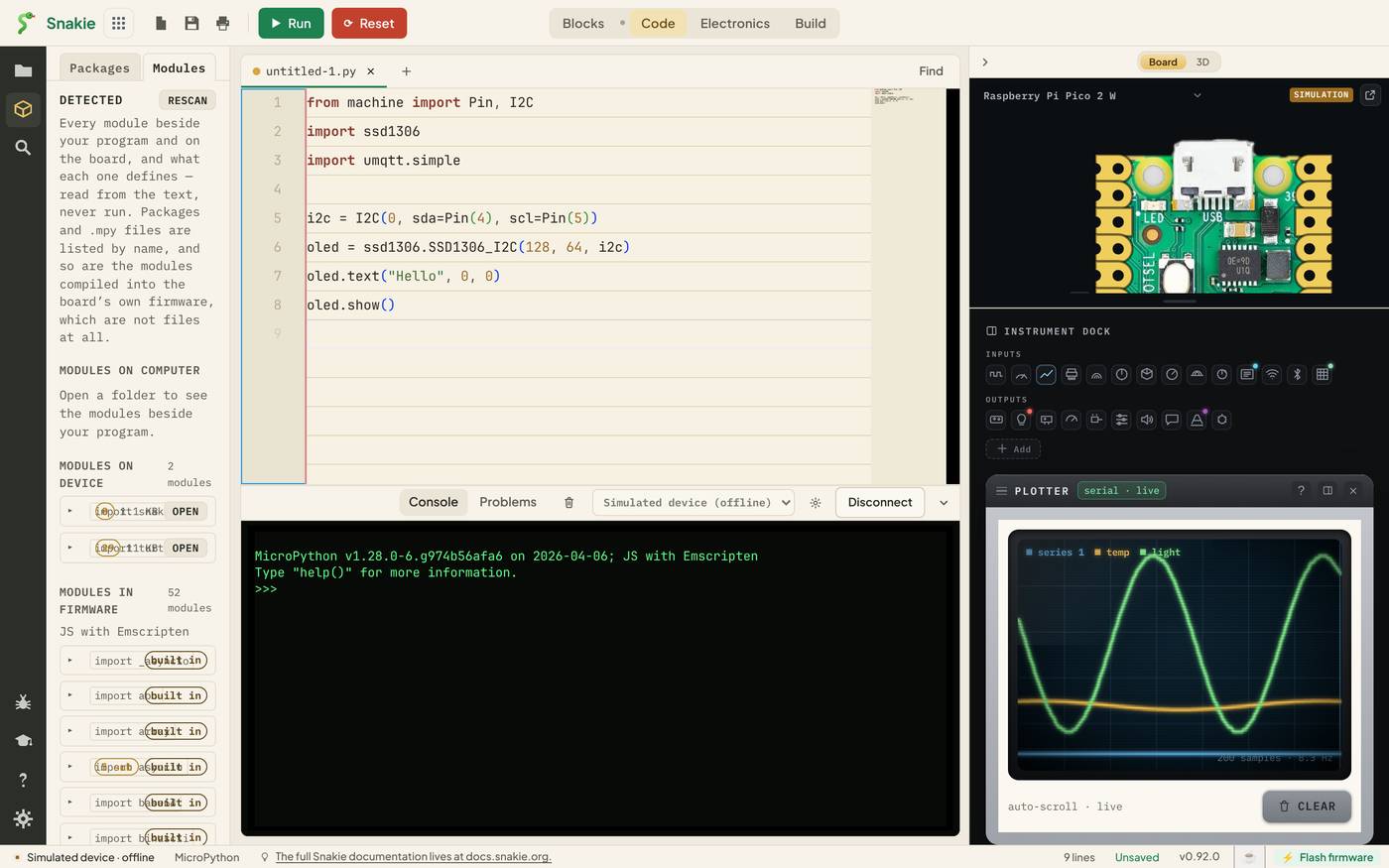
The heading says DETECTED, and the note under it explains the idea:
Every module beside your program and on the board, and what each one defines — read from the text, never run.
Modules are sorted into three groups by where they live.
| Group | Where it is | Example |
|---|---|---|
| MODULES ON COMPUTER | The folder you have open | Your own hcsr04.py |
| MODULES ON DEVICE | Files on the board, usually in /lib |
An installed ssd1306 |
| MODULES IN FIRMWARE | Compiled into MicroPython itself | machine, time, json |
Each row gives the module’s name and the exact line to use it, such as import turtle.
Modules on the device
These are ordinary files. The row shows how many things the module defines and its size, with an OPEN button that loads the file into the editor so you can read it.
Reading a library’s source is one of the best habits you can pick up. Most MicroPython drivers are a page or two of code, and they show you exactly what the hardware expects.
Modules in firmware
This group is the long one. On the simulated device it lists 52 modules, each tagged built in. They aren’t files. They’re part of the firmware, so there’s nothing to open and nothing to install.
Scroll through it once. You’ll find things you might have gone looking for a package for:
| Module | What it gives you |
|---|---|
json |
Reading and writing JSON |
framebuf |
Drawing pixels, lines and text for displays |
asyncio |
Running several tasks at once |
struct |
Packing numbers into bytes for sensors |
random |
Random numbers |
gc |
Checking and freeing memory |
Some rows show sub counts, such as asyncio with 5. Hover and Snakie lists the sub-modules.
What’s built in depends on the board. A Pico W has network. A plain Pico doesn’t. That’s why this panel asks the board you’ve actually connected.
What’s inside a module
Click the ▸ arrow on a row to open it. For a file, Snakie reads the text and lists the classes, functions, constants and variables it defines. For a firmware module, it asks the board what the module offers.
That turns “I think there’s a function for that” into a ten-second check.
Rescan
The list is taken when the panel opens. After you install a package, upload a file or plug in a different board, press RESCAN to look again.
A rule of thumb
Before you install anything:
- Look in MODULES IN FIRMWARE. If it’s there, just import it
- Look in MODULES ON DEVICE. If it’s there, it’s already installed
- Only then go to the Packages tab
Try it Yourself
- Find
framebufin the firmware list and expand it. Name two things it offers. - Open one of the modules on the device with OPEN. How many lines long is it?
- Is
networkbuilt into the simulated device? What would that mean for a Wi-Fi project?
Common Issues
Problem: MODULES ON COMPUTER says to open a folder. Solution: Open your project folder from the Files panel. Why: Snakie can only list the modules beside your program when it knows which folder that is.
Problem: A module I just installed isn’t listed. Solution: Press RESCAN. Why: The list is a snapshot, not a live view.
Problem: A module is built in on one board but missing on another. Solution: Check the firmware list for the board you’re using, and install a package if needed. Why: Each board’s firmware is built with a different set of modules.
Check your understanding
Quick quiz 1 of 3
What does “built in” mean for a module?
Quick quiz 2 of 3
What should you check before installing a package?
Quick quiz 3 of 3
Why does Snakie ask the connected board for its firmware modules?
You can use the arrows ← → on your keyboard to navigate between lessons.
Comments