Version Control with Git
Keep a history of your MicroPython project with Snakie's built-in Source Control panel, from the first commit to reading a diff and discarding a bad change
By Kevin McAleer, 6 Minutes
Page last updated November 21, 2026

Desktop app: Source Control is in the Snakie desktop app. You also need Git installed on your computer.
Every maker has done it. The robot worked on Tuesday. You “improved” it on Wednesday. Now it doesn’t work and you can’t remember what you changed.
Git is the cure. It keeps a history of your project as a series of snapshots called commits, and it can show you exactly what changed between any two of them.
Start a repository
Open your project folder in the Files panel, then click Source in the activity bar.
If the folder isn’t under Git yet, the panel says so and offers Initialise Repository. Click it. Snakie asks you to confirm, then does two things:
- Creates the repository (a hidden
.gitfolder that holds the history) - Adds a starter
.gitignore, if you don’t already have one
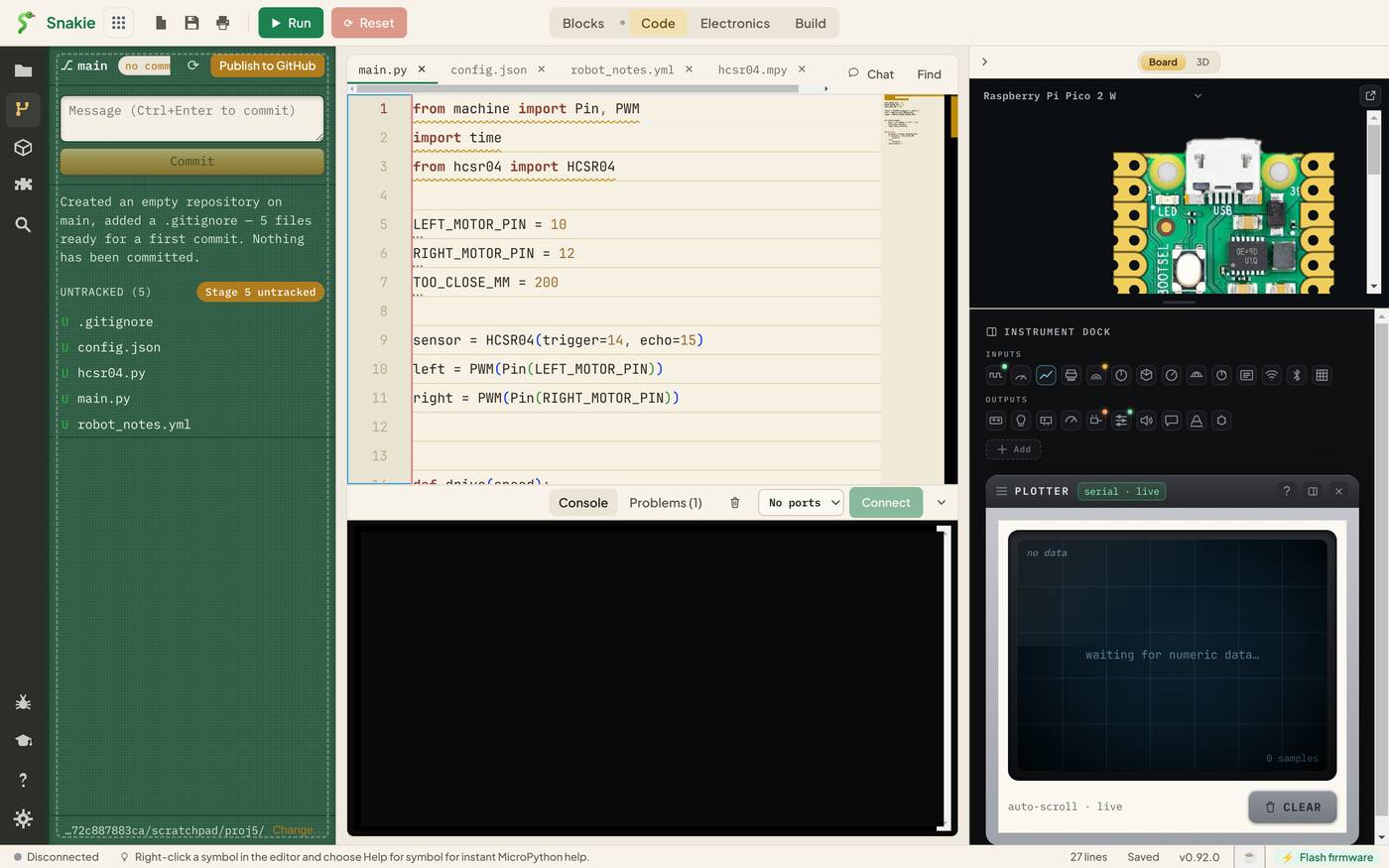
Nothing has been committed. Snakie says so: Created an empty repository on main, added a .gitignore — 5 files ready for a first commit. The chip at the top reads main · no commits yet, and every file is listed under UNTRACKED, marked U.
The .gitignore
Open the .gitignore Snakie wrote. It lists files Git should leave out of the history: desktop clutter like .DS_Store, Python’s __pycache__, editor scratch files and .bak rescue copies.
Everything that is your project stays in: your .py files, robot.yml, URDF models and their meshes. The file is yours to edit.
Your first commit
- Type a message in the box at the top:
First version of the obstacle robot - Click Commit, or press Ctrl+Enter
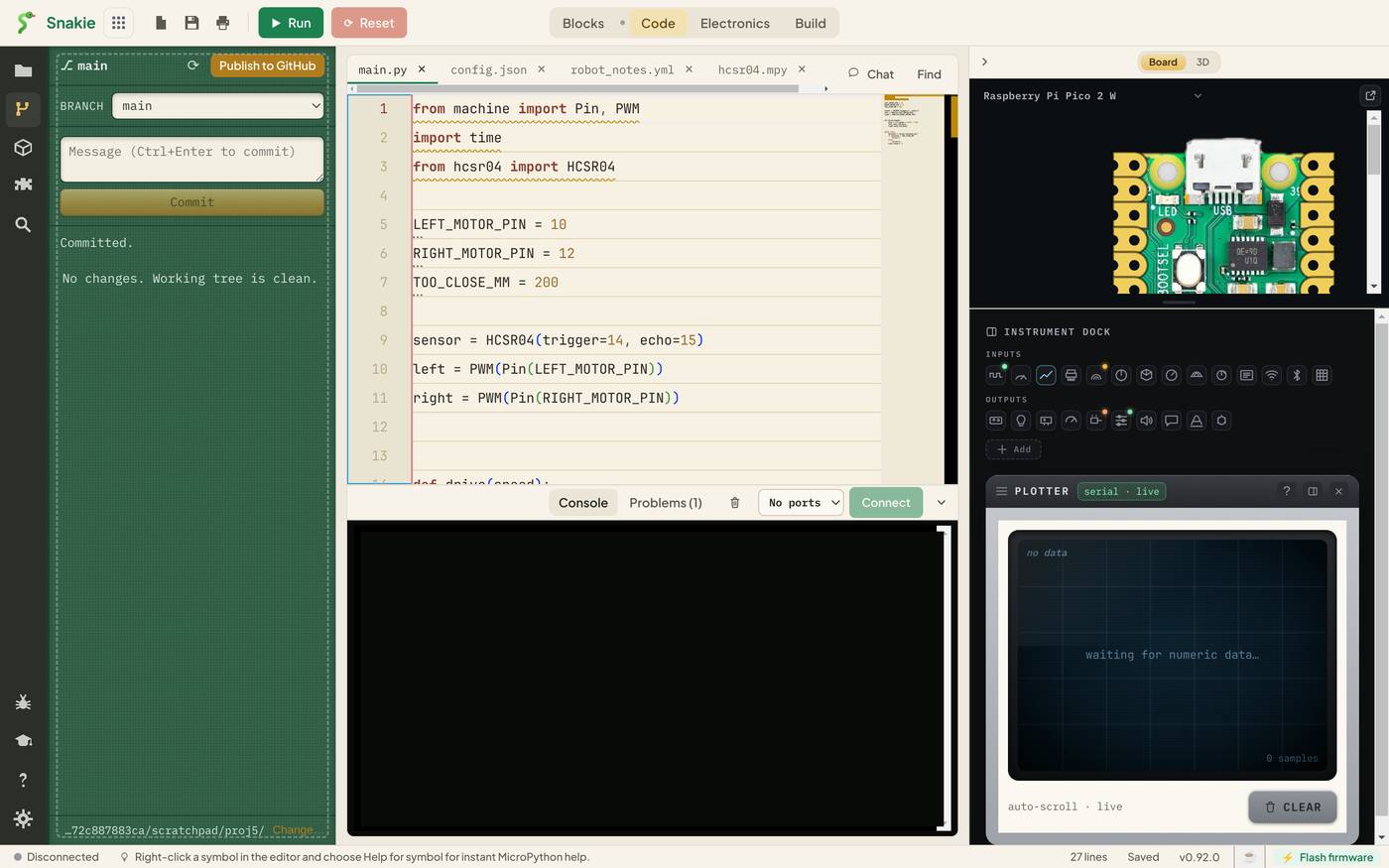
The panel now says Committed. and No changes. Working tree is clean. That snapshot is safe. Whatever you do next, you can get back to it.
When nothing is staged, Commit includes every change. That’s the simple way to work, and it’s fine for a one-person project.
See what changed
Edit main.py. Change TOO_CLOSE_MM = 200 to 150 and save. Back in Source Control, the file appears under CHANGES, marked M for modified. Click it.
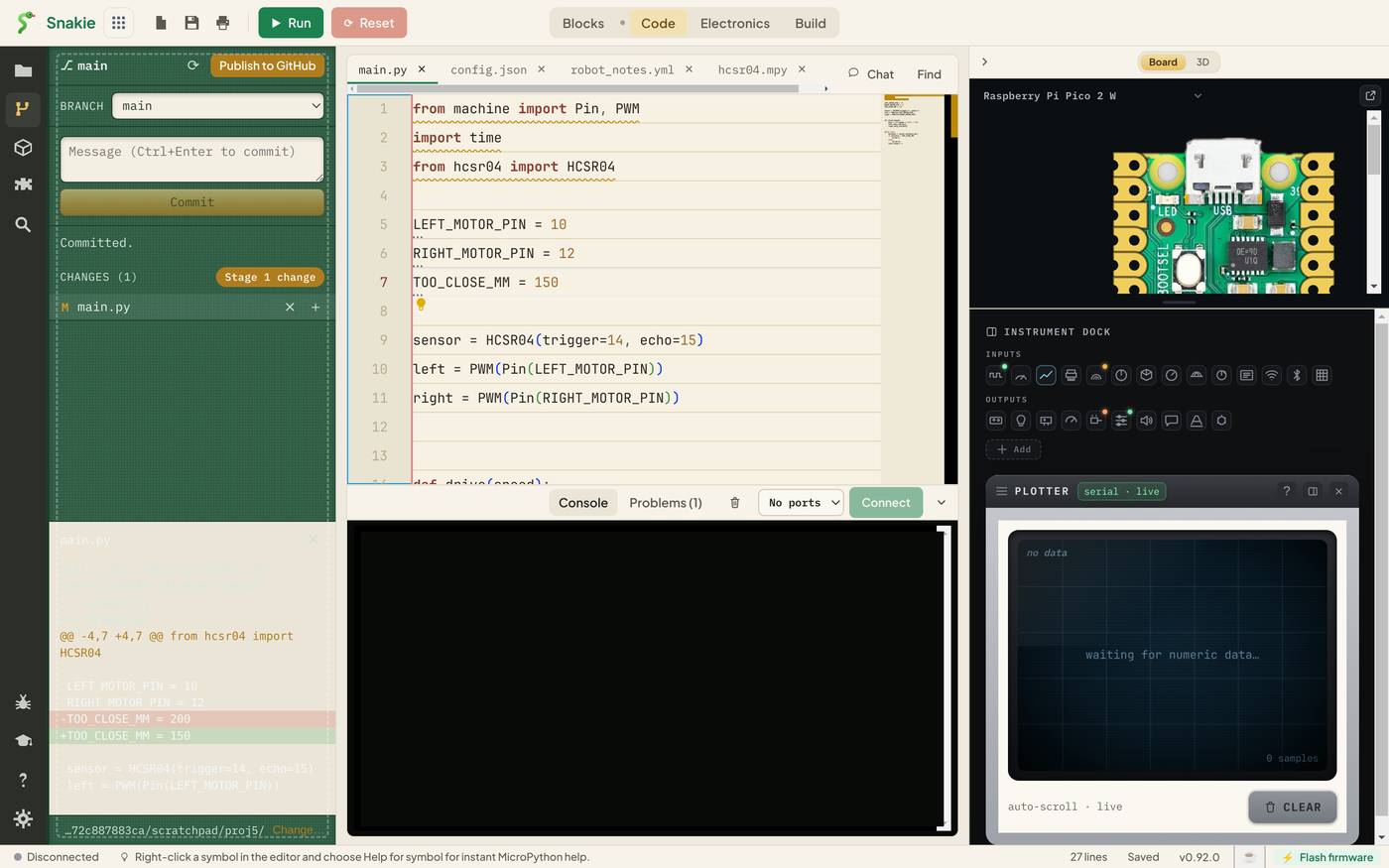
This is a diff. The red line, starting with -, is what was there. The green line, starting with +, is what’s there now:
-TOO_CLOSE_MM = 200
+TOO_CLOSE_MM = 150
This is the answer to “what did I change?”. When a robot stops working, the bug is somewhere in the diff. That narrows a 300-line program down to the three lines you touched.
Choosing what goes in
Each changed file has two small buttons:
| Button | Name | What it does |
|---|---|---|
| + | Stage | Mark this file to go into the next commit |
| ⨯ | Discard changes | Throw away your edits and restore the last committed version |
Staging lets you commit some changes and not others. Fixed a bug and also started a new feature? Stage the fix, commit it with a clear message, and leave the rest for later. Staged files move to STAGED CHANGES, where a − button unstages them.
Discard is the undo for a whole afternoon. It can’t itself be undone, so read the diff first.
Messages worth writing
A commit message is a note to yourself in three months. Say what changed and why.
| Weak | Better |
|---|---|
update |
Stop sooner: 150 mm |
fix |
Fix motors running after stop |
stuff |
Add reverse when too close |
Commit small and often. Got the servo sweeping is a perfectly good commit.
Branches and GitHub
The BRANCH drop-down shows which line of history you’re on, and switches between them. A branch is a safe place to try an idea without disturbing the version that works.
Publish to GitHub creates a repository on GitHub from this folder and pushes your history to it. That gives you a backup away from your computer, and a link you can share. Once published, the panel shows how many commits you are ahead of or behind the copy on GitHub.
The status bar at the bottom of the window shows a ⎇ count of changed files, wherever you are in the app.
What Git doesn’t see
Git tracks the folder on your computer. Files that only exist on the board aren’t in it. Keep the real copy of your code in the project folder and upload from there, and every change will show up in Source Control.
Try it Yourself
- Initialise a repository in a project folder and make a first commit.
- Change two files. Stage only one, commit it, then commit the other with its own message.
- Break something on purpose and save. Find it in the diff, then use Discard changes to put it right.
Common Issues
Problem: Source isn’t in the activity bar. Solution: Use the Snakie desktop app. Why: Git needs access to your computer’s files, which a browser tab doesn’t have.
Problem: The panel doesn’t show a change I just made. Solution: Save the file, then click the ⟳ refresh button at the top of the panel. Why: Git compares files on disk. An unsaved edit hasn’t reached the disk yet.
Problem: Commit fails asking who I am.
Solution: Tell Git once, in a terminal: git config --global user.name "Your Name" and git config --global user.email "[email protected]".
Why: Every commit records its author.
Check your understanding
Quick quiz 1 of 3
What is a commit?
Quick quiz 2 of 3
In a diff, what does a line starting with - mean?
Quick quiz 3 of 3
What does Discard changes do to a file?
You can use the arrows ← → on your keyboard to navigate between lessons.
Comments