Compiling to mpy
Compile a MicroPython module to a compact .mpy file in Snakie to save memory and boot faster, and learn when you should and should not
By Kevin McAleer, 5 Minutes
Page last updated November 21, 2026

Every time your board starts, MicroPython reads your .py files and compiles them to bytecode before it can run them. For a large library that takes time and, more importantly, memory. You can do that step once, on your computer, and give the board the result.
What an .mpy file is
A .mpy file is a module that’s already been compiled. The board loads it directly: no reading, no parsing, no compiling.
.py |
.mpy |
|
|---|---|---|
| Readable and editable | Yes | No |
| Compiled on the board at every start | Yes | No, already done |
| Memory needed to import | More | Less |
| Size on flash | Larger | Smaller |
| Works on any MicroPython version | Yes | Only matching versions |
The memory row is the one that matters most. Compiling needs working space. On a big module, that temporary peak can be the largest thing your program ever asks for, and it’s a classic cause of a confusing MemoryError during import, before any of your own code has run.
Compiling in Snakie
In the Local Files panel, right-click a .py file.
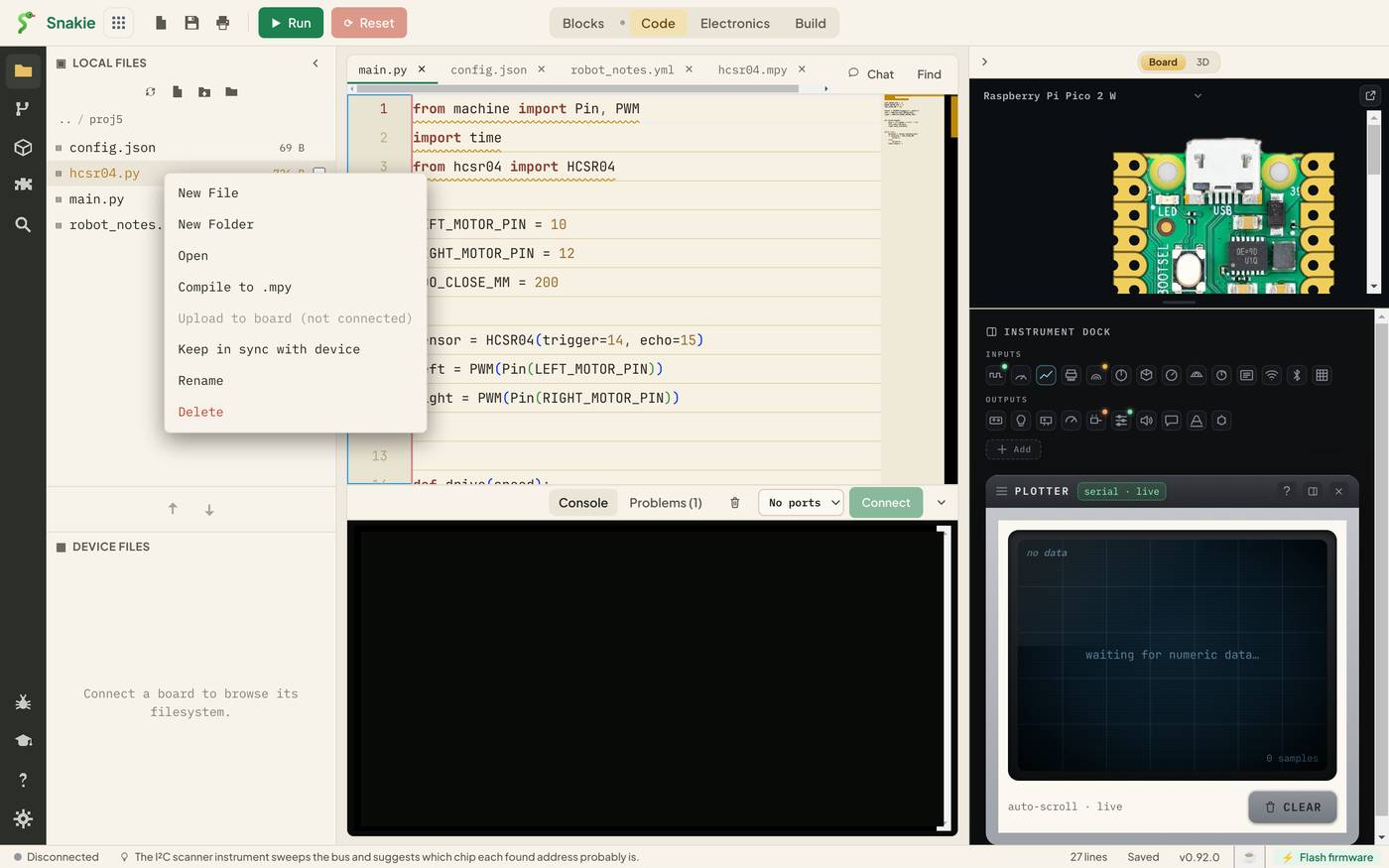
Choose Compile to .mpy. A new file appears beside the original with the same name and the new ending. Our 726-byte hcsr04.py becomes a 359-byte hcsr04.mpy. That’s half the size.
Your program doesn’t change at all:
from hcsr04 import HCSR04
MicroPython looks for hcsr04.py first and hcsr04.mpy second. So upload the .mpy instead of the .py, not alongside it. If both are on the board, the .py wins and you’ve gained nothing.
Looking inside
A .mpy is not text, but Snakie can still tell you about it. Double-click the new file.
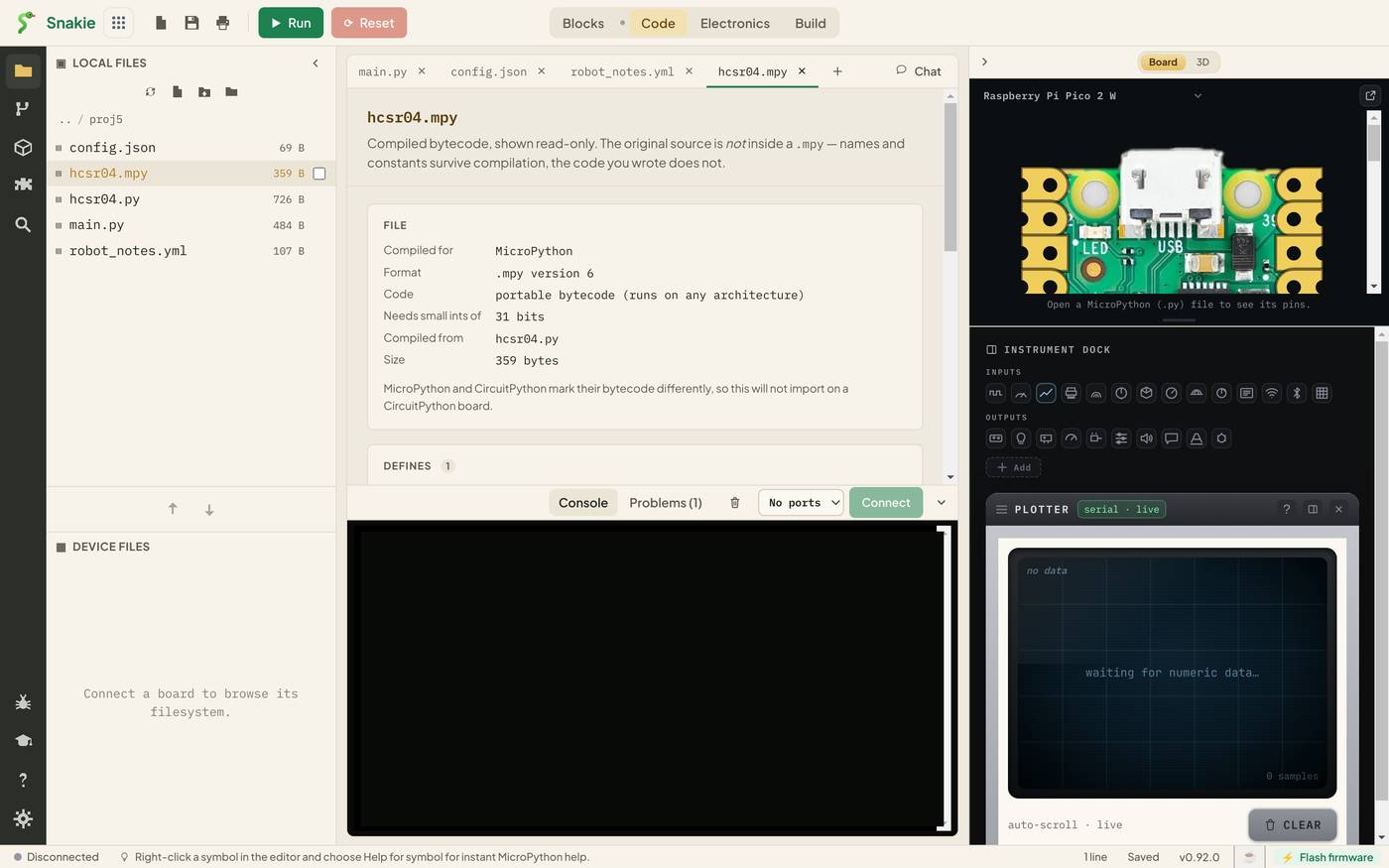
The top says it plainly: Compiled bytecode, shown read-only. The original source is not inside a .mpy — names and constants survive compilation, the code you wrote does not.
| Field | Our file | Meaning |
|---|---|---|
| Compiled for | MicroPython | Not CircuitPython, which marks its files differently |
| Format | .mpy version 6 | The bytecode version. See below |
| Code | portable bytecode | Runs on any chip |
| Compiled from | hcsr04.py | The source file’s name |
| Size | 359 bytes |
Under DEFINES is everything the module offers: the HCSR04 class, with __init__(self, trigger, echo, timeout_us=…), _pulse(self) and distance_mm(self). The names are real, read from the bytecode. Default values aren’t stored, which is why timeout_us shows ….
This view is handy for a .mpy someone else gave you. You can see what it contains and which version it was built for before you put it on a board.
The version catch
A .mpy is tied to a bytecode version. Version 6 is used by current MicroPython releases. A file built for one version won’t load on firmware that expects another, and you’ll see:
ValueError: incompatible .mpy file
So when you update a board’s firmware to a release that changes the format, recompile. Keeping the .py makes that a ten-second job.
When to compile
Do compile:
- Libraries and drivers that are finished and stable
- Big modules that cause
MemoryErroron import - Code you’re handing to others to use, not to read
Don’t compile:
main.py. MicroPython looks for it by that exact name- Anything you’re still changing. You lose the ability to edit on the board, and tracebacks are less helpful
- Code you want learners to read
Try it Yourself
- Compile a module of your own. What’s the size before and after?
- Open the
.mpyand compare the DEFINES list with the source. Is anything missing? - Put both
hcsr04.pyandhcsr04.mpyon a board, change aprintin the.py, and import it. Which one ran?
Common Issues
Problem: The menu says Compile to .mpy (unavailable). Solution: Open your project as a folder from the Files panel. Why: The compiler needs a real folder to write the new file into.
Problem: ValueError: incompatible .mpy file on the board.
Solution: Update the board’s firmware, or recompile after updating Snakie.
Why: The file’s bytecode version doesn’t match what the firmware expects.
Problem: My changes aren’t taking effect.
Solution: Recompile, and upload the new .mpy. Check there’s no stale copy on the board.
Why: The .mpy is a snapshot of the source at the moment you compiled it.
Check your understanding
Quick quiz 1 of 3
What is the main benefit of a .mpy file on a small board?
Quick quiz 2 of 3
Both hcsr04.py and hcsr04.mpy are on the board. Which is imported?
Quick quiz 3 of 3
Which file should you not compile?
You can use the arrows ← → on your keyboard to navigate between lessons.
Comments