YAML and JSON Validation
Catch mistakes in the YAML and JSON files your MicroPython project depends on with Snakie's built-in validation and one-click formatting
By Kevin McAleer, 5 Minutes
Page last updated November 21, 2026

Not every file in a robot project is Python. Settings often live in JSON. Snakie’s own project files, robot.yml and parts.yml, are YAML. Both are fussy about punctuation, and a single wrong character can stop a program loading its settings at all.
A settings file
Many projects keep their tunable numbers in a file so they can be changed without touching the code:
{
  "name": "obstacle-robot",
  "speed": 60,
  "too_close_mm": 200
}
And load them at start-up:
import json

with open("config.json") as f:
    config = json.load(f)

print("Speed:", config["speed"])
If config.json has a mistake in it, json.load() raises an error and the robot does nothing. You’d like to know before uploading.
JSON checking
Open a .json file in Snakie and break it. Here a new line has been added without the comma that should follow it.
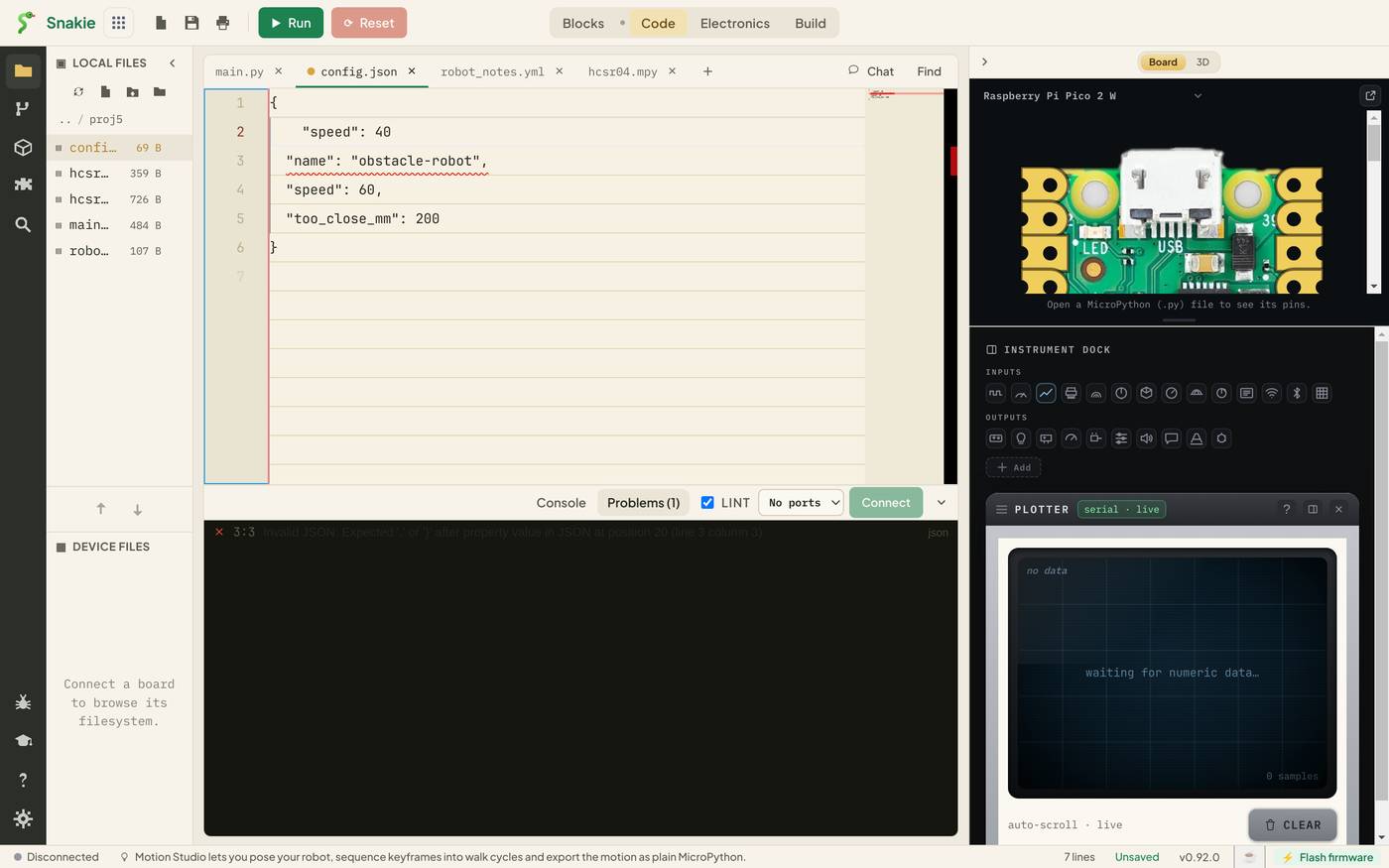
The editor underlines the spot, and Problems explains:
Invalid JSON: Expected ‘,’ or ‘}’ after property value in JSON at position 20 (line 3 column 3)
Notice that the error is reported on line 3, the line after the missing comma. That’s normal for this kind of mistake. The parser only realises something is wrong when it meets the next thing. If the reported line looks fine, look at the end of the line above.
The rules that trip people up most in JSON:
| Rule | Wrong | Right |
|---|---|---|
| Commas between items, none after the last | "a": 1, } |
"a": 1 } |
| Double quotes only | 'name' |
"name" |
| No comments | // speed |
Leave it out |
| Lower-case true, false and null | True |
true |
That last one catches Python programmers every time.
Format JSON
When the file is valid, the Problems panel shows No problems and a Format JSON button. Click it and the file is rewritten with consistent indentation. Useful after pasting in something squashed onto one line.
YAML checking
YAML uses indentation instead of brackets, which makes it pleasant to read and easy to break. Here a line has been indented with a tab.
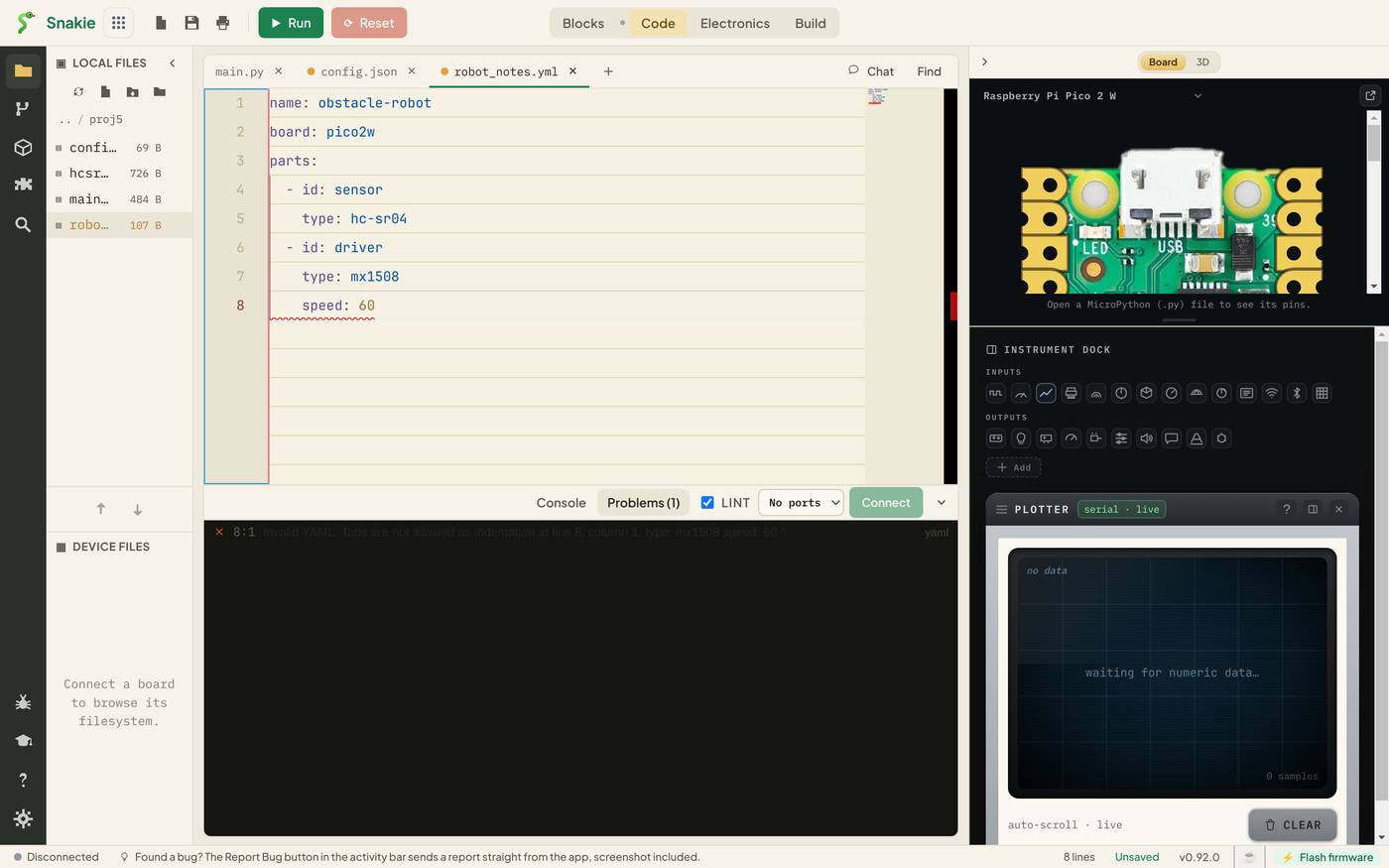
Invalid YAML: Tabs are not allowed as indentation at line 8, column 1
YAML’s main rules:
| Rule | Why it bites |
|---|---|
| Indent with spaces, never tabs | They look the same on screen |
| Items at the same level need the same indent | One extra space changes the meaning |
| A space after every colon | speed:60 is not a key and a value |
| List items start with a dash and a space | -item is just text |
Snakie checks every .yml and .yaml file you open this way. It matters most for robot.yml, the file behind the Electronics and Build workspaces, because Snakie reads that one itself.
What validation can’t know
The checker tells you the file is well formed. It can’t tell you the contents make sense. "speed": 600 is perfectly good JSON for a motor that tops out at 100.
One specific gap worth knowing: writing the same key twice in a JSON object isn’t flagged.
{ "speed": 40, "speed": 60 }
That loads without complaint, and the last one wins. If a setting seems to be ignored, search the file for a second copy with Ctrl+F.
Try it Yourself
- Create
config.jsonwith the settings above, then remove a closing quote. What does Problems say, and on which line? - Change
200toTrue. Is it valid JSON? What abouttrue? - Make a small YAML file with a list of three sensors. Indent one item by an extra space and read the error.
Common Issues
Problem: The error points at a line that looks fine. Solution: Check the end of the line before it for a missing comma, quote or bracket. Why: The parser reports where it got stuck, which is just after the real mistake.
Problem: My YAML looks right but Snakie says it’s invalid. Solution: Delete the indentation on the flagged line and retype it with spaces. Why: A tab and four spaces look identical, and YAML only accepts spaces.
Problem: The file is valid but my program still fails to read a setting. Solution: Check the key’s spelling and capitals in both the file and the code. Why: Validation checks the file’s shape, not whether your code asks for a key that’s there.
Check your understanding
Quick quiz 1 of 3
Which of these is valid JSON?
Quick quiz 2 of 3
What must YAML be indented with?
Quick quiz 3 of 3
A JSON error is reported on line 3, but line 3 looks fine. Where do you look?
You can use the arrows ← → on your keyboard to navigate between lessons.
Comments