Linting and the Problems Panel
Catch MicroPython mistakes before you run them with Snakie's Python linter and learn to read and filter the Problems panel
By Kevin McAleer, 6 Minutes
Page last updated November 21, 2026

Desktop app: Python linting with ruff needs the Snakie desktop app. In the browser the Problems panel still works, and shows the MicroPython hints from the next lesson.
A linter reads your code without running it and points at things that look wrong. The name comes from the fluff a clothes dryer catches. It’s the cheapest bug-finding there is, because it happens while you type.
Getting set up
Snakie’s Python linting uses ruff, a very fast linter. It runs on your computer, not on the board, so it needs to be installed there once:
pip install ruff
Snakie finds it automatically. If ruff isn’t installed it will use pyflakes instead if you have that, and if you have neither the editor simply stays quiet.
Squiggles
Open a Python file and look for wavy underlines. Each one is a finding. Hover over it to read what it says.
At the bottom of the window, next to Console, the Problems tab shows a count, such as Problems (7). Click it.
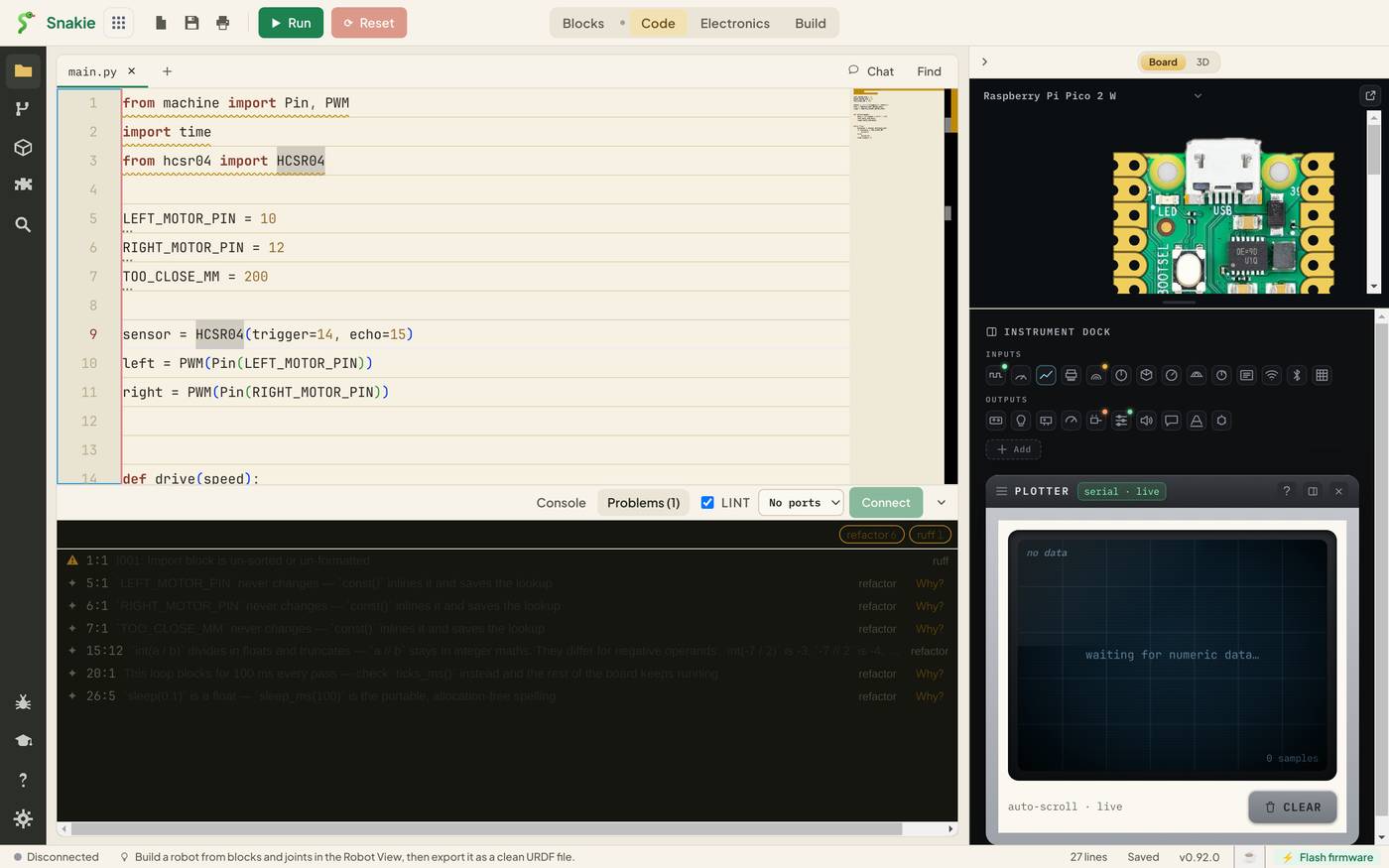
Reading a row
Every row has four parts:
| Part | Example | Meaning |
|---|---|---|
| Icon | ⚠ or ✦ | ⚠ is a linter finding. ✦ is a MicroPython hint |
| Position | 1:1 |
Line and column |
| Message | I001: Import block is un-sorted or un-formatted |
What was found, with ruff’s rule code |
| Source | ruff or refactor |
Who found it |
Click a row and the editor jumps to that line.
Here is what the panel says about our robot’s main.py:
| Where | Message | Source |
|---|---|---|
| 1:1 | I001: Import block is un-sorted or un-formatted | ruff |
| 5:1 | LEFT_MOTOR_PIN never changes. const() inlines it and saves the lookup |
refactor |
| 15:12 | int(a / b) divides in floats and truncates. a // b stays in integer maths |
refactor |
| 20:1 | This loop blocks for 100 ms every pass. Check ticks_ms() instead |
refactor |
| 26:5 | sleep(0.1) is a float. sleep_ms(100) is the portable, allocation-free spelling |
refactor |
One row from ruff and several marked refactor. The refactor rows are Snakie’s own MicroPython advice, and they get the whole of the next lesson.
Filtering
At the top right of the panel are chips, one per source, each with a count: refactor 6, ruff 1. Click a chip to show only that source’s rows. When a file has thirty findings, starting with just ruff’s is a good way in.
The LINT tick box beside the tab switches Python linting off and on. Leave it on. The time to switch it off is when you’re pasting in a big block of half-finished code and the squiggles are a distraction.
What ruff catches
The findings you’ll meet most:
| Code | In plain English | Why you care |
|---|---|---|
| F401 | Imported but never used | Every import costs memory on a microcontroller |
| F841 | Variable assigned but never used | Often a typo in the name you meant to use |
| F821 | Undefined name | A guaranteed NameError when that line runs |
E9 and invalid-syntax |
The file won’t even parse | Nothing will run until it’s fixed |
| I001 | Imports not sorted | Tidiness only |
Fix the ones that would stop the program first: syntax errors and undefined names. Leave tidiness until last.
A finding like F821 is the real prize. On a desktop, an undefined name fails the moment you run. On a robot, it fails when that line is finally reached, which might be the one branch that only runs when the battery is low.
The lightbulb
When ruff knows how to fix something, a lightbulb appears on that line. Click it, or press Ctrl+., and choose the fix. We’ll use the same lightbulb for refactorings next.
Try it Yourself
- Add
import osto the top of a file and don’t use it. Which code appears in Problems? - Misspell a variable where it’s used, such as
distnce. Find the row and click it. - Filter the panel to show only
ruffrows, then onlyrefactor.
Common Issues
Problem: There are no ruff rows at all.
Solution: Check you’re in the desktop app, that LINT is ticked, and that ruff --version works in a terminal.
Why: The linter runs on your computer. Without ruff or pyflakes installed there’s nothing to run.
Problem: ruff complains about machine or micropython.
Solution: Nothing to fix. Those modules exist on the board.
Why: ruff is a general Python tool. It checks your code’s logic, and doesn’t need the hardware modules to do that.
Problem: The rows in the Problems panel are hard to read. Solution: Hover over the squiggle in the editor to read the same message, or click the row to jump to the line. Why: In the light theme of this version the message text is low in contrast against the dark panel.
Check your understanding
Quick quiz 1 of 3
When does a linter check your code?
Quick quiz 2 of 3
What do the numbers 15:12 mean on a Problems row?
Quick quiz 3 of 3
Why is an “undefined name” finding so valuable on a robot?
You can use the arrows ← → on your keyboard to navigate between lessons.
Comments