Meshing Gears
Add a mating gear in BetterCad, read the gear ratio, and keep a pair meshed at the right centre distance as you change it
By Kevin McAleer, 5 Minutes
Page last updated November 21, 2026

One gear does nothing. Two gears are a machine. The hard part of a gear pair is the distance between their centres: a fraction too close and they jam, a fraction too far and they skip. BetterCad places the second gear for you.
Add a mating gear
- Start a new model and make a gear with 16 teeth. Press Enter.
- In the Browser, right-click Gear 16T and choose Add mating gear.
A second gear appears beside the first, already meshed, with its panel open.
- Set Teeth to
32.
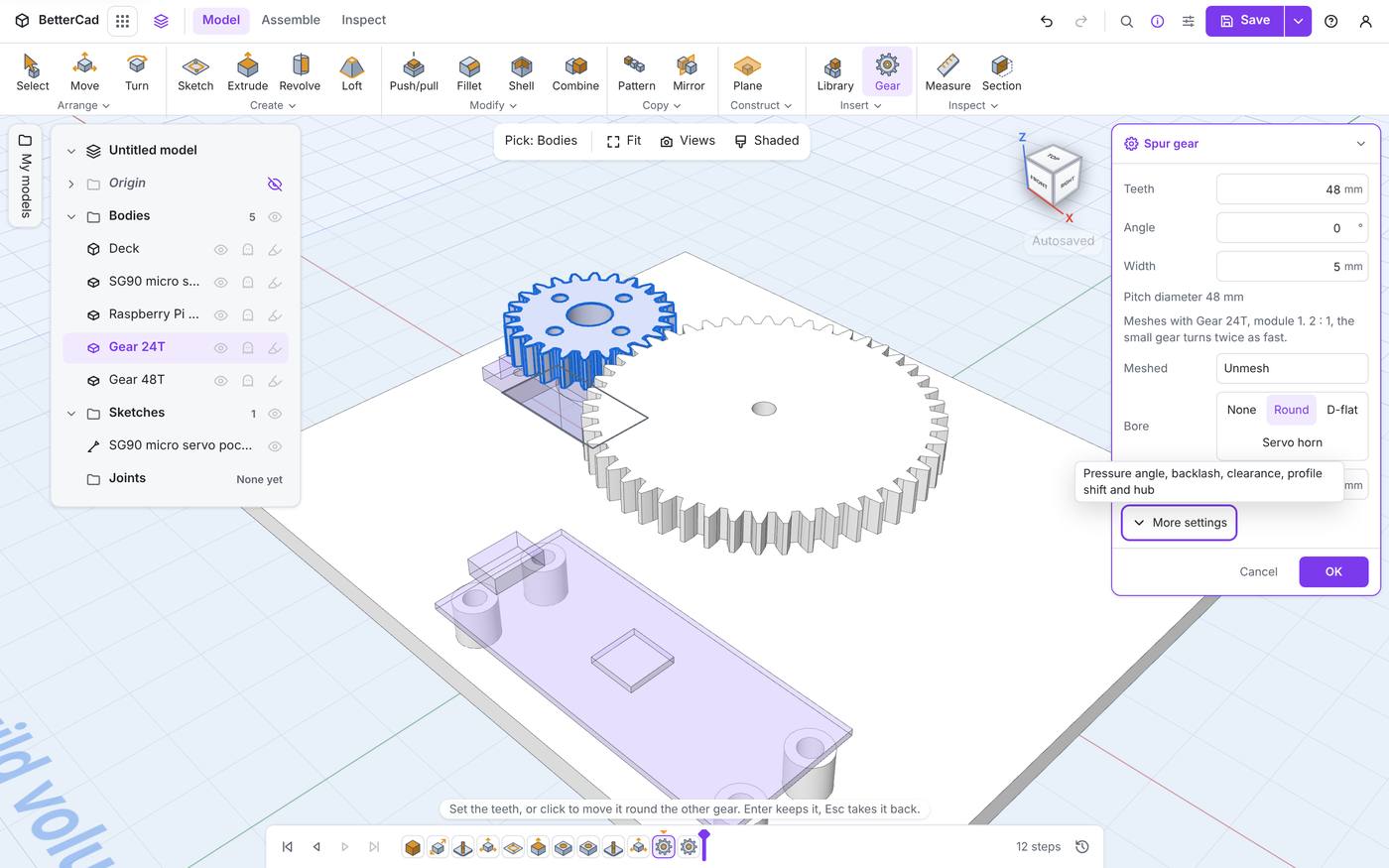
The panel for a mating gear is a little different:
- There’s no Module. A mating gear takes its partner’s module and pressure angle, because it has to.
- Angle sets where it sits round the first gear. 0 puts it along X, 90 swings it a quarter of the way round. You can also click in the view to move it round.
- A line tells you what you’ve made: “Meshes with Gear 16T, module 1. 2 : 1, the small gear turns twice as fast.”
- Meshed has an Unmesh button.
The mating gear copies its partner’s bore to start with. Change it if the two sit on different things.
Reading the ratio
The ratio is just the two tooth counts.
driver_teeth = 16      # the gear on the motor
driven_teeth = 32      # the gear it turns

ratio = driven_teeth / driver_teeth    # 2.0, written 2 : 1

# The driven gear turns slower by the ratio...
servo_sweep = 180                       # degrees
output_sweep = servo_sweep / ratio      # 90 degrees

# ...and pushes harder by the same amount.
servo_torque = 1.8                      # kg·cm, a typical SG90
output_torque = servo_torque * ratio    # 3.6 kg·cm, before friction
Small gear driving big gear: slower and stronger. Big driving small: faster and weaker. And every pair of gears reverses the direction of the turn.
The centre distance follows from the same numbers:
module = 1
centre_distance = module * (16 + 32) / 2    # 24 mm
You never need to type that, but it’s worth knowing when you’re planning where the axles go.
It stays meshed
Here’s the real payoff. A meshed gear follows its partner.
- Press Enter to keep the pair.
- Right-click the first gear’s step on the timeline and choose Edit gear.
- Change its teeth from 16 to 20.
The big gear moves outward to stay in mesh, and turns so its teeth still fall into the gaps. Move or turn the first gear and the second goes with it.
Unmesh cuts the link and leaves the gear where it is, free to move on its own.
Mesh two gears you already have
If both gears exist already, select the two of them, press Ctrl+K and run Mesh gears. The newer gear moves beside the older one.
It only works if they can truly mesh. Try it with a module 1 gear and a module 2 gear:
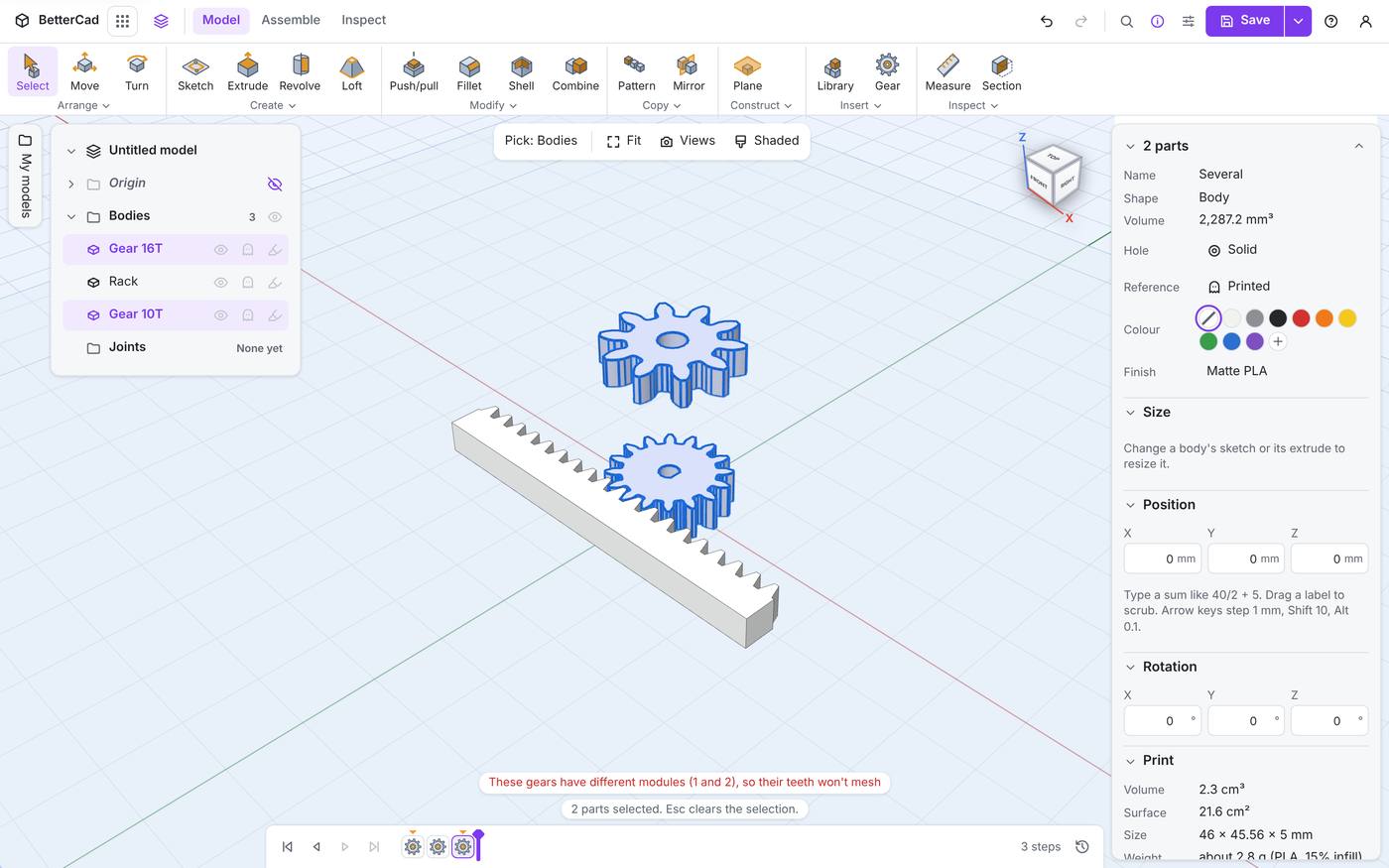
“These gears have different modules (1 and 2), so their teeth won’t mesh”. Fix the module on one of them and try again.
Choosing tooth counts
A few habits that save reprints:
- Keep the small gear at 17 teeth or more when you can, to avoid undercut.
- For a ratio you’ll run hard, pick tooth counts that don’t divide evenly, such as 17 and 36. The same teeth then don’t meet on every turn and wear is spread out.
- Need a big ratio in a small space? Use two stages. Two 3 : 1 pairs give 9 : 1 and take less room than one 9 : 1 pair.
Try it Yourself
- Make a 20-tooth gear and add a mating gear with 50 teeth. What ratio does the panel report?
- Set the mating gear’s Angle to 90, then 180. Watch it swing round.
- Edit the first gear and change its module to 1.5. What happens to the second?
Common Issues
Problem: There’s no Add mating gear in the menu. Solution: Right-click a gear made with the Gear tool. Why: BetterCad needs the gear’s settings to build a partner. An imported gear STL has none.
Problem: The mating gear has holes I didn’t ask for. Solution: Change its Bore. It copied the first gear’s. Why: A new mate starts with its partner’s settings.
Problem: Printed gears are too tight at the distance BetterCad chose. Solution: Raise Backlash on both gears. Don’t move them apart by hand. Why: The centre distance is right. The teeth are printing fat.
Check your understanding
Quick quiz 1 of 3
A 15-tooth gear drives a 45-tooth gear. What’s the ratio?
Quick quiz 2 of 3
Why does a mating gear have no Module box?
Quick quiz 3 of 3
You change the first gear’s teeth after meshing. What does the second gear do?
You can use the arrows ← → on your keyboard to navigate between lessons.
Comments