Board Size and Details
Set the real size and colour of your part in the Snakie Part Editor and fill in the details that make it easy to find
By Kevin McAleer, 4 Minutes
Page last updated November 21, 2026

Every part starts with two questions: how big is it, and what is it? Get the size right first, because everything else is placed relative to it.
Measure your board
Measure the width and height of your board in millimetres. A ruler is fine. Calipers are better.
Our VL53L0X breakout is 25 mm wide and 13 mm tall.
No board to hand? The seller’s product page usually has a dimension drawing, and so does the datasheet.
Set the size
- Click + New part.
- Scroll the side panel to Board.
- Type
25into Width (mm) and13into Height (mm). - Click Fit in the toolbar.
The green rectangle becomes a wide, short board. The four starter pins are still there. You’ll sort them out in the next lesson.
Two more settings live in the same section:
- Background is the colour of the circuit board. Click the swatch to pick one. Ours is purple, but we’ll cover it with a photo later, so green is fine for now.
- Corner radius (mm) rounds the corners. If you type a value in millimetres it takes priority over the slider above it.
Name the part
At the top of the side panel, type the name into Name:
VL53L0X Distance Sensor
Just below, Snakie shows Saves as vl53l0x-distance-sensor/parts.yml. The folder name is made from the part name, in lower case with dashes.
Fill in the details
Click Show next to Details. A form opens with everything Snakie knows about the part.
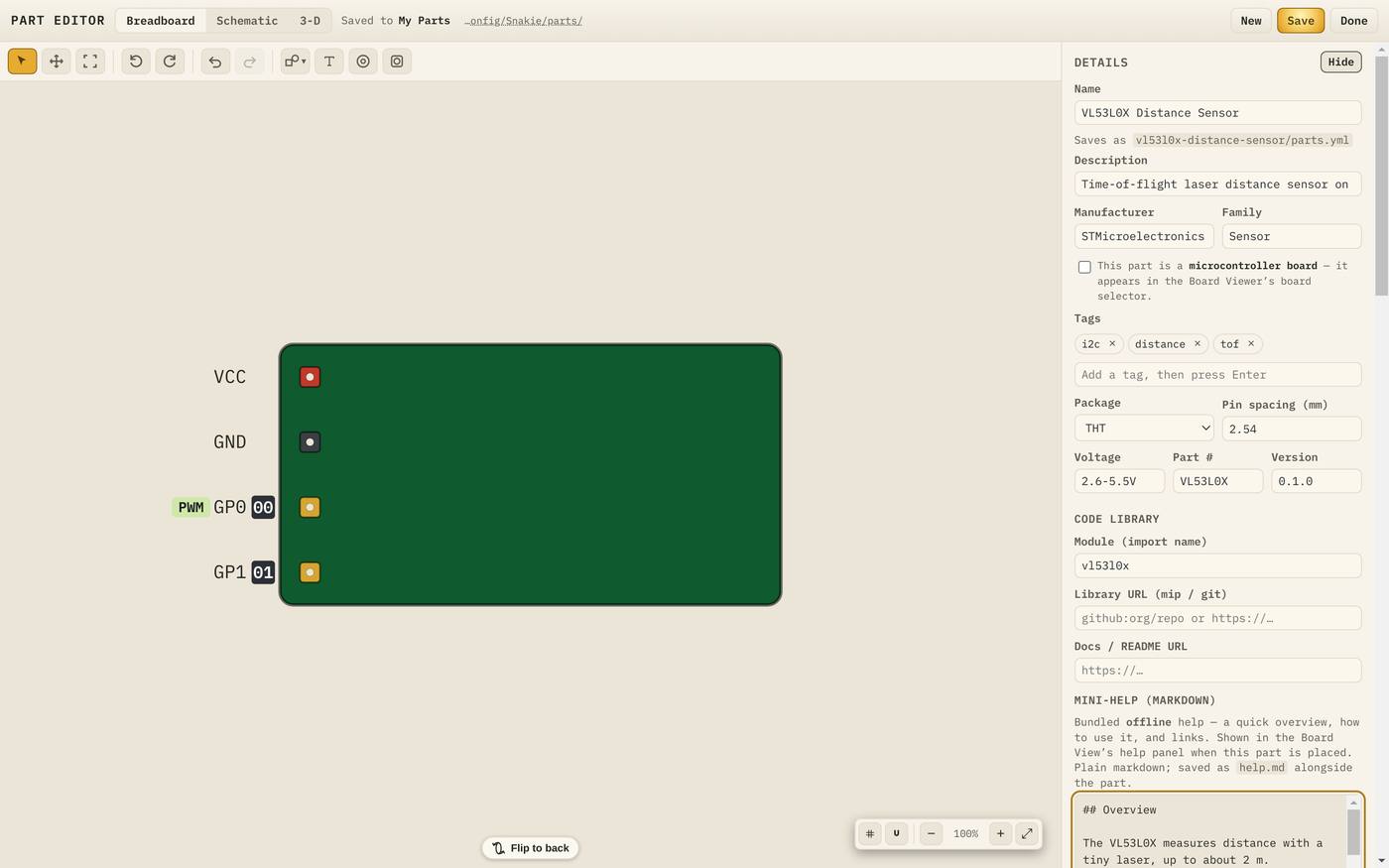
Fill it in like this:
| Field | Value | Why it matters |
|---|---|---|
| Description | Time-of-flight laser distance sensor on an I2C breakout. Measures up to 2 m. | Shown under the part’s name in the library |
| Manufacturer | STMicroelectronics | Shown on the schematic symbol |
| Family | Sensor | Decides which group the part is listed under |
| Tags | i2c, distance, tof | Extra words the library search can find |
| Package | THT | Through-hole pins, or SMD for surface mount |
| Pin spacing (mm) | 2.54 | The standard breadboard pitch |
| Voltage | 2.6-5.5V | A note for humans. The checked limits come later |
| Part # | VL53L0X | The chip or product code |
| Version | 0.1.0 | Goes up as you improve the part |
To add a tag, type it and press Enter. Each tag becomes a small chip with a cross to remove it.
Leave the box This part is a microcontroller board unticked. That’s for lesson 11.
Click Hide to fold the form away again.
Save early
Click Save in the top bar. A green message confirms it:
Saved "VL53L0X Distance Sensor" to my-parts (v0.1.0).
You now have a real part on disk. Save again whenever you finish a step.
Try it Yourself
- Set your part to 25 by 13 mm and give it the name above.
- Fill in the description, family and three tags.
- Save, then click Done.
- In the Library, find My Parts. Your part is listed under SENSOR.
- Type
tofin the search box. Your part is found by its tag. - Click the part, then the pencil button, Edit part, to carry on.
Common Issues
Problem: I can’t save my part in the browser version. Solution: Use the desktop app for this course. Why: Parts are read-only on the web, because there’s no parts folder to write to.
Problem: My part is listed under BREAKOUT, not SENSOR. Solution: Change Family in the Details form and save again. Why: New parts start with the family Breakout.
Check your understanding
Quick quiz 1 of 3
Why set the board size before anything else?
Quick quiz 2 of 3
Which field decides the group a part appears under in the library?
Quick quiz 3 of 3
What does the version number tell Snakie?
You can use the arrows ← → on your keyboard to navigate between lessons.
Comments