Material and Weight
Choose a material and infill in BetterCad, read the weight estimate and understand how it's worked out
By Kevin McAleer, 6 Minutes
Page last updated November 20, 2026

How much filament will this use? Is there enough left on the spool? What will it weigh on the end of a robot arm? BetterCad answers before you slice, with an estimate that’s close enough to plan by.
Where the numbers are
Properties, on the right, has a Print section. With nothing selected it shows the whole model’s volume and weight. Select a part and you get that part’s volume, surface area, overall size and weight.
The settings behind the estimate are at the bottom of the Print panel, under Material.
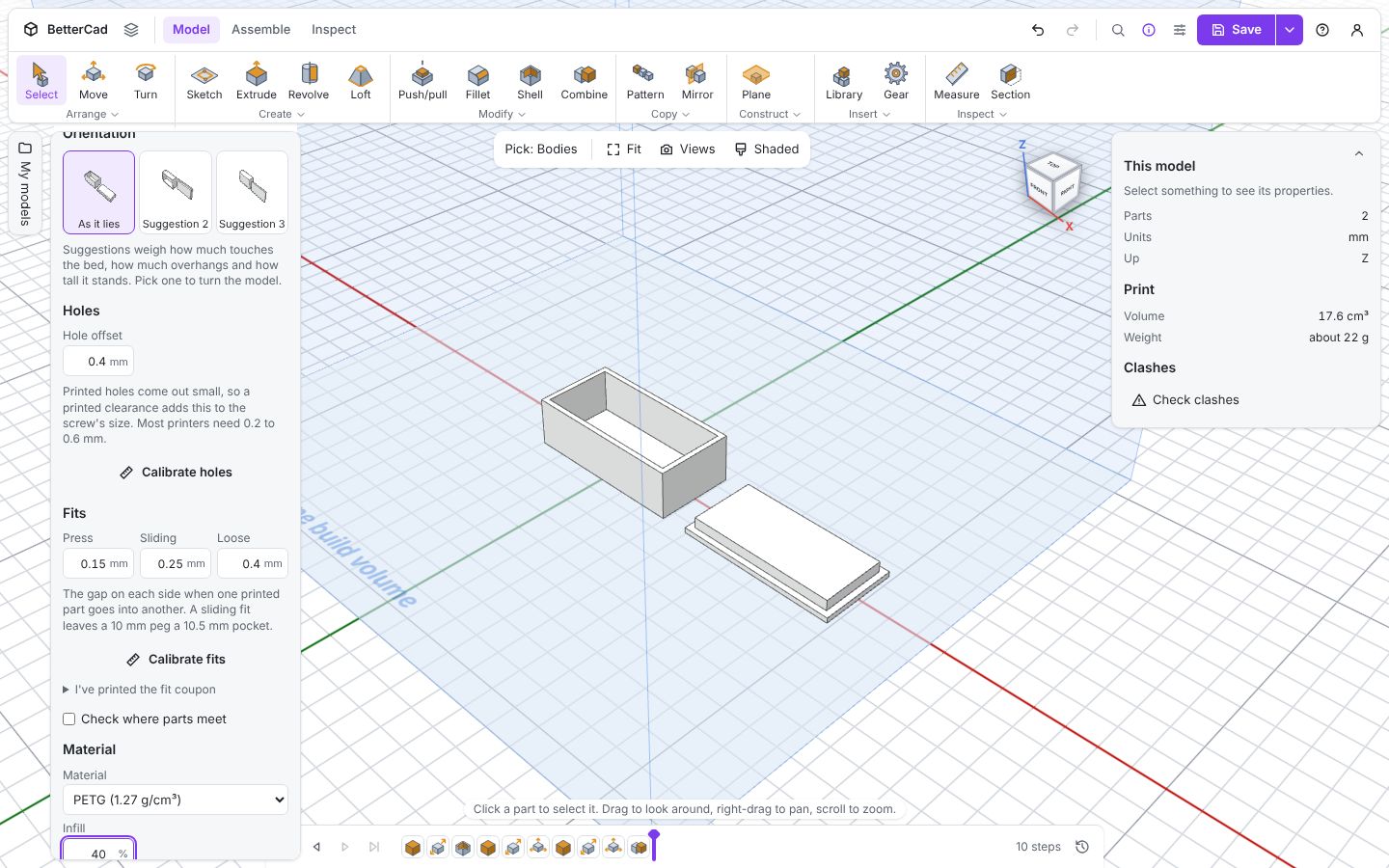
The panel sums it up in a sentence: This model weighs about 22 g in PETG at 40% infill.
Choose a material
| Material | Density (g/cm³) | In a sentence |
|---|---|---|
| PLA | 1.24 | Easy, stiff and accurate. The default for a reason |
| PETG | 1.27 | Tougher and more heat resistant. A little stringy |
| ABS | 1.04 | Strong and heat resistant. Needs an enclosure and ventilation |
| ASA | 1.07 | Like ABS, and stands up to sunlight |
| TPU | 1.21 | Flexible. For tyres, bumpers and grips |
Choosing a material here changes the weight estimate, and it’s saved with your printer. It doesn’t change the shape of the model. If you swap materials often, calibrate holes and fits for each and save them as separate printers.
Choose an infill
Infill is how much of the inside of a part is filled. Slicers print solid outer walls and a sparse pattern within.
| Infill | Good for |
|---|---|
| 10 to 15% | Most things. Display pieces, enclosures, brackets under light load |
| 20 to 40% | Parts that get squeezed, clamped or bolted down hard |
| 50% and up | Rarely worth it. More walls add more strength for less plastic |
The infill you set here is only used for the estimate. Set the same value in your slicer.
How the estimate works
BetterCad treats the part the way a slicer does, in two pieces:
- A solid skin over the whole surface: about three walls of 0.42 mm, and 1 mm of top and bottom
- The inside, filled at your infill percentage
# How BetterCad estimates weight
skin = surface_area * skin_thickness      # solid plastic, capped at the part's volume
inside = volume - skin                    # what's left in the middle
plastic = skin + inside * infill          # infill is 0.15 for 15%
weight = plastic * density                # density is 1.24 for PLA
That explains something you may have spotted in the screenshot. Changing the box and lid from 15% to 40% infill barely moved the weight. Its walls are only 2 mm thick, so the part is all skin. There’s almost no inside to fill.
It also explains why a chunky part gets much heavier as infill goes up, and why adding a wall in the slicer strengthens a part more cheaply than adding infill.
How far to trust it
The panel says so itself: “An estimate from the volume and surface, usually within 20% of your slicer.” That’s why the weight is always written as about 22 g.
It can’t know your exact wall count, layer height, supports, brim or purge tower. Use it to answer questions like these:
- Is this a 10 g part or a 200 g part?
- Do I have enough left on this spool?
- Which of two designs uses less plastic?
For the real figure, use the slicer.
Design lighter
When weight matters, as it does on anything a servo has to lift:
- Shell it. A hollow part with 1.6 mm walls is often strong enough
- Cut windows. Holes through the middle of flat areas remove plastic where it does least work
- Add ribs, not thickness. A thin plate with a rib along it is stiffer than a thick plate of the same weight
- Then lower the infill. It’s the last resort, not the first
Select a part before and after each change and watch the weight in Properties.
Try it Yourself
- Add a Box of 40 × 40 × 40 mm and note its weight at 15% infill. Now try 50%. How much heavier is it?
- Shell the same box to a 2 mm wall with the top open. What does it weigh now?
- Switch the material between PLA and ABS. Which is lighter, and by roughly how much?
Common Issues
Problem: The weight shows a dash. Solution: The body is an imported mesh with gaps in its surface. Repair it, or import a STEP file. Why: A shape that isn’t closed has no volume to measure.
Problem: My slicer says 30 g and BetterCad said 22 g. Solution: Check for supports, a brim or more walls in the slicer. Why: The estimate covers the part alone, with about three walls.
Problem: Changing infill doesn’t change the weight. Solution: Nothing is wrong. The part is thin enough to be all skin. Why: Infill only fills what’s left inside the walls.
Check your understanding
Quick quiz 1 of 3
A thin-walled box weighs the same at 15% and 40% infill. Why?
Quick quiz 2 of 3
How close is the estimate to a slicer’s figure?
Quick quiz 3 of 3
What does choosing PETG in the Print panel change?
You can use the arrows ← → on your keyboard to navigate between lessons.
Comments