Checking for Clashes
Use the BetterCad clash check to find parts that overlap or touch in any pose, and read the results
By Kevin McAleer, 5 Minutes
Page last updated November 21, 2026

On screen, two parts can pass straight through each other and nothing complains. On the bench, something cracks. The clash check finds every place where two parts are trying to be in the same space.
Check a pose
- Click Home.
- Click Clashes in the Check group.
The Clashes section in Properties opens and lists what it found. At home, the arm is fine:
- Under Touching: “Base and Upper arm touch” and “Upper arm and Forearm touch”
Touching is expected. The parts meet face to face at their joints, and that’s what a joint is.
Make it clash
The shoulder’s limits are -90 and 90, and inside that range the arm never hits anything. Let’s give it more room and see what goes wrong.
- Right-click Shoulder in the Browser and choose Edit joint.
- Set Lower to
-150and Upper to150.
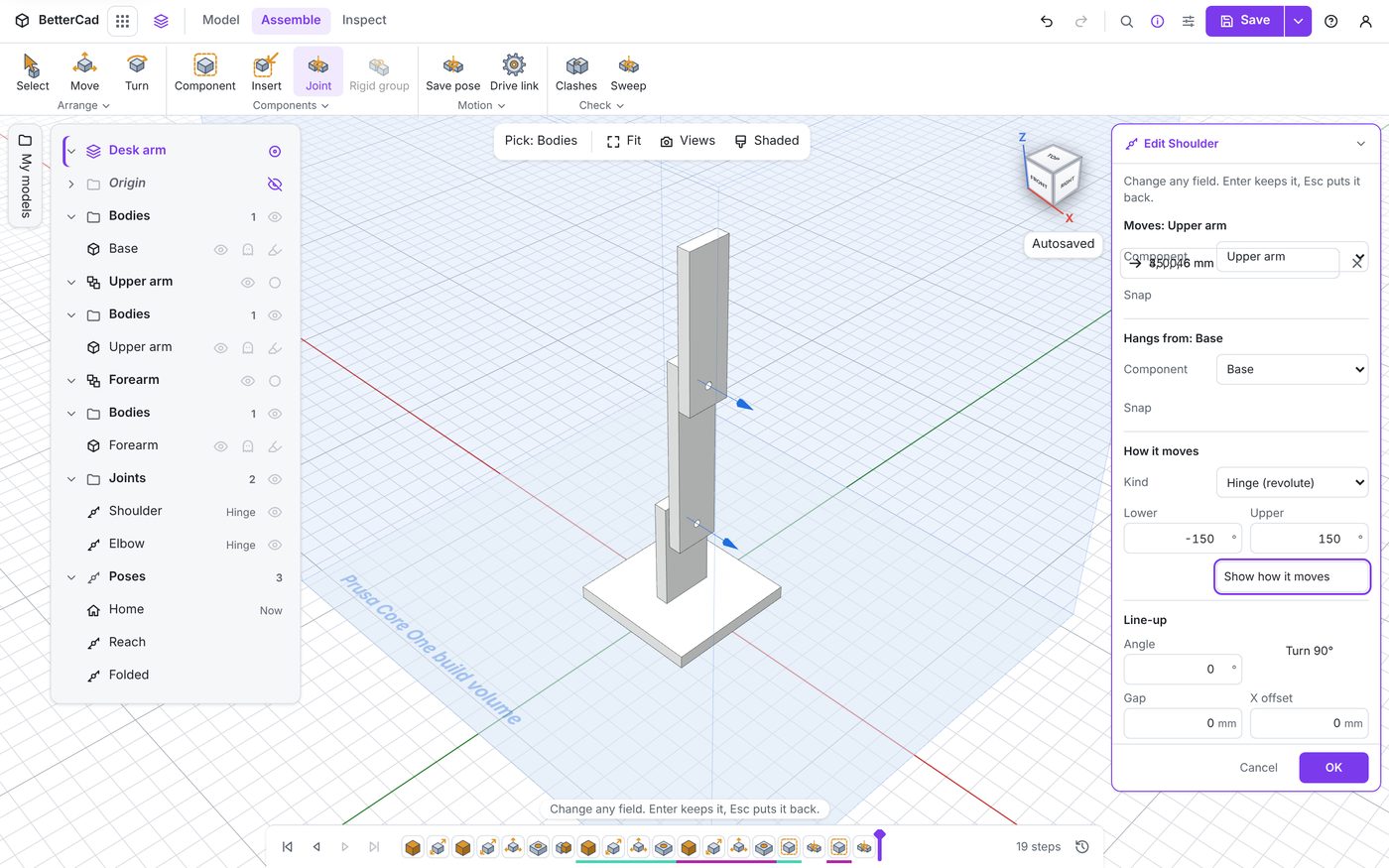
- Click OK.
- In the Pose section, set Shoulder to
140. - If the results have gone, click Check clashes in Properties to switch the check back on.
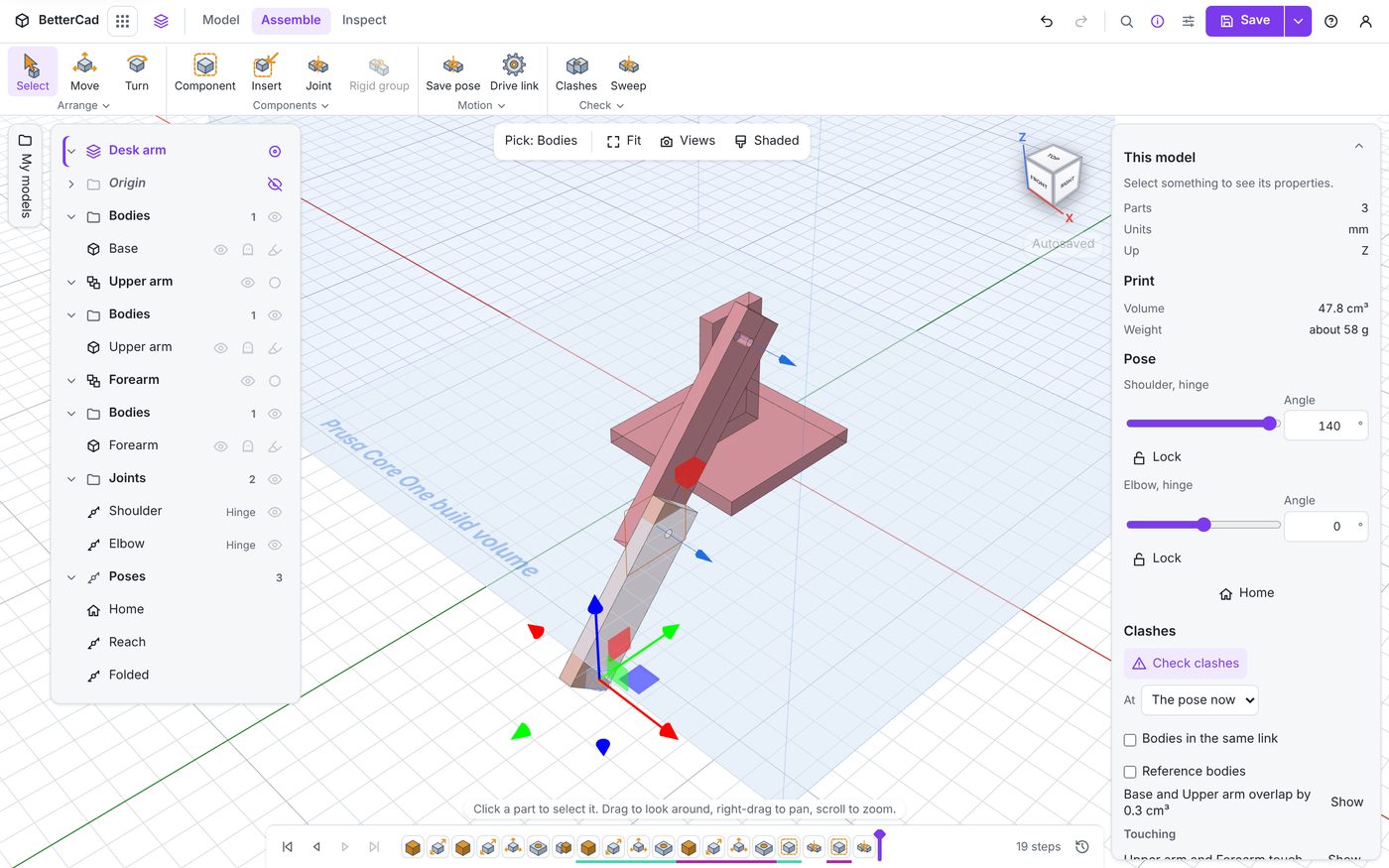
The view turns red where it matters. The upper arm has swung right over and is buried in the base plate, and Properties says “Base and Upper arm overlap by 0.3 cm³”.
Reading the results
| Result | Meaning |
|---|---|
| overlap by a volume | The two parts share space. That can’t be built |
| Touching | The parts meet but don’t overlap |
| Nothing listed | The pose is clear |
Each result has a Show button that frames the clash in the view. On a busy robot that saves a lot of hunting.
The size of the overlap is a clue. A tiny one is often a corner that needs a chamfer. A big one means the design needs a rethink.
What gets checked
Above the results are three settings:
| Setting | What it does |
|---|---|
| At | Which pose to check: The pose now, Home, or any named pose |
| Bodies in the same link | Also checks bodies inside one moving part against each other |
| Reference bodies | Includes reference bodies, such as a servo from the catalogue |
At is the one to remember. Pick a named pose from the list and BetterCad checks it without you going to it. Save your awkward poses once and you can test them after every design change.
Reference bodies is worth ticking when your model has bought parts in it. A printed arm that swings through a servo is every bit as broken as one that swings through another print.
Bodies in the same link is off to start with because bodies in one moving part usually overlap on purpose: a bracket sitting in its slot, a nut in its trap.
Fixing a clash
There are three honest fixes:
- Change a part. Shorten it, notch it, round the corner that hits
- Move a joint. A taller upright would let this arm swing further
- Limit the joint. If the arm never needs to go there, stop it going there
The third is often the right one, and the next lesson has BetterCad work out the limit for you.
For now:
- Press Esc to switch the check off, then click Home.
Try it Yourself
- Set the shoulder to 120 and check. Then 130, then 135. Roughly where does the overlap start?
- Set At to your Folded pose and check it without going there.
- Add a Library box sitting half inside the base plate, and check with Bodies in the same link off and then on. Delete the box afterwards.
Common Issues
- Problem: The check lists parts as touching and you expected nothing
- Solution: Nothing to do, or add a small Gap to the joint
-
Why: Parts joined face to face do touch. Touching isn’t a clash
- Problem: The parts stay red and the list won’t go away
- Solution: Press Esc, or click Check clashes again
-
Why: Check clashes is a switch. It stays on until you turn it off
- Problem: A servo passes through a printed part and nothing is reported
- Solution: Tick Reference bodies and check again
- Why: Reference bodies are left out unless you ask
Check your understanding
Quick quiz 1 of 3
The check reports “Upper arm and Forearm touch”. Is that a problem?
Quick quiz 2 of 3
How do you check a saved pose without moving the arm?
Quick quiz 3 of 3
When should you tick Reference bodies?
You can use the arrows ← → on your keyboard to navigate between lessons.
Comments