Joint Kinds and Line-up
Choose between hinge, wheel, slider and fixed joints in BetterCad and adjust a joint with angle, gap, offsets and flip
By Kevin McAleer, 5 Minutes
Page last updated November 21, 2026

Both joints so far are hinges, because that’s what the Joint tool gives you first. BetterCad has four kinds, and between them they cover nearly every hobby robot.
The four kinds
Right-click Elbow in the Browser and choose Edit joint. The Kind list under How it moves has four choices. Each shows its plain name first and the name URDF uses in brackets.
| Kind | How it moves | Limits | Use it for |
|---|---|---|---|
| Hinge (revolute) | Turns about the axle, between limits | Lower and Upper, in degrees | A servo, an elbow, a gripper finger, a lid |
| Wheel (continuous) | Turns about the axle without limits | None | A wheel, a gear, a propeller, a continuous-rotation servo |
| Slider (prismatic) | Slides along the axle, between limits | Lower and Upper, in mm | A rack, a linear rail, a lift |
| Fixed (fixed) | Doesn’t move | None | A part that’s bolted on but that you want as its own link, such as a camera |
Try it:
- Change Kind to Slider (prismatic).
The forearm now slides in and out along the line of its hole, and the limits have changed to millimetres.
- Click Show how it moves to watch.
- Change Kind back to Hinge (revolute).
The axle is the same line for every kind. A hinge turns about it, and a slider slides along it.
Limits
A hinge starts with limits of -90 and 90 degrees. That’s a fair guess for a hobby servo, which turns about 180 degrees in all.
Set them from what your hardware can do:
- A standard servo: -90 to 90
- A part that hits an end stop: whatever the stop allows
- A hinge that should only open one way: 0 to 120, say
The limits stop the slider, stop a drag, and are written into the URDF file. In a later lesson BetterCad will find the angle where the arm hits the base and offer to set the limit there for you.
Line-up
The Line-up section adjusts how the moving part sits on the joint at home.
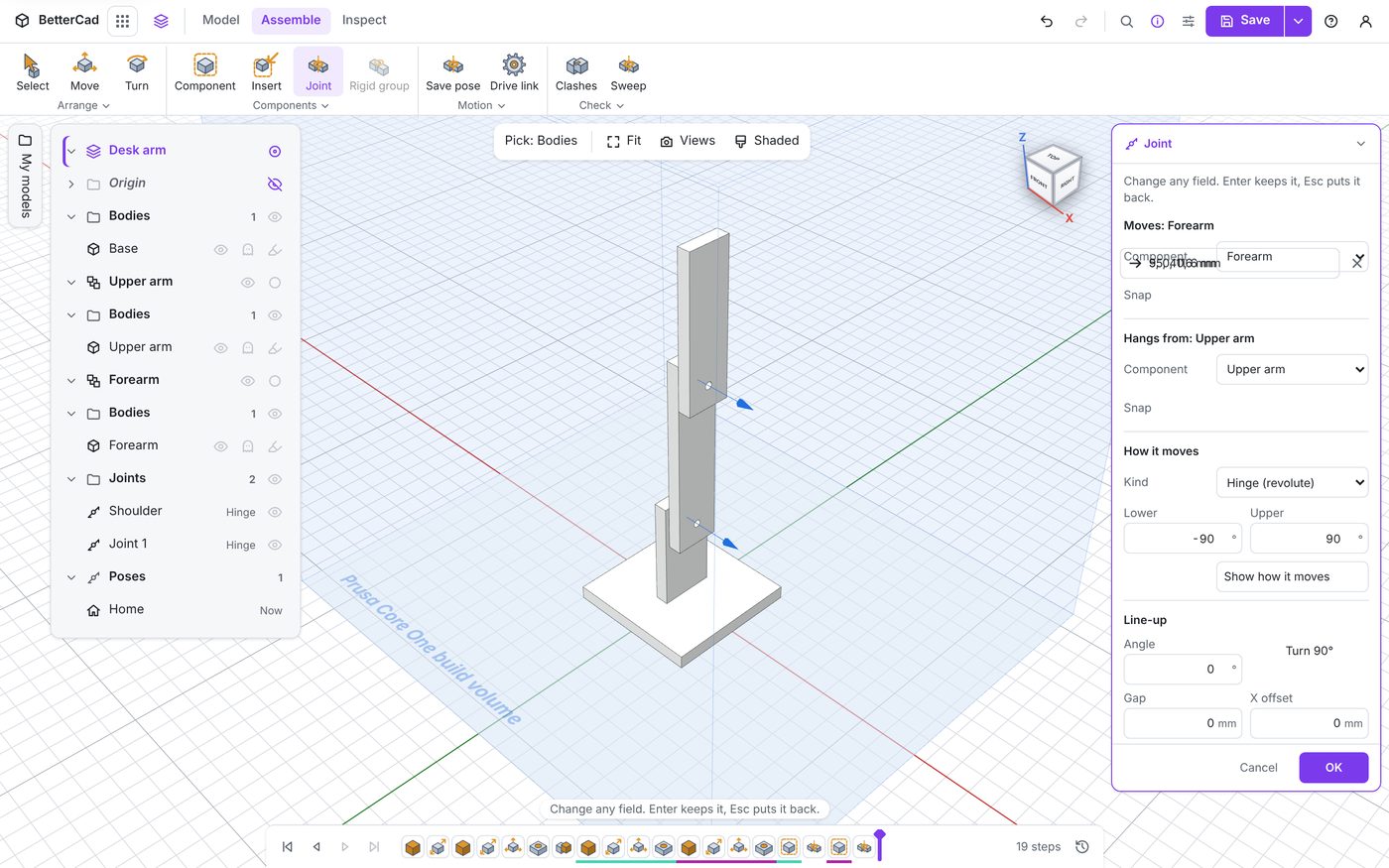
| Setting | What it does | Key |
|---|---|---|
| Angle | Turns the part about the axle | |
| Turn 90° | Turns it a quarter turn. Shift turns it back | Q |
| Gap | Leaves a space between the two faces | |
| X, Y, Z offset | Shifts the part sideways from the snap | |
| Flip | Turns the part over, onto the other side of the snap | W |
Line-up changes where home is. It doesn’t pose the joint. If your arm should rest pointing forwards, not straight up, set Angle to 90 here and that becomes zero for the slider, the limits and the URDF file.
- With the Elbow panel still open, press Q.
The forearm turns a quarter turn about the elbow, so at home the arm now makes an L.
- Press Shift+Q to turn it back, then click OK.
When to use Gap
Parts join face to face, touching. Real joints often have something between the faces: a washer, a bearing, a servo horn. Type that thickness into Gap and the model matches the hardware.
A small gap helps on screen too. Two faces that touch exactly are reported by the clash check as touching, which is true but noisy.
Try it Yourself
- Edit the Shoulder, set Angle to 90 and click OK. Press Home. Where does the arm rest now? Set it back to 0.
- Edit the Elbow and set a Gap of 2 mm. Look at the joint from the side. Set it back to 0.
- Tick Flip on the Elbow. The forearm moves to the other side of the upper arm. Untick it.
Common Issues
- Problem: A wheel joint has no Lower and Upper boxes
- Solution: Nothing to do
-
Why: A wheel turns without limits, so there are none to set
- Problem: After changing Angle, the pose slider’s zero is somewhere new
- Solution: That’s expected. Use the Pose section to move the joint and Line-up to set where it rests
-
Why: Line-up moves home, and angles are measured from home
- Problem: Q and W do nothing
- Solution: Click in the 3D view first, then press the key
- Why: While the cursor is in a number box, letters go to the box
Check your understanding
Quick quiz 1 of 3
Which kind of joint suits a robot’s drive wheel?
Quick quiz 2 of 3
What is the difference between Line-up’s Angle and the Pose section’s Angle?
Quick quiz 3 of 3
A bearing 4 mm thick sits between two parts at a joint. Which setting models it?
You can use the arrows ← → on your keyboard to navigate between lessons.
Comments