Watch and Update
Point Snakie's instruments at your PWM and ADC objects once with watch, then refresh every instrument with a single update call in your loop
By Kevin McAleer, 4 Minutes
Page last updated November 20, 2026

So far every reading has had its own line of code. With several things to measure that soon clutters a loop. There’s a tidier way.
Register once, update often
inst.watch() takes the objects you care about and remembers them. inst.update() then reads every one and sends each to the right instrument.
Open the Oscilloscope and the Multimeter, then run this in the full app. A servo sweeps on GP15 while a light sensor is read on GP26.
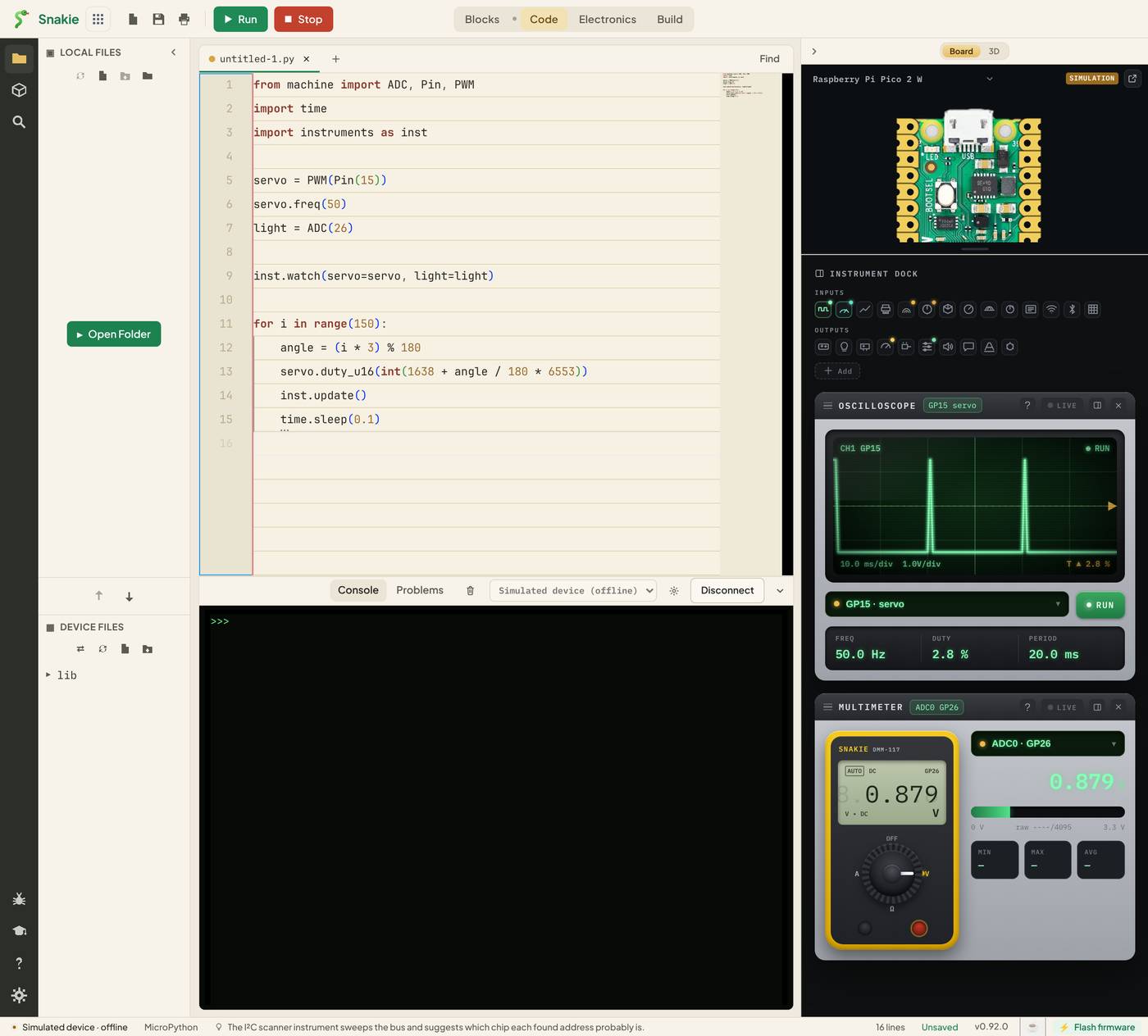
Two instruments, one line in the loop.
How it knows where to send things
watch() looks at the type of each object:
| You watch a | It goes to |
|---|---|
PWM object |
Oscilloscope (and the Servo panel) |
ADC object |
Multimeter |
The name you give becomes the channel name. servo=servo appears in the scope’s selector as GP15 · servo, and light=light shows on the meter.
In the picture the scope reads 50.0 Hz with a 20.0 ms period. That’s the servo signal from lesson 5, measured without writing a line about frequency.
Where update() goes
Put inst.update() once in your main loop, after you’ve changed your outputs:
while True:
    # 1. read sensors
    # 2. decide
    # 3. set outputs
    inst.update()      # 4. report
    time.sleep(0.1)
Every pass round the loop, the instruments get a fresh picture of the whole system.
Don’t flood the line
Each update prints a few lines of telemetry. In a loop that runs a thousand times a second, that’s a lot of printing, and printing takes time. Your robot would slow down because it’s busy describing itself.
Ten to twenty updates a second is plenty for the eye. If your loop is fast, report every so often:
count = 0
while True:
    # fast control code here
    count += 1
    if count % 50 == 0:
        inst.update()
When to use which
- One reading, used by your code anyway:
inst.read_adc(). It returns the volts - Several objects, just for watching:
inst.watch()andinst.update() - A calculated value such as a speed or an error:
inst.plot()
They mix happily. A program can watch() its motors and plot() its distance reading.
Try it Yourself
- Add an LED to the program:
led = PWM(Pin(16)),led.freq(1000), andled=ledinwatch(). Find it in the scope’s selector. - Move
inst.update()above theduty_u16line. Is the reading now one step behind? - Change the sleep to
0.01and use thecount % 10trick so the instruments still update ten times a second.
Common Issues
Problem: The instruments don’t move.
Solution: Check inst.update() is inside the loop and indented to match it.
Why: watch() only registers objects. Nothing is sent until update() runs.
Problem: The scope shows the servo, but the wrong signal is on screen. Solution: Pick your channel from the selector under the screen. Why: The scope shows one signal at a time, and the simulator adds demo channels.
Problem: My program runs slower with instruments on.
Solution: Update less often, or remove inst.update() when you’ve finished debugging.
Why: Telemetry is printed text, and printing takes time.
Check your understanding
Quick quiz 1 of 3
What does inst.watch(servo=servo) do on its own?
Quick quiz 2 of 3
Which instrument does a watched ADC object feed?
Quick quiz 3 of 3
Why not call inst.update() a thousand times a second?
You can use the arrows ← → on your keyboard to navigate between lessons.
Comments