Blocks from a Plugin
Add your own blocks to the Snakie Blocks workspace from a Python plugin, with number inputs, dropdowns and value blocks
By Kevin McAleer, 7 Minutes
Page last updated November 21, 2026

Blocks for your own robot
The newest members of the club start in the Blocks workspace. Snakie’s toolbox has blocks for pins, loops and maths, but nothing for clubbot.forward(30). How could it? That’s your robot.
A plugin can add blocks. They appear in the toolbox under Plugins, and each one writes real MicroPython, so a beginner’s block program and an expert’s code drive the same robot.
A block is a description
Here’s the idea that makes this easy. You don’t write code that runs when a block is used. You describe the block: what it says, what holes it has, and what Python it stands for. Snakie builds the block from the description.
block(id, message, code, args=[...], imports=[...], tooltip="...")
| Part | Meaning |
|---|---|
id |
A short name, unique within your plugin |
message |
The words on the block. %1, %2 mark where the inputs go |
code |
The Python it produces. {NAME} marks where each input’s value goes |
args |
The inputs, in the same order as %1, %2 |
imports |
Modules the code needs. Snakie adds the import line once |
tooltip |
Help shown when the mouse rests on the block |
The first block
Add block to the import:
from snakie import Context, block, diagnostic, edit, fix, message, plugin, status
And add this at the bottom of the file:
@plugin.blocks("ClubKit")
def club_blocks():
    """Blocks for the club's robot."""
    imports = [{"module": "clubbot"}]
    return [
        block("forward", "drive forward %1 cm", "clubbot.forward({CM})\n",
              args=[{"name": "CM", "kind": "number", "default": 20}],
              imports=imports, tooltip="Drive forward in a straight line."),
    ]
Read the block line by line:
- The message is
drive forward %1 cm. The%1is a hole argssays the hole is calledCM, takes a number, and starts at 20- The code is
clubbot.forward({CM}). Whatever is in the hole replaces{CM} - The
\non the end matters. This block is a whole line of code, so it ends with a new line
Notice that club_blocks takes no ctx. It isn’t about the open file. Snakie calls it once, when it builds the toolbox.
Save and Reload, then switch to the Blocks workspace. Open Plugins in the toolbox and click ClubKit. Your block is there.
Three more
Replace the return list with the full set:
    return [
        block("forward", "drive forward %1 cm", "clubbot.forward({CM})\n",
              args=[{"name": "CM", "kind": "number", "default": 20}],
              imports=imports, tooltip="Drive forward in a straight line."),
        block("turn", "turn %1 by %2 degrees", "clubbot.turn({DIR} * {DEG})\n",
              args=[{"name": "DIR", "kind": "choice", "options": [["right", "1"], ["left", "-1"]]},
                    {"name": "DEG", "kind": "number", "default": 90}],
              imports=imports, tooltip="Turn on the spot."),
        block("stop", "stop the motors", "clubbot.stop()\n",
              imports=imports, tooltip="Stop both motors."),
        block("distance", "distance ahead in cm", "clubbot.distance()",
              shape="value", output="Number",
              imports=imports, tooltip="How far away the nearest thing is."),
    ]
Save, Reload and look again.
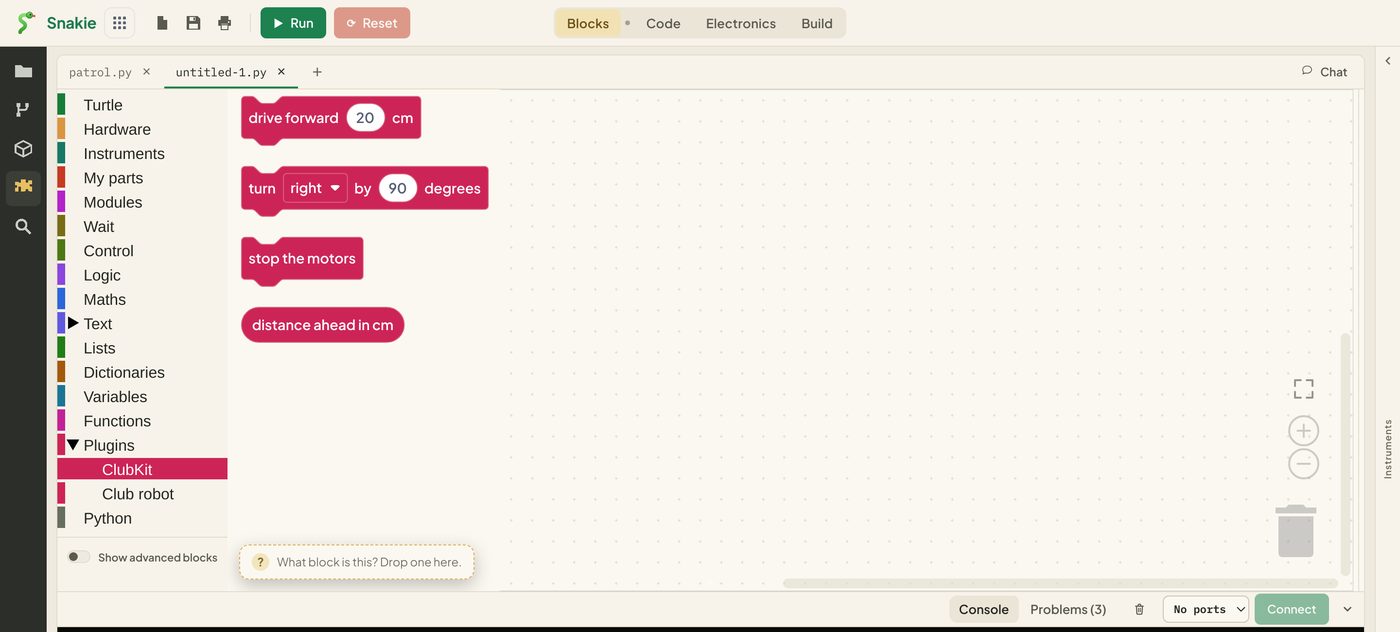
Each one shows something new.
turn has two inputs. The first is a choice, which makes a dropdown. Each option is a pair: the word the learner sees, and the text that goes into the code. Choosing “left” puts -1 in place of {DIR}. One block covers both directions.
stop has no inputs at all, so it needs no args.
distance is a different shape. shape="value" makes a rounded block that plugs into other blocks, such as an if, and output="Number" says what kind of value it gives. Its code has no \n, because it’s part of a line, not a whole one.
| Kind of input | Looks like | Becomes |
|---|---|---|
number |
A socket holding a number | The number, or whatever block is plugged in |
text |
A socket holding text | The text in quotes |
choice |
A dropdown | The option’s value, exactly as you typed it |
toggle |
A tick box | True or False |
pin |
A dropdown of pins | The GPIO number |
Build a program
Drag out drive forward, turn and stop the motors, and snap them together.
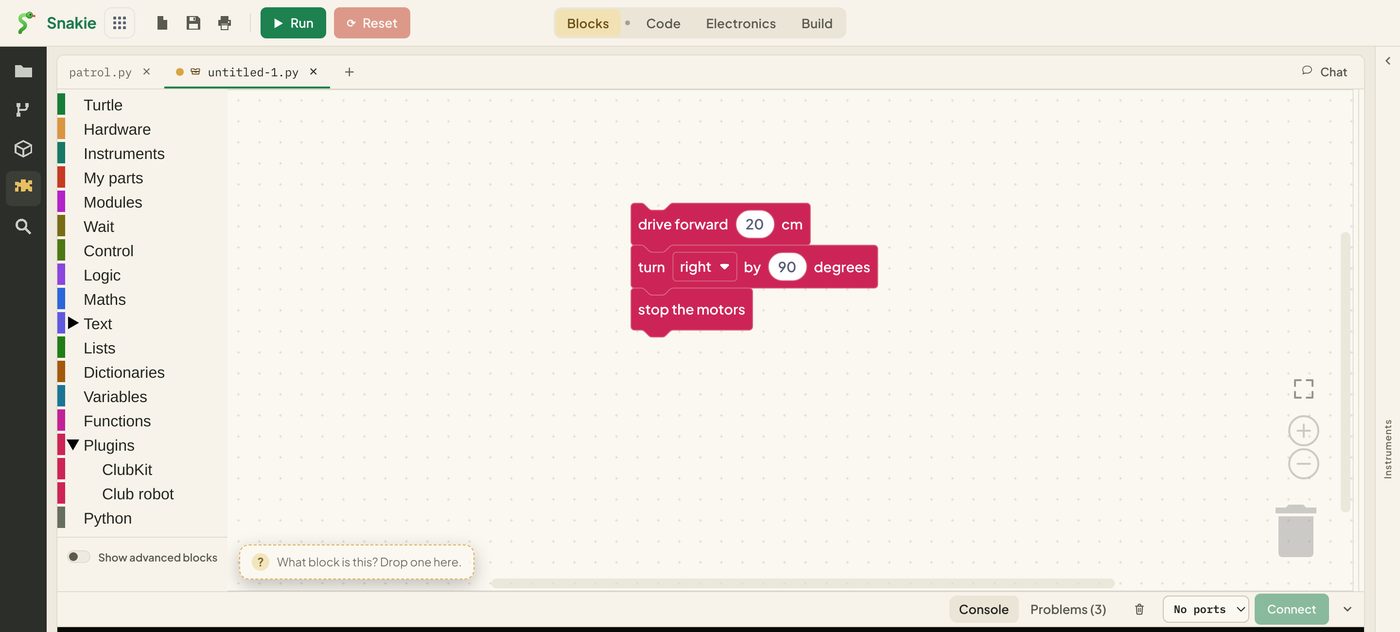
Now switch to the Code workspace.
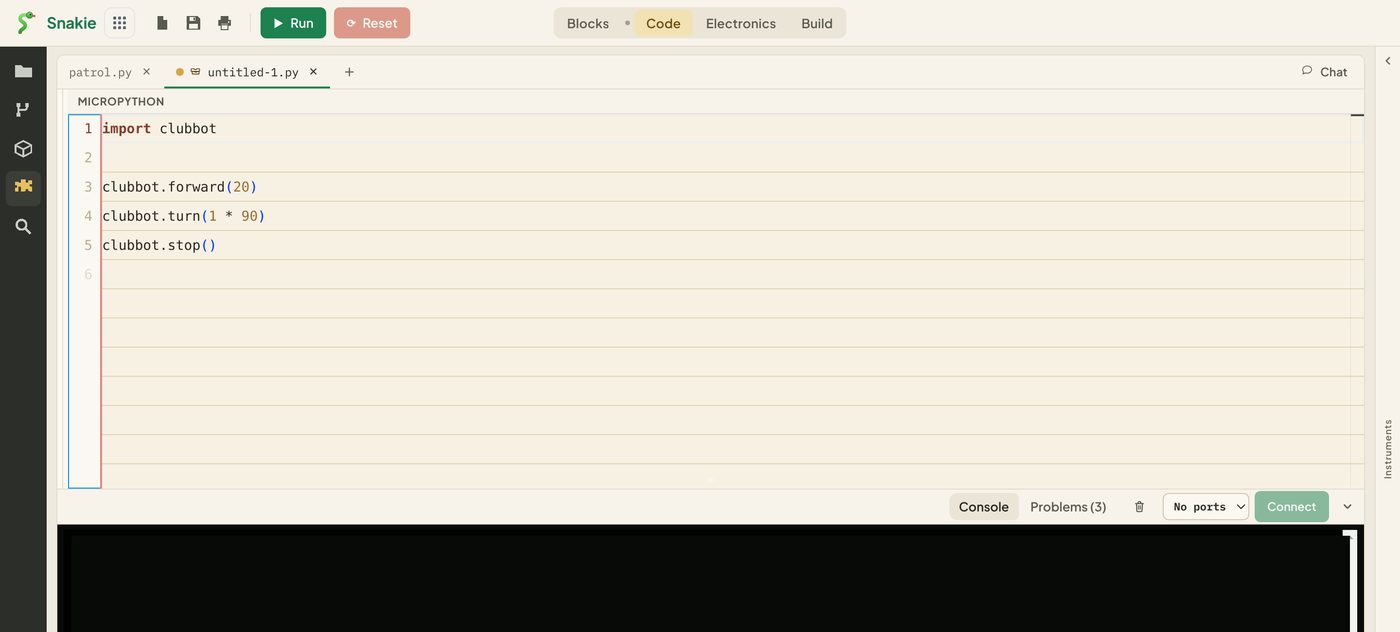
There’s the MicroPython, with import clubbot added once at the top. The turn block wrote clubbot.turn(1 * 90): the 1 came from the dropdown and the 90 from the number.
You’ll also see a second drawer called Club robot under Plugins. That’s blocks_demo, the example that ships with Snakie. Ours is named ClubKit so the two don’t get mixed up.
Blocks can’t misbehave
A block is only a template that produces text. It can’t run code on your computer, reach the board or read files. The worst a badly written block can do is put odd Python into a program, where anyone can read it before pressing Run.
Snakie also checks every block. If the code mentions {SPEED} and there’s no input called SPEED, or the message has no %1 for an input, that block is refused and the rest still load.
Try it Yourself
- Change the default distance to 10 and Reload. Does a block already on the canvas change?
- Add a
reverseblock: “drive backward %1 cm”, producingclubbot.forward(-{CM}) - Add a value block “bumper pressed” with
output="Boolean"and the codeclubbot.bumper(). Plug it into an if block from Logic - Add a block with a
toggleinput: “headlights %1”, producingclubbot.lights({ON})
Common Issues
Problem: There’s no Plugins category in the toolbox. Solution: Check the plugin is under MOUNTED in the rack, then switch away from Blocks and back. Why: The toolbox is built from the plugins that loaded. A plugin with a load error contributes nothing.
Problem: One block is missing but the others are there.
Solution: Compare its message, args and code. Every input needs a %n in the message, and every {NAME} in the code needs an input.
Why: Snakie turns away a block that doesn’t add up, and keeps the rest.
Problem: Two blocks’ code runs together on one line.
Solution: End the code of a stacking block with \n.
Why: A stacking block is a full line of Python. A value block isn’t, so it has no \n.
Check your understanding
Quick quiz 1 of 3
What does %1 mean in a block’s message?
Quick quiz 2 of 3
A choice option is [“left”, “-1”]. What goes into the Python when “left” is picked?
Quick quiz 3 of 3
Which block should have shape=”value”?
You can use the arrows ← → on your keyboard to navigate between lessons.
Comments