When Plugins Break
Learn what Snakie shows when a plugin has a syntax error or crashes, and how to find and fix the bug quickly
By Kevin McAleer, 5 Minutes
Page last updated November 21, 2026

Break it on purpose
Every plugin author breaks their plugin sooner or later. It’s much less alarming when you’ve seen it before, so let’s do it now, on purpose, twice.
There are two kinds of failure, and Snakie shows them in different places.
| Kind | When it happens | Where you see it |
|---|---|---|
| The plugin won’t load | When you click Reload | In the rack |
| A command crashes | When you click RUN | In the messages |
Failure one: it won’t load
Open __init__.py and delete the colon from the end of the def line:
@plugin.command("clubkit.hi", "Say hi")
def say_hi(ctx: Context)
    return message("info", f"Hi from ClubKit! You're editing {ctx.file.name}.")
Save and click Reload.
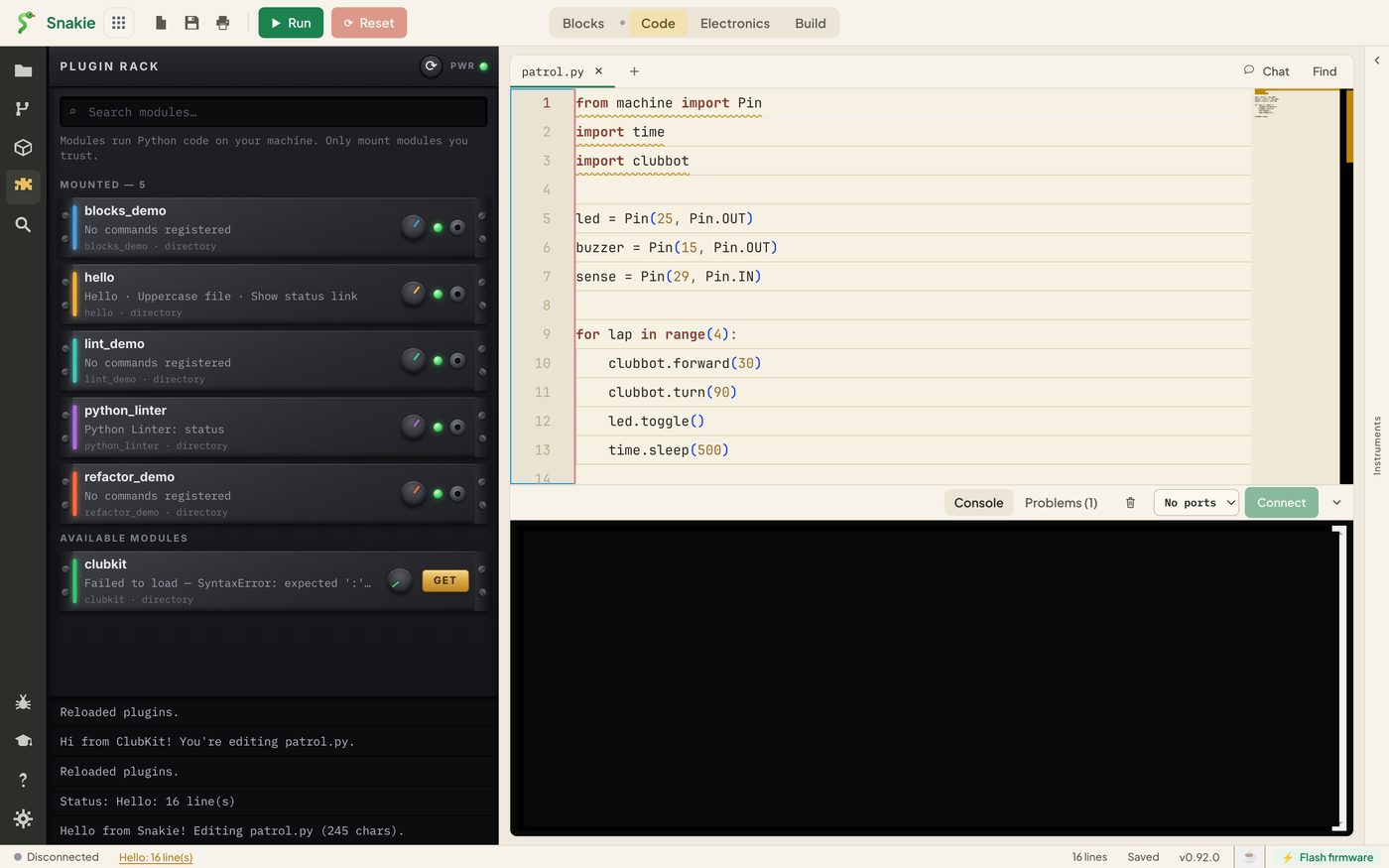
clubkit has dropped out of MOUNTED into a separate group at the bottom, and where its commands used to be it now says:
Failed to load — SyntaxError: expected ':' (__init__.py, line 5)
That one line tells you what’s wrong (expected ':'), which file, and which line. If the text is cut short, hover over the module to read all of it, or drag the edge of the panel to make it wider.
Notice what didn’t happen. Snakie didn’t crash. The other five plugins loaded as usual. One broken plugin can’t take the rest down.
Put the colon back, save and Reload. clubkit returns to MOUNTED.
Failure two: it crashes when run
Some bugs only show up when the code runs. Add a line that can’t work:
@plugin.command("clubkit.hi", "Say hi")
def say_hi(ctx: Context):
    laps = 10 / 0
    return message("info", f"Hi from ClubKit! You're editing {ctx.file.name}.")
Save and Reload. This time the plugin loads happily, because the file is valid Python. Now click RUN.
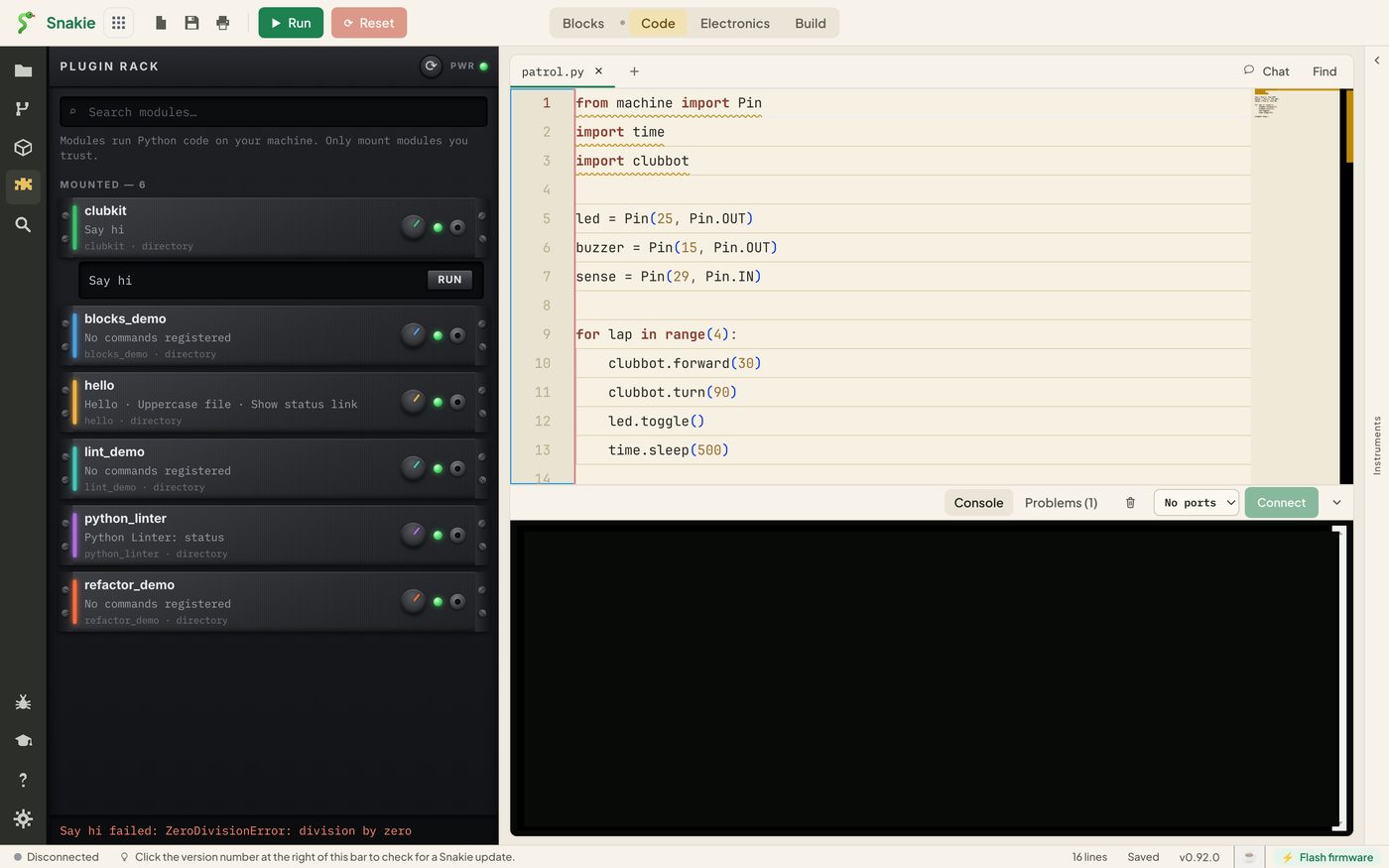
The message area says:
Say hi failed: ZeroDivisionError: division by zero
You get the command’s title, the kind of error and its message. Again, nothing else is harmed. Delete the bad line, save and Reload.
Finding a bug
You don’t get a line number for a crash, so here are three ways to track one down.
1. Return what you know. A message is the plugin author’s print. Send back the value you’re unsure about:
return message("info", f"content has {len(ctx.file.content)} characters")
2. Test the idea outside Snakie. Most plugin code is ordinary string handling. Try the tricky line in a Python prompt first, where you get a full traceback.
3. Catch the error yourself. For a command that might fail on odd files, say what went wrong in your own words:
@plugin.command("clubkit.hi", "Say hi")
def say_hi(ctx: Context):
    if not ctx.file.name:
        return message("warning", "Open a file first.")
    return message("info", f"Hi from ClubKit! You're editing {ctx.file.name}.")
A friendly warning beats a TypeError every time, especially if other people will use your plugin.
print()inside a plugin doesn’t appear in Snakie. The host keeps printed text away from its conversation with the editor, so use a message when you want to see a value.
Three habits that save time
- Reload after every small change. If it breaks, you know which change did it
- Read the rack first. If your plugin isn’t under MOUNTED, nothing in it will work until the load error is fixed
- Keep commands quick. While your function runs, the host can’t answer anything else
Try it Yourself
- Misspell
messageasmesagein theimportline, Reload, and read the error - Misspell it only inside the function this time. Does the plugin load? What happens on RUN?
- Fix both and confirm Say hi works again
Common Issues
Problem: The error text is cut off with “…”. Solution: Hover over the module, or widen the panel by dragging its right edge. Why: The rack only has room for one line.
Problem: I fixed the bug but the plugin still says Failed to load. Solution: Save the file, then click Reload. Why: The rack shows the result of the last load.
Problem: My print() output is nowhere to be seen.
Solution: Return a message in its place.
Why: Printed text is kept out of the channel the host uses to talk to Snakie.
Check your understanding
Quick quiz 1 of 3
Your plugin has a syntax error. When do you find out?
Quick quiz 2 of 3
One plugin fails to load. What happens to the others?
Quick quiz 3 of 3
What is the plugin author’s substitute for print()?
You can use the arrows ← → on your keyboard to navigate between lessons.
Comments