Commands That Change Code
Use the edit action in a Snakie plugin to rewrite the open file, and learn the rules for commands that change code safely
By Kevin McAleer, 5 Minutes
Page last updated November 21, 2026

From reading to writing
So far ClubKit only looks. Now it gets to change things.
The club has a rule: every program starts with a header comment saying which club it belongs to and what the file is called. Nobody remembers to add it. One button will.
The edit action
A command changes the file by returning an edit:
edit(new_content)
new_content is the whole file as you want it to be. Snakie swaps the text in the editor for your new text. There’s no “insert at line 3” for commands. You take ctx.file.content, build the new version, and hand all of it back.
Two things to know:
- The edit changes the editor, not the file on disk. The tab is marked as unsaved, and it’s up to the user to save
- Because it’s a normal change to the editor, the user can look it over before saving
The header command
Add edit to the import line and a constant under PIN_USE:
from snakie import Context, edit, message, plugin, status

HEADER = "# Robot Club\n"
Then add the command. Put it above list_pins:
@plugin.command("clubkit.header", "Add club header")
def add_header(ctx: Context):
    """Put the club's header comment at the top of the file."""
    if ctx.file.content.startswith(HEADER):
        return message("info", "This file already has the club header.")
    return [
        edit(HEADER + f"# File: {ctx.file.name}\n\n" + ctx.file.content),
        message("info", f"Added the club header to {ctx.file.name}."),
    ]
Save, Reload, open patrol.py and run Add club header.
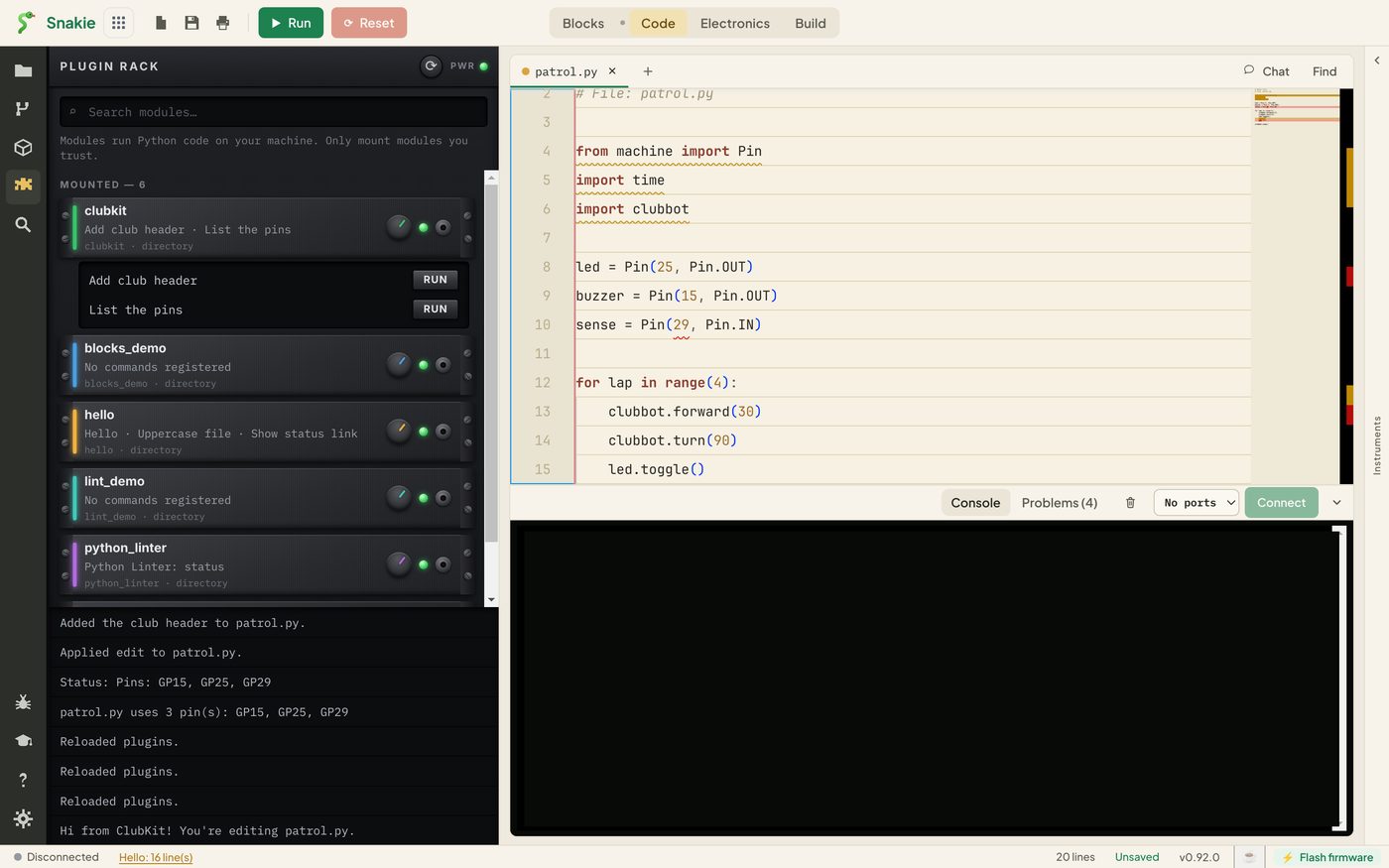
Three lines have appeared at the top of the file, the tab shows it has unsaved changes, and the panel has two new messages. One is yours. The other, “Applied edit to patrol.py”, is Snakie confirming it made the change.
Run it twice
Click RUN again. This time you get “This file already has the club header”, and the file isn’t touched.
That check is the most important line in the function. Without it, every click would add another header. A command that’s safe to run again and again is called idempotent, and it’s what you want from any command that edits.
Ask of every editing command: what happens if someone clicks it twice?
Rules for commands that edit
Changing someone’s code is a serious thing to do. Good plugins follow a few rules.
Change as little as you can. Build the new text from the old text. Don’t reformat lines you weren’t asked to touch.
Say what you did. Return a message with the edit, so the user isn’t left wondering what changed.
Do nothing when there’s nothing to do. Return a message, not an edit that puts back the same text. An edit marks the file as changed even when it isn’t.
Keep the line endings. Add \n after anything you insert, and keep the file’s final newline.
Try it Yourself
Here’s a function to practise on. It’s the heart of the header command with Snakie taken away, so you can run it right here. Change the code so it also adds a line saying # Checked by ClubKit.
Then, in your plugin:
- Run Add club header on a new, empty file
- Write
clubkit.tidy, titled “Trim line ends”, that removes spaces from the end of every line.line.rstrip()trims one line, and"\n".join(lines)puts them back together. Remember the final newline - Make
clubkit.tidyreport how many lines it changed, and return only a message when that number is zero
Common Issues
Problem: The header is added again every time. Solution: Check whether it’s already there before you edit. Why: The command gets the current text each time it runs, including the header it added last time.
Problem: The whole file went onto one line, or lost its last line.
Solution: Join lines with "\n" and add a final "\n".
Why: splitlines() removes the line endings, so you have to put them back.
Problem: The file on disk hasn’t changed. Solution: Save the tab. Why: An edit changes the editor. Saving is left to the user.
Check your understanding
Quick quiz 1 of 3
What do you pass to edit()?
Quick quiz 2 of 3
What does idempotent mean for a command?
Quick quiz 3 of 3
After a command returns an edit, is the file saved?
You can use the arrows ← → on your keyboard to navigate between lessons.
Comments