Commands That Read Code
Write a Snakie plugin command that searches a MicroPython program for the pins it uses and reports them in a message and the status bar
By Kevin McAleer, 5 Minutes
Page last updated November 21, 2026

A useful question
“Which pins does this program use?” Every club leader asks it, usually while holding a robot with a wire in the wrong hole.
Let’s make ClubKit answer it. The command will read the program, find every pin and report back.
Finding pins in text
ctx.file.content is one long string. In MicroPython a pin nearly always looks like Pin(15, so we want every number that follows Pin(.
Python’s re module finds patterns like that. Try this in a Python prompt on your computer:
import re

code = "led = Pin(25, Pin.OUT)\nbuzzer = Pin(15, Pin.OUT)"
print(re.findall(r"Pin\(\s*(\d+)", code))
It prints ['25', '15']. Here’s how to read the pattern:
| Piece | Means |
|---|---|
Pin\( |
the letters Pin then an opening bracket (the \ says “a real bracket”) |
\s* |
any spaces, or none |
(\d+) |
one or more digits, and the brackets say “this is the bit I want” |
Pin.OUT isn’t matched, because there’s no bracket straight after Pin.
The command
Replace the contents of __init__.py with this. Say hi has done its job, so it goes.
"""ClubKit: a Snakie plugin for our robot club."""

import re

from snakie import Context, message, plugin

PIN_USE = re.compile(r"Pin\(\s*(\d+)")


@plugin.command("clubkit.pins", "List the pins")
def list_pins(ctx: Context):
    """Report every GPIO pin the program uses."""
    pins = sorted({int(n) for n in PIN_USE.findall(ctx.file.content)})
    if not pins:
        return message("warning", "No pins found. Is this the right file?")
    names = ", ".join(f"GP{n}" for n in pins)
    return message("info", f"{ctx.file.name} uses {len(pins)} pin(s): {names}")
The busy line is the one that builds pins. Reading it from the inside out:
PIN_USE.findall(...)gives the numbers as text:['25', '15', '29']int(n) for n in ...turns each into a number- The curly brackets make a set, which throws away repeats. A pin used twice is listed once
sorted(...)puts them in order
Then there are two ways out. No pins at all earns a warning, because the user has probably run the command on the wrong file. Otherwise the pins are joined into a sentence.
Save, Reload, open patrol.py, and run List the pins.
Two answers at once
A command can return a list of things, and Snakie handles each in turn. Let’s also put the pins in the status bar, where they stay in view while you wire up.
Add status to the import:
from snakie import Context, message, plugin, status
And change the last line of the function:
    return [
        message("info", f"{ctx.file.name} uses {len(pins)} pin(s): {names}"),
        status(f"Pins: {names}", tooltip="From ClubKit"),
    ]
Save, Reload and run it again.
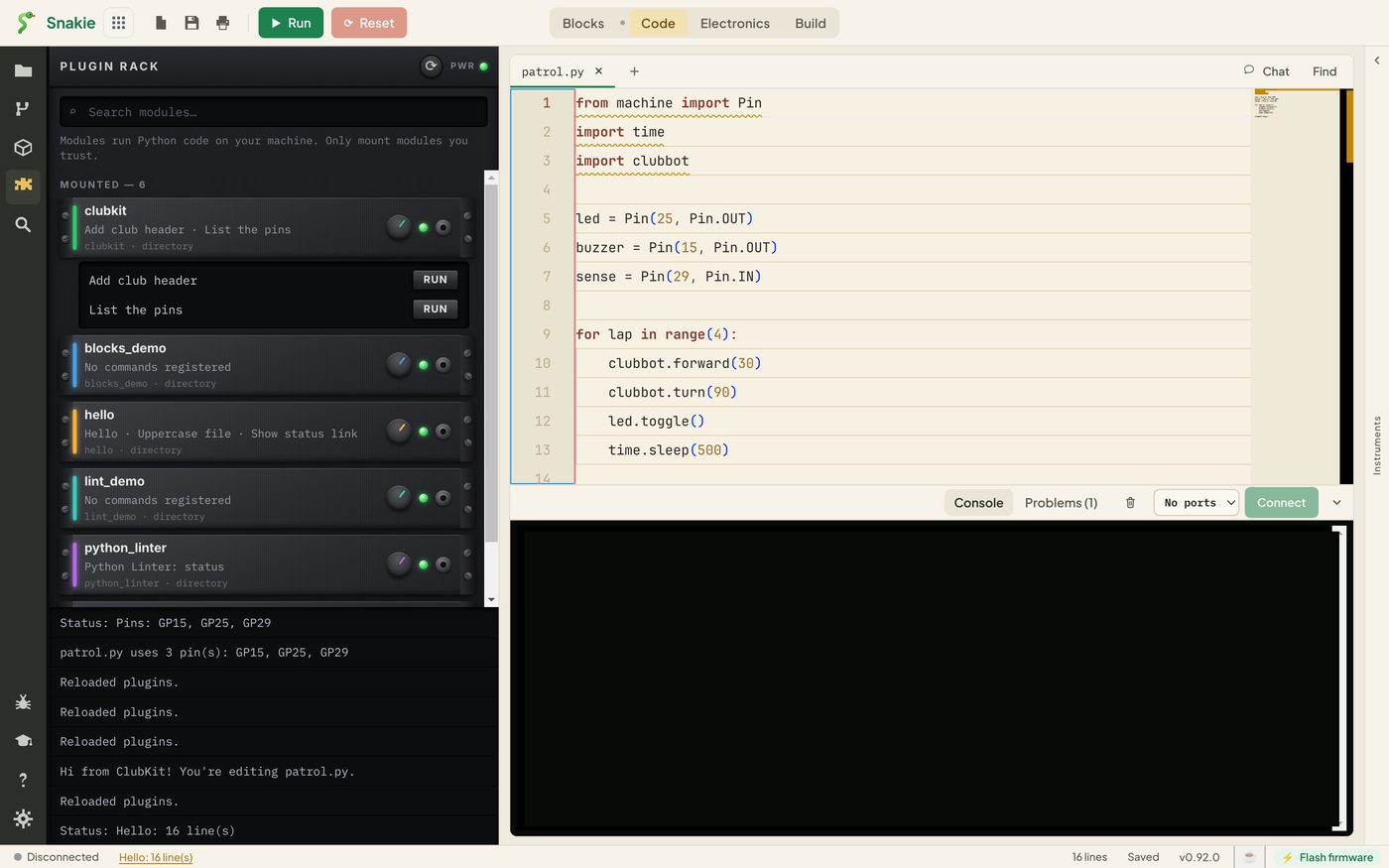
The message is at the bottom of the panel, and Pins: GP15, GP25, GP29 is in the status bar at the bottom left of the window.
status takes a few optional extras:
| Extra | Does |
|---|---|
tooltip="..." |
Text shown when you hover over it |
href="https://..." |
Makes it a link |
priority=1 |
Higher numbers win when plugins compete for the space |
Message or status?
- Use a message for an answer to something the user just asked
- Use a status for a fact worth keeping in view
- Use a warning or error message when the user needs to do something
Try it Yourself
- Add a second
Pin(15, ...)line topatrol.pyand run the command. Is GP15 listed once or twice? - Run the command on a file with no pins
- Write a new command,
clubkit.count, titled “Count the lines”, that reports how many lines the file has and how many are blank.ctx.file.content.splitlines()gives you a list of lines
Common Issues
Problem: Pin(LED_PIN) isn’t found.
Solution: That’s expected with this pattern. It only finds pins written as numbers.
Why: The plugin reads text. It doesn’t run the program, so it can’t know what LED_PIN holds.
Problem: NameError: name 're' is not defined.
Solution: Add import re at the top of the file.
Why: A plugin is a normal Python file and needs its own imports.
Problem: The status bar text has gone. Solution: Run the command again. Why: Another plugin’s status can replace it, and it isn’t saved between sessions.
Check your understanding
Quick quiz 1 of 3
How does a command send back a message and a status together?
Quick quiz 2 of 3
Why does the command use a set when collecting pins?
Quick quiz 3 of 3
The command can’t find the pin in Pin(LED_PIN). Why?
You can use the arrows ← → on your keyboard to navigate between lessons.
Comments