Your First Linter
Write a Snakie linter plugin that underlines a classic MicroPython mistake as you type and lists it in the Problems panel
By Kevin McAleer, 6 Minutes
Page last updated November 21, 2026

A helper that never needs asking
A command waits to be clicked. A linter doesn’t. It runs by itself every time the code changes and underlines anything it doesn’t like, the way a spell checker does.
ClubKit’s first rule will catch the club’s favourite mistake:
time.sleep(500)
Whoever wrote that wanted half a second. But sleep counts in seconds, so the robot sits there for over eight minutes and everyone thinks it’s crashed. They meant sleep_ms(500).
How a linter is built
A linter is a function with a different decorator. It takes the same ctx and returns a list of diagnostics. A diagnostic is one problem at one place in the file.
diagnostic(line, message, severity="warning", column=..., end_column=..., source="...")
| Part | Meaning |
|---|---|
line |
Which line, counting from 1 |
message |
What to tell the user |
severity |
"error", "warning", "info" or "hint" |
column, end_column |
Where the squiggle starts and stops, counting from 1 |
source |
A short name shown beside the problem, so people know who’s complaining |
Everything counts from 1, because that’s how editors number lines. Python counts from 0, so there’ll be some + 1 in the code.
Add the linter
Add diagnostic to the import, and one more pattern under PIN_USE:
from snakie import Context, diagnostic, edit, message, plugin, status

LONG_SLEEP = re.compile(r"\bsleep\(\s*(\d{3,})\s*\)")
That pattern reads: the word sleep, a bracket, a number with three or more digits, and a closing bracket. sleep(2) is fine. sleep(500) is suspicious.
Now add the linter at the bottom of the file:
@plugin.linter("club-rules")
def club_rules(ctx: Context):
    """Squiggle the mistakes our club makes most often."""
    found = []
    for number, line in enumerate(ctx.file.content.splitlines(), start=1):
        match = LONG_SLEEP.search(line)
        if match:
            found.append(diagnostic(
                number,
                f"sleep({match.group(1)}) waits {match.group(1)} seconds. Did you mean milliseconds?",
                severity="warning",
                column=match.start() + 1,
                end_column=match.end() + 1,
                source="clubkit",
            ))
    return found
Walking through it:
enumerate(..., start=1)hands us each line with its number, already counting from 1LONG_SLEEP.search(line)looks for the pattern in that linematch.start()andmatch.end()say where in the line it was found, counting from 0, so we add 1- Each problem goes into the
foundlist, and the list is returned
Save and click Reload.
See it work
Open patrol.py and make any small change, such as typing a space and deleting it.
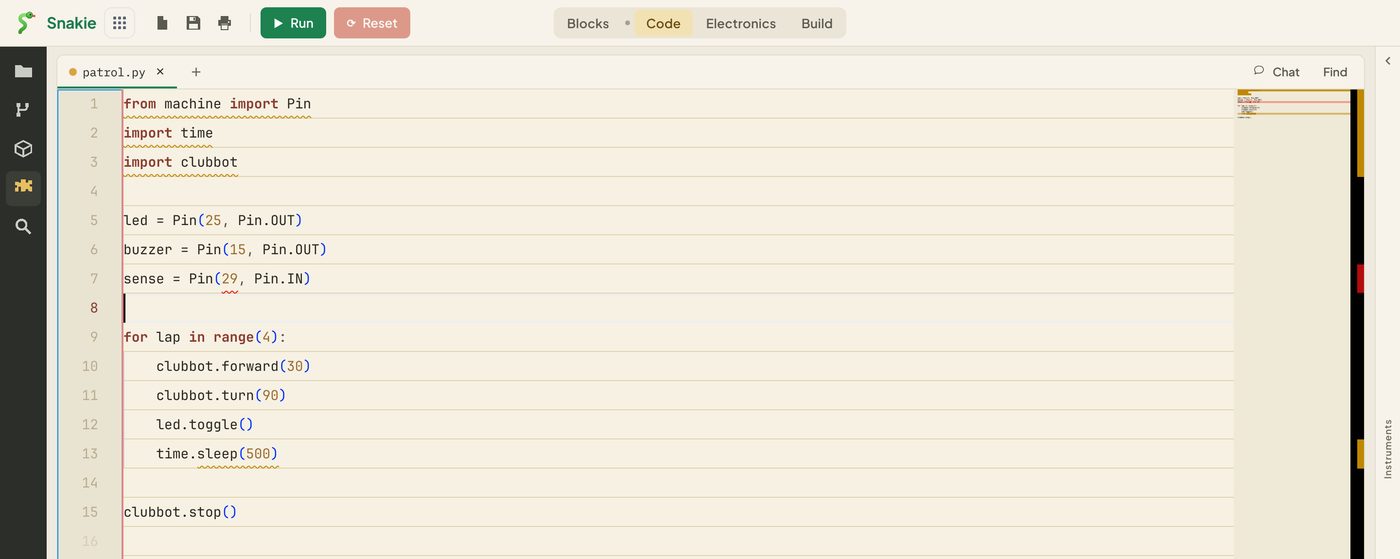
sleep(500) on line 13 now has a wavy underline. (The screenshots also show a red mark on line 7. That comes from a rule you’ll add in lesson 9.) Hover over the underline:
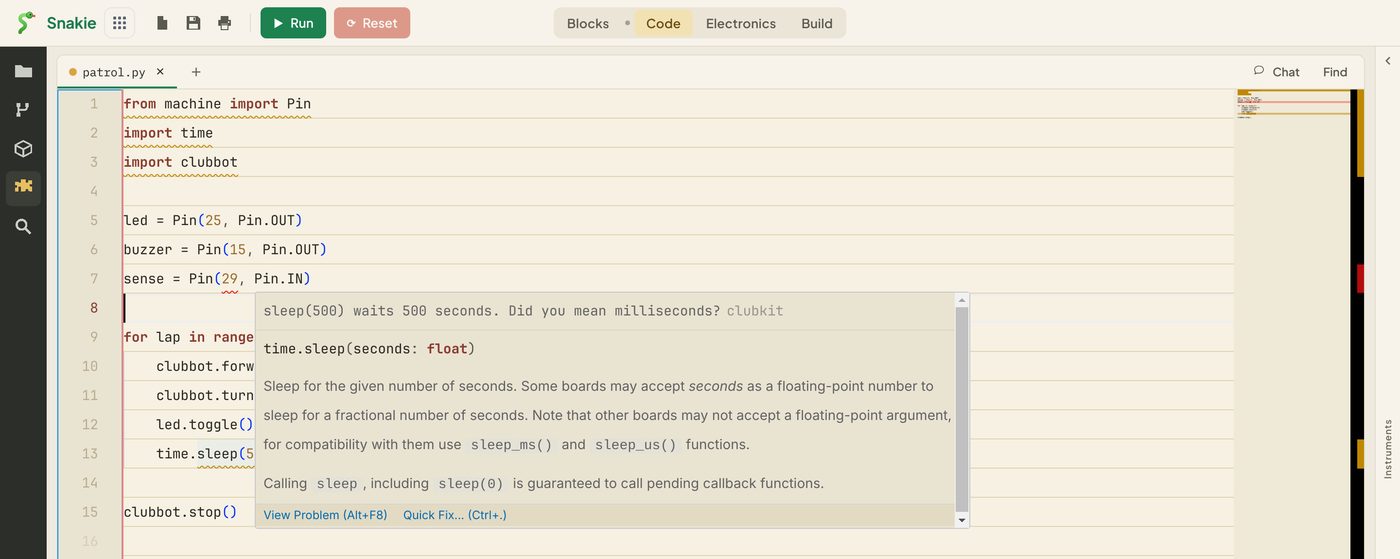
Your message is at the top of the pop-up, with clubkit beside it. Underneath, Snakie adds its own help for time.sleep, which backs up your point nicely.
Now change 500 to 2. A moment after you stop typing, the squiggle goes. Change it back and it returns.
Snakie waits until you pause typing, then asks every linter to check the file. Old answers are thrown away, so your linter never fights your typing.
The Problems panel
Squiggles are easy to miss in a long file. Click Problems above the console.
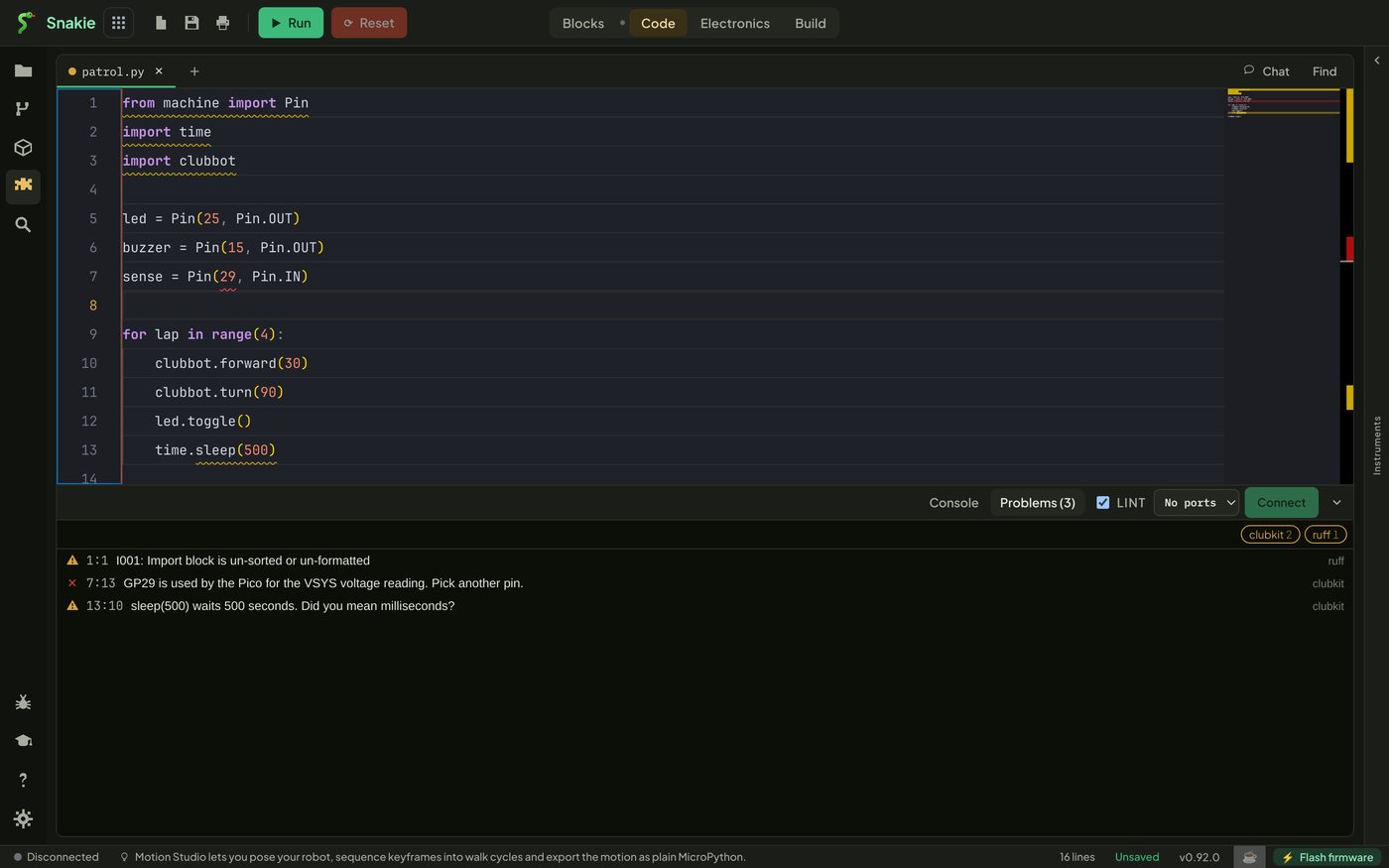
Every problem in the file is listed with its line and column, its message and its source. Yours sits alongside the ones from ruff, the built-in Python linter. Click a row to jump to that line. The chips at the top right filter the list by source.
(The screenshot uses Snakie’s dark theme, which is the easiest way to read this panel.)
Choosing a severity
| Severity | Use it when |
|---|---|
error |
The program can’t work like this |
warning |
It will run, but probably not as intended |
info |
Worth knowing, no action needed |
hint |
A gentle suggestion |
A long sleep is legal Python and might even be intended, so it’s a warning. Be sparing with errors. A linter that cries wolf gets switched off.
Try it Yourself
The rule is plain Python, so you can try it here. This version uses simple string methods. Add a line with sleep(1000) to the program and run it again. Then change the rule so that numbers from 100 upwards are flagged, but sleep(60) is not.
Then, in your plugin:
- Change the severity to
"error"and then"info". How does the underline change? - Leave out
columnandend_column. What gets underlined now? - Add a second check to the same loop that gives an
"info"on any line containing# TODO
Common Issues
Problem: No squiggles after Reload. Solution: Make a small edit to the file. Why: Linters run when the text changes or a file is opened. Reloading the plugins doesn’t re-check a file that’s already open.
Problem: The squiggle is one character out.
Solution: Check your + 1s.
Why: Python counts positions from 0 and the editor counts from 1.
Problem: The linter stopped working and nothing says why. Solution: Check the rack for a load error. If it loaded, test the function’s logic in a Python prompt. Why: A linter that crashes is skipped quietly, so that one bad rule can’t break the others or interrupt your typing.
Check your understanding
Quick quiz 1 of 3
When does a linter run?
Quick quiz 2 of 3
What does a linter return?
Quick quiz 3 of 3
match.start() gives 4. What column do you pass to diagnostic()?
You can use the arrows ← → on your keyboard to navigate between lessons.
Comments