Quick Fixes
Attach a one-click quick fix to a Snakie linter warning so the lightbulb can repair the code for you
By Kevin McAleer, 5 Minutes
Page last updated November 21, 2026

Don’t just complain
ClubKit can now spot sleep(500). But it knows exactly what the fix is, so why make someone type it?
A quick fix is a repair attached to a diagnostic. The user sees a lightbulb, clicks it, and the code is corrected.
The fix helper
fix(title, new_text)
| Part | Meaning |
|---|---|
title |
What the menu item says |
new_text |
The text to put in |
Used like that, the fix replaces the squiggled text. That’s the neatest way to work: underline exactly the code that’s wrong, and the fix swaps exactly that.
You can also aim a fix somewhere else by adding line, column, end_line and end_column, all counting from 1. We’ll use that in the challenge at the end.
Add the fix
Add fix to the import:
from snakie import Context, diagnostic, edit, fix, message, plugin, status
Then give the diagnostic a fixes list. The new part is the last line:
        match = LONG_SLEEP.search(line)
        if match:
            found.append(diagnostic(
                number,
                f"sleep({match.group(1)}) waits {match.group(1)} seconds. Did you mean milliseconds?",
                severity="warning",
                column=match.start() + 1,
                end_column=match.end() + 1,
                source="clubkit",
                fixes=[fix(f"Change to sleep_ms({match.group(1)})", f"sleep_ms({match.group(1)})")],
            ))
Our squiggle covers sleep(500). The fix replaces it with sleep_ms(500). Because the pattern starts at the word sleep, the time. in front is left alone, and time.sleep(500) becomes time.sleep_ms(500).
Save, Reload, and nudge patrol.py with a small edit so it’s checked again.
Use it
- Click on the squiggled
sleep(500) - Press Ctrl + . (Cmd + . on a Mac), or click the lightbulb that appears at the start of the line
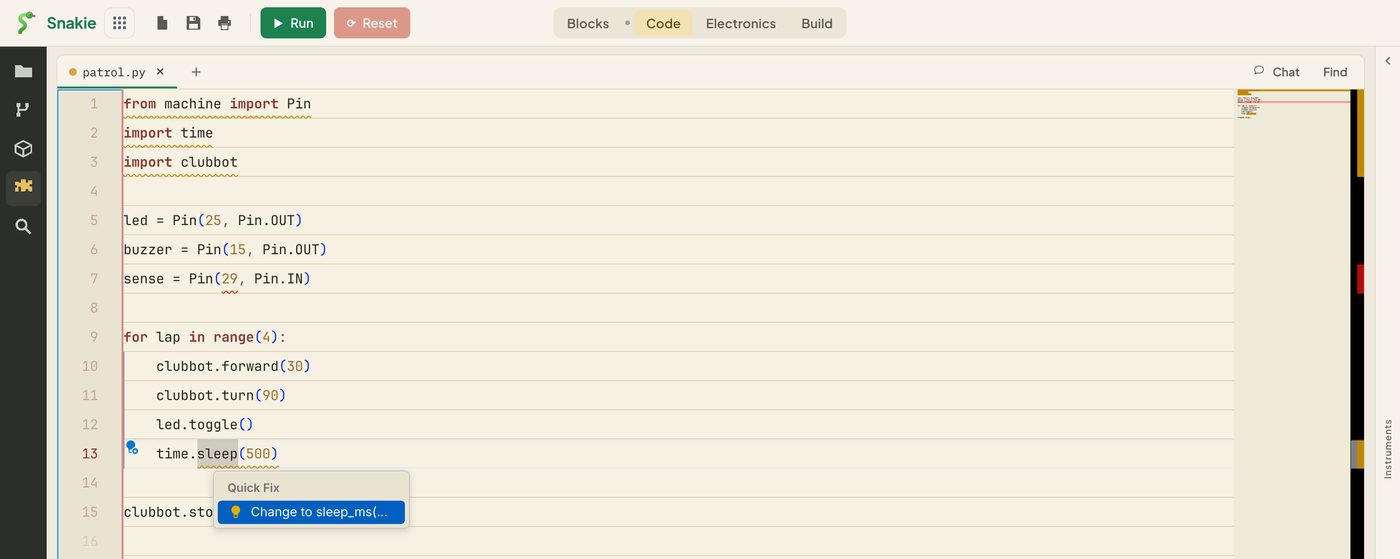
A small Quick Fix menu opens with your title in it.
- Press Enter
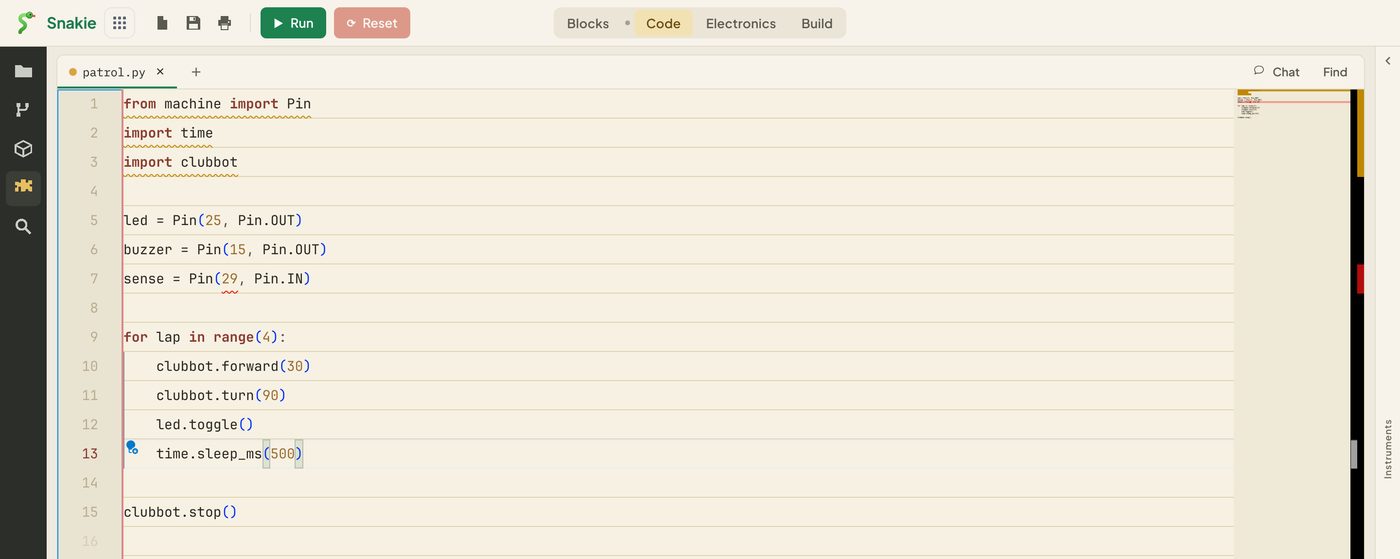
The line now reads time.sleep_ms(500) and the squiggle has gone. Nobody had to remember the name of the function.
The fix is a normal edit, so Ctrl + Z undoes it.
What makes a good fix
The title says what will happen. “Change to sleep_ms(500)” is better than “Fix”.
It’s certain. Only offer a fix when you’re confident it’s what the user wants. For a guess, leave the fix off and let the message do the work.
It’s small. Replace the few characters that are wrong. Fixes have to name a range, so you can’t replace the whole file, and that’s a good thing.
It doesn’t create a new problem. Our fix is safe because time.sleep_ms exists whenever time.sleep does. What about code that says from time import sleep and then calls sleep(500)? The fix would write sleep_ms(500), and sleep_ms was never imported. That’s the challenge below.
More than one fix
fixes is a list, so you can offer a choice:
fixes=[
    fix("Change to sleep_ms(500)", "sleep_ms(500)"),
    fix("Change to sleep(0.5)", "sleep(0.5)"),
]
Both appear in the menu. Keep it to two or three. A long menu is a sign the rule isn’t sure what it wants.
Try it Yourself
- Add the second fix above, working out the seconds from the number that was matched.
int(match.group(1)) / 1000gives the value - Undo a fix with Ctrl + Z and apply the other one
- Challenge: when the file contains
from time import sleep, change the title to warn thatsleep_msneeds importing too."from time import sleep" in ctx.file.contentis all the check you need
Common Issues
Problem: The lightbulb says there are no quick fixes.
Solution: Check fixes=[...] is inside the diagnostic(...) brackets, then Reload and edit the file.
Why: A fix belongs to a diagnostic. A diagnostic without fixes is only a message.
Problem: The fix replaces the wrong text.
Solution: Make the squiggle cover exactly the text you want replaced, by checking column and end_column.
Why: A fix with no range of its own replaces whatever the diagnostic underlined.
Problem: The fix leaves a stray bracket behind.
Solution: Make sure your pattern includes the closing bracket.
Why: match.end() is where the pattern stopped. Anything after it is left in place.
Check your understanding
Quick quiz 1 of 3
A fix has no line or column of its own. What does it replace?
Quick quiz 2 of 3
Where do you attach a fix?
Quick quiz 3 of 3
When should you leave the fix off a warning?
You can use the arrows ← → on your keyboard to navigate between lessons.
Comments