Rules for Your Hardware
Teach your Snakie linter about the Raspberry Pi Pico's reserved pins, ignore comments, and decide what deserves an error
By Kevin McAleer, 6 Minutes
Page last updated November 21, 2026

Rules a general linter can’t know
ruff, the Python linter built into Snakie, knows Python. It has no idea what your club’s robot is wired to, or which pins are off limits on your board. You do. Rules about your own hardware are where a plugin earns its keep.
Here’s one for the Raspberry Pi Pico. A few GPIO numbers exist in MicroPython but aren’t on the pin header, because the board uses them itself:
| Pin | What the Pico uses it for |
|---|---|
| GP23 | Controlling the power supply mode |
| GP24 | Sensing USB power |
| GP25 | The on-board LED (fine to use, on a plain Pico) |
| GP29 | Reading the supply voltage |
Look at patrol.py again:
sense = Pin(29, Pin.IN)
Somebody has “wired a sensor to GP29”. There’s no GP29 pad to wire it to. The program runs without a single error message and the sensor never works. That’s the second mistake, and it’s a perfect job for a linter.
Add the rule
Under your other constants, add a table of the pins and why they’re taken:
OFF_HEADER = {23: "the power supply mode", 24: "USB power sensing", 29: "the VSYS voltage reading"}
Then add a second check inside the for loop of club_rules, after the sleep check:
        for match in PIN_USE.finditer(line):
            pin = int(match.group(1))
            if pin in OFF_HEADER:
                found.append(diagnostic(
                    number,
                    f"GP{pin} is used by the Pico for {OFF_HEADER[pin]}. Pick another pin.",
                    severity="error",
                    column=match.start(1) + 1,
                    end_column=match.end(1) + 1,
                    source="clubkit",
                ))
Three things are new:
finditerfinds every match in the line, because one line can set up more than one pinmatch.start(1)is where the first group starts. That’s the number in the brackets of our pattern, so the squiggle sits under29alone and not under all ofPin(29severity="error". This can’t work as written, so it earns the stronger red underline
There’s no fix this time. ClubKit can’t know which pin the sensor is really on, so it explains and lets the user choose. That’s the “be certain” rule from the last lesson.
Save, Reload and nudge patrol.py.
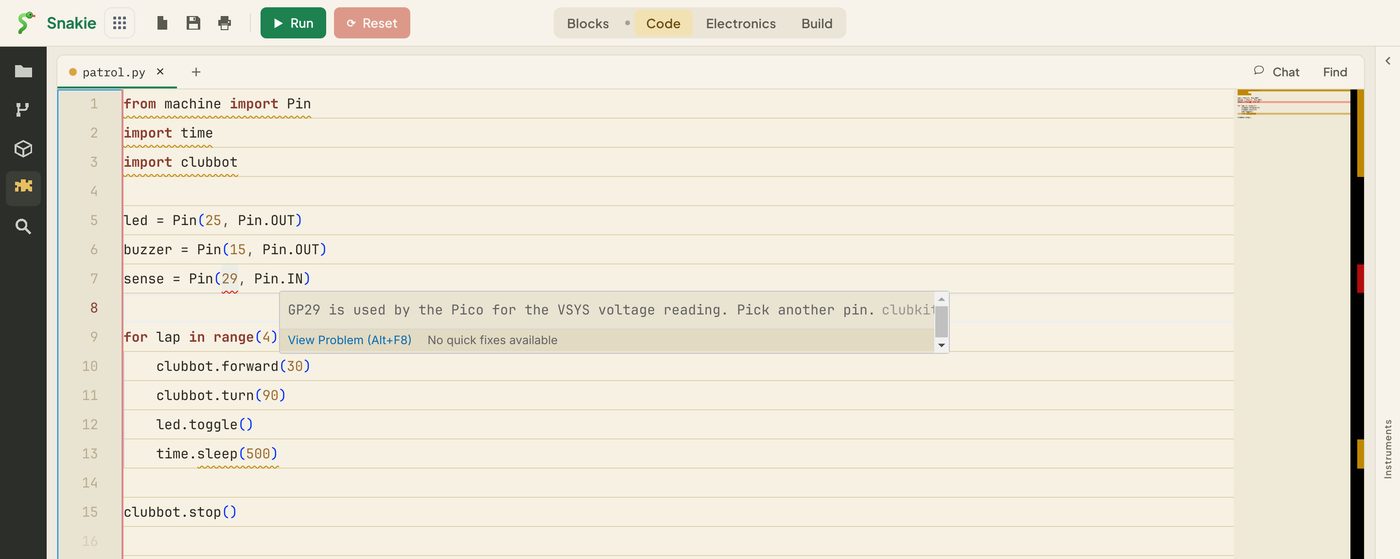
The 29 is underlined in red, and the hover says why. The pop-up also says there are no quick fixes available, which is exactly what we intended.
Don’t lint the comments
Try adding this line to patrol.py:
# time.sleep(500) was far too long
It gets a squiggle. The linter is reading text, and a comment is text. That’s a false alarm, and false alarms teach people to ignore your plugin.
The simplest cure is to cut each line off at the # before checking it. Add one line at the top of the loop and use code in place of line in both checks:
    for number, line in enumerate(ctx.file.content.splitlines(), start=1):
        code = line.split("#")[0]

        match = LONG_SLEEP.search(code)
        ...
        for match in PIN_USE.finditer(code):
The columns still line up, because we only chopped off the end of the line.
It isn’t perfect. A # inside a string, such as print("#1"), would cut the line short. For a club linter that’s a fair trade: we might miss something on a rare line, but we won’t raise a false alarm. When you have to choose, miss a problem before you invent one.
Designing a good rule
Before adding a rule, ask four questions.
- Is it nearly always a mistake? If people often do it on purpose, it’s a hint at most
- Can the message teach? “GP29 is used by the Pico for the VSYS voltage reading. Pick another pin.” says what’s wrong, why, and what to do
- Does the squiggle point at the exact spot? Underline the
29, not the whole line - Is it about your setup? Leave general Python style to
ruff
Try it Yourself
- Add a line using
Pin(23)and check the message names the right reason - Put two pins on one line, such as
a, b = Pin(24), Pin(2). Is only the bad one underlined? - The club robot’s motors are on GP2 to GP5. Add a
"warning"when a program sets up one of those pins itself, with a message saying to useclubbotinstead - Add
"hint"for anyPin(25line: “GP25 is the on-board LED on a Pico. On a Pico W use Pin(‘LED’).”
Common Issues
Problem: The whole of Pin(29 is underlined.
Solution: Use match.start(1) and match.end(1).
Why: With no number, start() and end() cover the whole match. The 1 picks the first bracketed group.
Problem: KeyError or no message for a pin.
Solution: Check the pin is in OFF_HEADER with if pin in OFF_HEADER before looking it up.
Why: Looking up a key that isn’t in a dictionary raises an error, and a linter that raises is skipped.
Problem: A warning appears on a commented-out line.
Solution: Check code, the part before the #, in every rule.
Why: It’s easy to update one check and forget the other.
Check your understanding
Quick quiz 1 of 3
Why is a plugin a good place for a rule about GP29?
Quick quiz 2 of 3
Why does the GP29 rule have no quick fix?
Quick quiz 3 of 3
What is a false alarm?
You can use the arrows ← → on your keyboard to navigate between lessons.
Comments