Your First Plugin
Create the ClubKit plugin folder, write a one-command Snakie plugin in Python and load it into the Plugin Rack
By Kevin McAleer, 5 Minutes
Page last updated November 21, 2026

Meet ClubKit
Imagine you help run a robot club. Everyone writes MicroPython for the same little robot, and everyone makes the same handful of mistakes. Over this course you’ll build ClubKit, a plugin that helps.
It starts very small: one button that says hi.
Make the folder
- Go to the
.snakie/pluginsfolder from lesson 1 - Inside it, make a folder called
clubkit - Inside that, make an empty file called
__init__.py
You should end up with this:
.snakie/
  plugins/
    clubkit/
      __init__.py
The folder name becomes the plugin’s name in the rack. Use lower case and no spaces, because it has to be a valid Python name.
You can write the file in any editor, including Snakie itself. In Snakie, use Open Folder and choose the clubkit folder.
Write the plugin
Put this in __init__.py:
from snakie import Context, message, plugin


@plugin.command("clubkit.hi", "Say hi")
def say_hi(ctx: Context):
    return message("info", f"Hi from ClubKit! You're editing {ctx.file.name}.")
That’s a complete plugin. Let’s read it.
Line 1 imports three things from snakie, the toolkit Snakie gives every plugin:
pluginis how you register thingsmessagebuilds a message to send backContextis the type ofctx. It’s only there so your editor can autocompletectx.file
@plugin.command("clubkit.hi", "Say hi") is a decorator. A decorator is a line starting with @ that sits on top of a function and does something with it. This one tells Snakie “here’s a command”. It takes two pieces of text:
| Part | Purpose |
|---|---|
"clubkit.hi" |
The command’s id. It must be different from every other command, so start it with your plugin’s name |
"Say hi" |
The title. This is the label next to the RUN button |
The function takes ctx and returns a message. message needs a level and some text. The level is "info", "warning" or "error".
Load it
- Save the file
- In Snakie, open the Plugins panel
- Click the Reload arrow
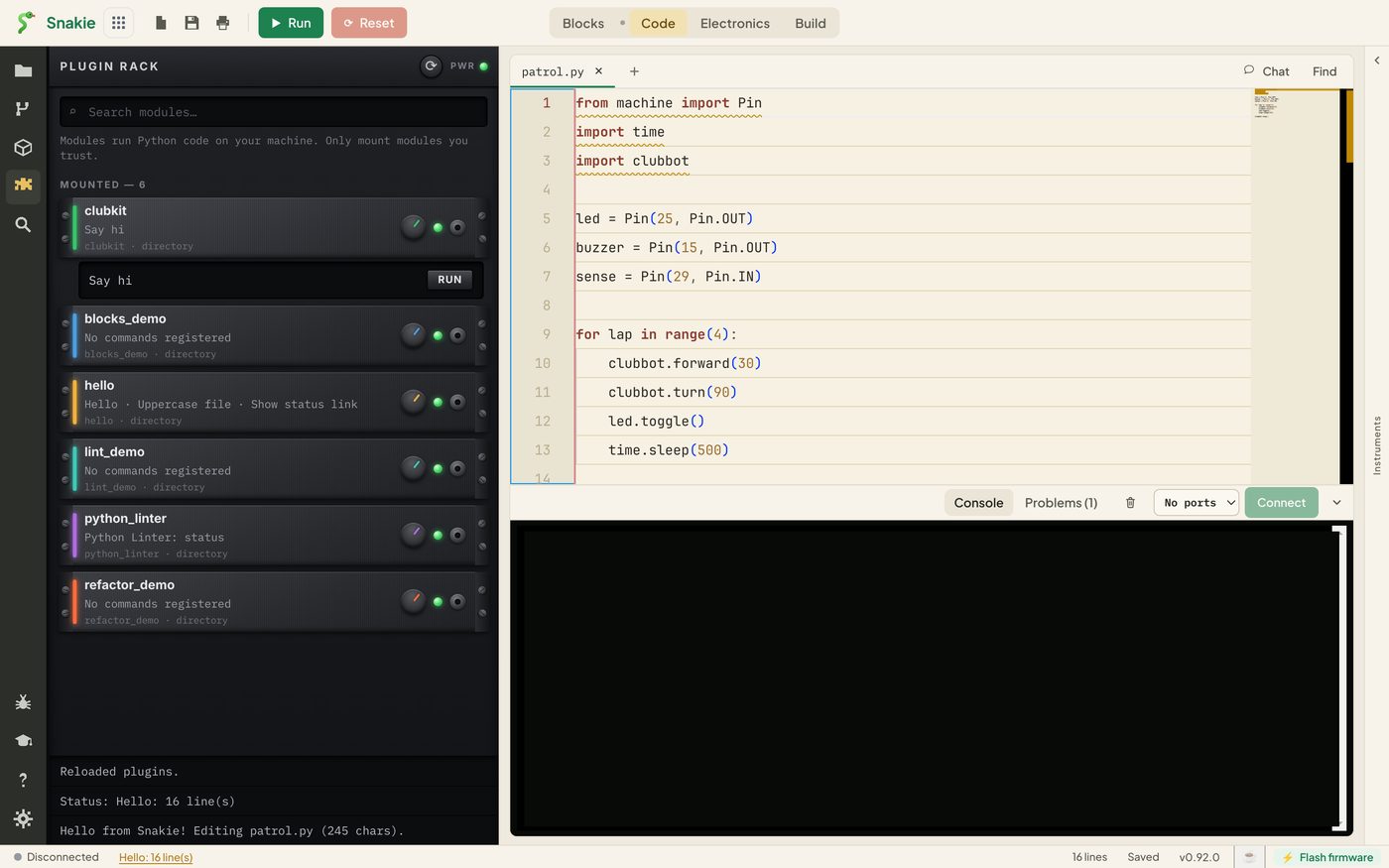
clubkit appears at the top of the rack, with Say hi listed under its name. The MOUNTED count has gone up by one.
- Open a Python file to act on. Any will do
- Click the
clubkitmodule to open it, then click RUN
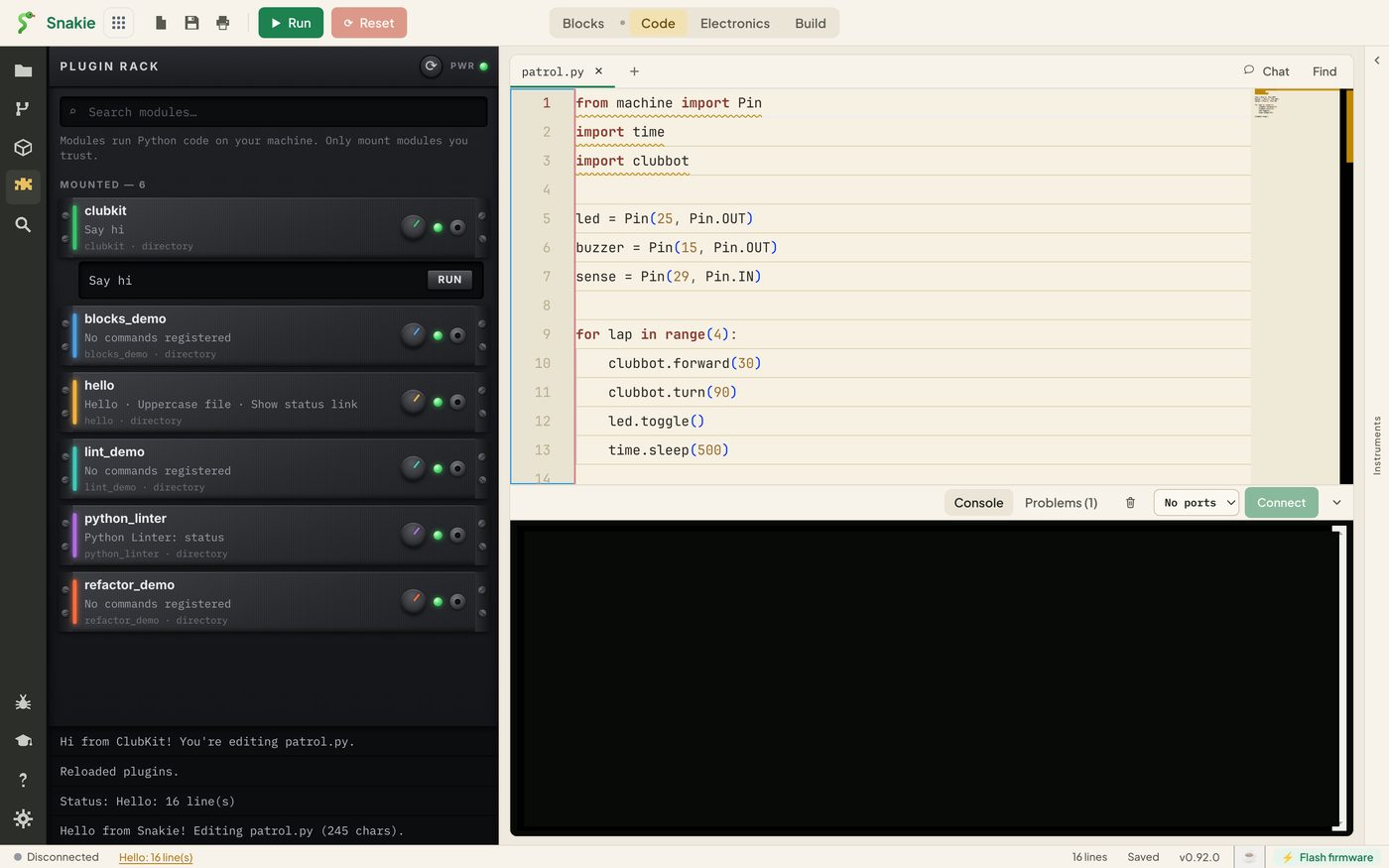
Your message appears at the bottom of the panel. You’ve extended your editor.
The edit and reload loop
Plugins are loaded once, when the host starts. Snakie doesn’t watch your file for changes. So the rhythm of plugin writing is:
- Change the code
- Save
- Click Reload
- Try it
Forgetting step 3 is the most common reason a change “doesn’t work”.
A sample program to work on
From here on, ClubKit needs a robot program to chew on. Make a new folder somewhere for the club’s code, and save this in it as patrol.py.
from machine import Pin
import time
import clubbot

led = Pin(25, Pin.OUT)
buzzer = Pin(15, Pin.OUT)
sense = Pin(29, Pin.IN)

for lap in range(4):
    clubbot.forward(30)
    clubbot.turn(90)
    led.toggle()
    time.sleep(500)

clubbot.stop()
It drives the robot round a square. clubbot is the club’s own helper module, which we’re pretending lives on the robot. You don’t need it, because we never run this program. ClubKit only reads it.
There are two mistakes hiding in there. Can you spot them? ClubKit will find both by lesson 9.
Try it Yourself
- Change the message text, save, and run the command without reloading. What do you see?
- Reload and run it again
- Change the level from
"info"to"warning", then"error". How does the message change? - Add a second command called
clubkit.byewith the title “Say bye”. Copy the three lines and change them
Common Issues
Problem: clubkit doesn’t appear after Reload.
Solution: Check the path is exactly .snakie/plugins/clubkit/__init__.py, with two underscores each side of init.
Why: The host only loads .py files directly in plugins, and folders that contain __init__.py.
Problem: The message still shows the old text. Solution: Save the file and click Reload. Why: The host keeps the version it loaded until it’s restarted.
Problem: Two of my commands do the same thing. Solution: Give each one its own id. Why: The id is how Snakie tells commands apart. Two commands with one id clash.
Check your understanding
Quick quiz 1 of 3
What does the line starting with @plugin.command do?
Quick quiz 2 of 3
You’ve edited your plugin and saved it. What else must you do?
Quick quiz 3 of 3
Which of these is a good command id for ClubKit?
You can use the arrows ← → on your keyboard to navigate between lessons.
Comments