KevsRobots Learning Platform
Off-Grid Messaging with MeshCore
78% Percent Complete
Overview
Hardware
Flashing the Firmware
Build the Repeater
Build the Client
Using Your Mesh
Going Further
Paths and Routing
Flood routing, path routing, hops and trace - how MeshCore stays quiet as it grows
By Kevin McAleer, 5 Minutes
This is the lesson that explains why MeshCore behaves the way it does. Once routing clicks, everything else - why clients do not repeat, why adverts matter, why the network stays usable - falls into place.
Two ways to deliver a message
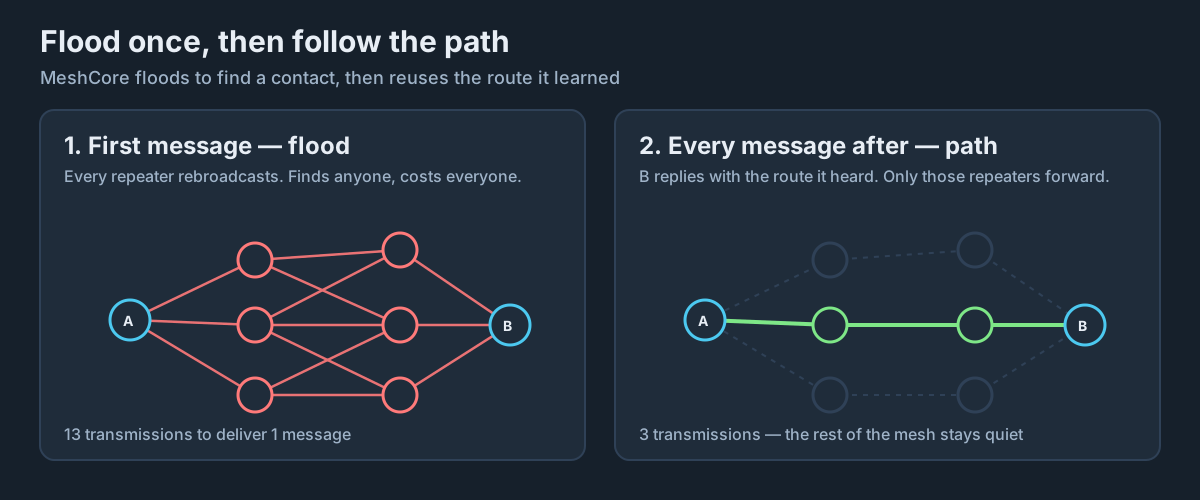
Flooding
The simple approach: every repeater that hears a packet rebroadcasts it, up to a hop limit. It will definitely find the destination, if a route exists at all.
The cost: airtime grows with the number of repeaters, not the distance to the destination. Twenty repeaters means twenty transmissions for one message. In a busy region, that is how a mesh strangles itself.
Path routing
MeshCore’s default: a message carries an explicit list of the repeaters it should travel through. Only those repeaters forward it. Everyone else hears it and ignores it.
The cost: you have to know the path first.
The hybrid: how MeshCore combines them
- You send your first message to a new contact. MeshCore has no path, so the packet floods
- The destination receives it and notes the sequence of repeaters it arrived through
- The reply comes back carrying that path, and your node stores it against that contact
- Every subsequent message uses that path directly. No flooding, no wasted airtime
This is why the first message to someone can feel slow, and every message afterwards is quick. It is not your imagination - the network genuinely did more work the first time.
Hops
A hop is one repeater forwarding your packet. A path of A → B → C is two hops.
Fewer hops is better:
- Each hop is a full transmission and takes airtime
- Each hop adds latency
- Each hop is another chance for the packet to be lost
MeshCore encodes each repeater in a path as a small hash. The default one-byte mode allows roughly 64 hops in a flood - far more than any real network needs.
Tracing a path
From a client, the app usually exposes a trace function on a contact - and from meshcore-cli the commands are trace and dtrace. A trace shows you which repeaters a packet travelled through and the signal quality at each step.
This is your best diagnostic tool. If messages to someone have got slow or unreliable, trace them and see whether the path has grown an extra hop or whether one hop has a terrible SNR.
When paths break
Paths are stored, not negotiated. If the mesh changes underneath one - a repeater is switched off, or somebody moves house - the stored path stops working.
What happens: your app retries along the stored path, fails, and on the final attempt falls back to flooding. It usually recovers on its own.
What you can do: most clients offer reset path or rediscover path on a contact. Use it after you or the other node has moved.
Why mobile repeaters are a bad idea: a repeater in a car breaks every path that runs through it, constantly, forcing everyone back to flooding. It is the single most antisocial thing you can do to a mesh.
Why clients do not repeat
Now it makes sense. If every phone-connected node also forwarded traffic:
- Paths would be built through devices that walk out of range mid-conversation
- Battery life would collapse
- Flood traffic would multiply by the number of people, not the number of repeaters
MeshCore separates the roles deliberately. Infrastructure is infrastructure; clients are clients.
Repeaters are selective
A MeshCore repeater does not rebroadcast everything it hears. It forwards when:
- The packet is a flood that has not exceeded its hop limit and it has not already seen it, or
- The packet carries a path and this repeater is named in it
Everything else is heard and dropped. That selectivity is the whole reason a MeshCore mesh scales past a handful of nodes.
Try it Yourself
- Send a first message to a new contact and time it. Send a second message and time that. Note the difference.
- Run a trace on a distant contact and count the hops.
- Challenge: power your repeater off mid-conversation with someone routed through it. Watch the message fail, then recover by flooding. Turn it back on.
Common Issues
Problem: Messages to one specific contact stopped working, but everyone else is fine.
Solution: Reset the path for that contact.
Why: A stored path through a repeater that is now offline will keep failing until the node rediscovers a route.
Problem: The first message to someone takes ages.
Solution: Nothing is wrong - it is flooding to find them.
Why: This is the hybrid routing design working as intended. Subsequent messages will be much faster.
Problem: My repeater has huge packet counts but nobody routes through it.
Solution: Check stats-packets and neighbors, and consider that it may simply be hearing a lot and being chosen by nobody.
Why: Repeaters hear everything in range. Being used requires being on a path that a client has discovered - which usually means being well placed and well advertised.
You can use the arrows ← → on your keyboard to navigate between lessons.
Comments