KevsRobots Learning Platform
Off-Grid Messaging with MeshCore
18% Percent Complete
Overview
Hardware
Flashing the Firmware
Build the Repeater
Build the Client
Using Your Mesh
Going Further
How LoRa Works
Spreading factor, bandwidth and coding rate - the three dials that decide your range
By Kevin McAleer, 5 Minutes
Before we buy anything, it is worth five minutes understanding what LoRa actually does, because three settings decide whether your mesh reaches the end of the street or the next town.
The trick behind LoRa
LoRa stands for Long Range. It is a modulation scheme that spreads a tiny amount of data across a relatively wide slice of radio spectrum using a “chirp” - a signal that sweeps up in frequency over time.
The magic is that a receiver which knows the chirp pattern can dig the signal out from below the noise floor. WiFi needs a signal stronger than the background noise. LoRa does not. That is why a 158mW radio the size of a matchbox can outrange a 100mW WiFi access point by a factor of a hundred.
The price you pay is speed. We are talking hundreds of bits per second, not megabits.
The three dials
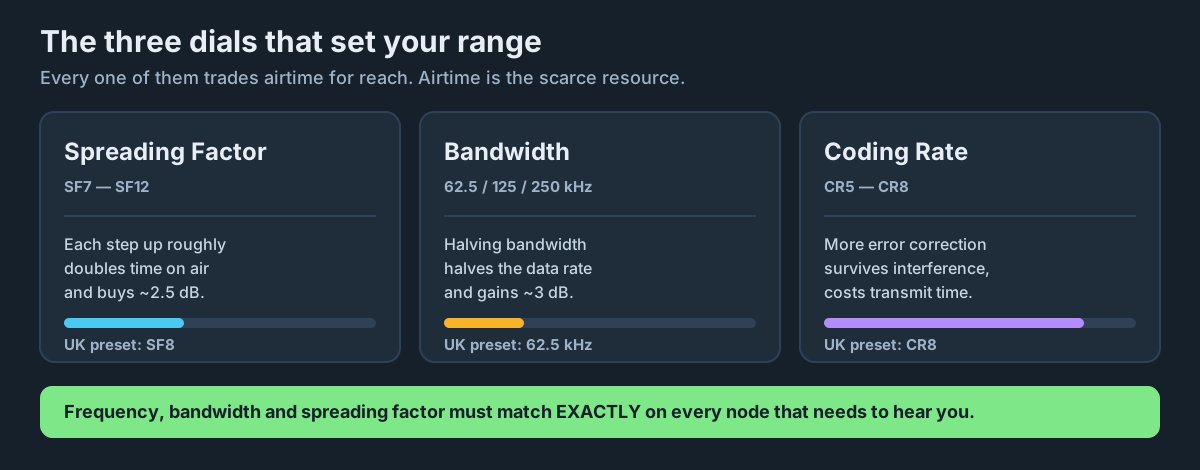
Spreading Factor (SF)
What it does: Controls how long each chirp lasts. SF7 is the fastest and shortest; SF12 is the slowest and longest.
The trade: Every step up in SF roughly doubles the time on air, and buys you about 2.5dB of extra link budget - very roughly a 30% range increase per step.
Why this matters: SF12 sounds tempting until you realise a single short message can hog the channel for over a second. In a shared community mesh, everyone else has to wait. Modern MeshCore networks favour a lower SF with a narrower bandwidth instead.
Bandwidth (BW)
What it does: How wide a slice of spectrum each transmission occupies. Common values are 62.5kHz, 125kHz and 250kHz.
The trade: Halving the bandwidth halves the data rate but gains about 3dB of sensitivity - and, importantly, makes your signal easier to squeeze between other people’s interference in a busy ISM band.
Why this matters: The 868MHz band in the UK is crowded with weather stations, doorbells and smart meters. A narrow 62.5kHz channel slips between them.
Coding Rate (CR)
What it does: How much forward error correction is added. CR5 means 4 useful bits for every 5 transmitted; CR8 means 4 useful bits for every 8.
The trade: More error correction survives more interference, at the cost of a longer transmission.
Why this matters: On a marginal link, CR8 can be the difference between a message arriving and a message vanishing. On a strong link it is just wasted airtime.
Putting numbers on it
Here is roughly what those dials do to a short MeshCore text message, at 868MHz:
| Settings | Approx. data rate | Airtime for a short message | Character |
|---|---|---|---|
| SF7, BW250 | ~11,000 bps | ~50ms | Fast, short range |
| SF8, BW62.5 | ~1,500 bps | ~350ms | The UK/EU sweet spot |
| SF11, BW250 | ~1,100 bps | ~500ms | The old MeshCore default |
| SF12, BW125 | ~250 bps | ~2s | Maximum range, hogs the channel |
Notice that SF8/BW62.5 and SF11/BW250 have similar data rates - but the narrow one is far more resistant to interference and uses a quarter of the spectrum.
Airtime is the real currency
Here is the single most useful mental model for a LoRa mesh:
Only one node can talk at a time. Everything you do that makes a transmission longer takes airtime away from everyone else on the network.
That is why MeshCore avoids flooding, why repeaters are selective, and why the community keeps drifting toward narrower, faster settings. It is also why the UK has a legal duty cycle limit, which we will get to in lesson 4.
Everyone must match
LoRa is not like WiFi where devices negotiate. Two nodes can only hear each other if their frequency, bandwidth, spreading factor and coding rate all match exactly.
If your repeater is on SF8 and your client is on SF11, they are effectively on different planets. This is far and away the most common reason a new MeshCore setup does not work, and we will set both nodes identically in lesson 6.
Try it Yourself
- Open an online LoRa airtime calculator and enter SF8 / BW62.5 / CR8 with a 50 byte payload. Note the airtime.
- Change SF to 12 and look at the airtime again. How many times longer is it?
- Challenge: at a 10% duty cycle limit, how many SF12 messages per hour could you legally send? Now do the same for SF8.
Common Issues
Problem: “Higher spreading factor means better, right? I will just use SF12.”
Solution: Match your local community’s settings instead.
Why: SF12 is antisocial in a shared mesh, and a node nobody else can hear has infinite range to nowhere.
Problem: “My node shows a good RSSI but messages still fail.”
Solution: Check SNR as well as RSSI, and consider raising the coding rate.
Why: RSSI tells you how loud the signal is; SNR tells you how loud it is compared to the noise. LoRa can decode below the noise floor - down to about -20dB SNR at SF12, and around -10dB at the SF8 we will be using - but interference eats that margin.
You can use the arrows ← → on your keyboard to navigate between lessons.
Comments