KevsRobots Learning Platform
Off-Grid Messaging with MeshCore
66% Percent Complete
Overview
Hardware
Flashing the Firmware
Build the Repeater
Build the Client
Using Your Mesh
Going Further
First Contact
Adverts, contacts and sending your first message across your own mesh
By Kevin McAleer, 5 Minutes
Two boards, two roles, matching settings. This is the lesson where it becomes a network.
The moment of truth
Put the repeater at one end of the house and take the client with you. Both powered, both with antennas.
In the app, look at your contacts list. Within a minute or two of the repeater’s next advert - or immediately if you press advert on the repeater’s console - your repeater should appear there by name.
That is your mesh working. Two radios, no infrastructure, no bill.
What just happened
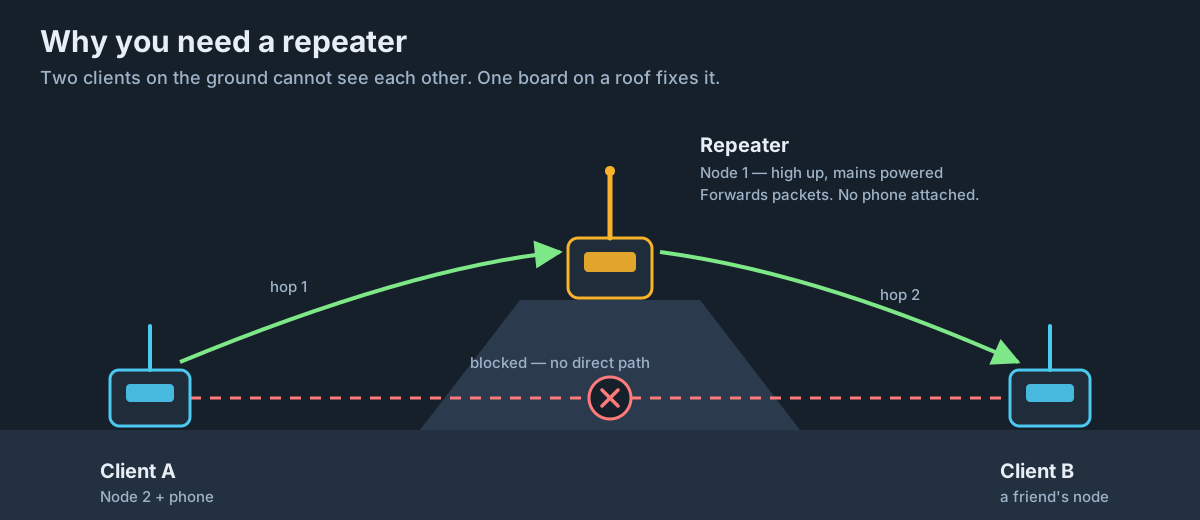
The repeater transmitted an advert - a small packet containing its name, its public key and its role. Your client heard it directly, over the air, and added it to the contact list along with the signal quality it was received at.
No pairing, no handshake, no registration. In a mesh, being heard is joining.
Reading the signal
Tap the repeater in your contacts list and you will see figures like:
- RSSI - Received Signal Strength Indicator, in dBm. Always negative. -60 is a very strong local signal; -120 is right at the edge
- SNR - Signal to Noise Ratio, in dB. LoRa decodes below the noise floor - roughly -20dB at SF12 and about -10dB at the SF8 we are using - which is what makes it remarkable
How to read them together: RSSI tells you how loud the signal arrived; SNR tells you how loud it was compared to the noise around it. A strong RSSI with a terrible SNR means something local is generating interference. A weak RSSI with a good SNR means you are simply far away, which is fine.
Sending a message
MeshCore has two ways to say something:
Direct messages
Tap a contact and type. The message is end-to-end encrypted to that node’s public key. Only they can read it - not the repeaters in between.
Channel messages
Channels are group chat. Everyone with the same channel key sees the messages. We cover channels properly in the next lesson.
Your first message
With only two nodes, a repeater is not a great conversation partner - it has no human on the end. So there are three ways to actually get a message through:
- Message a local community node. If there is another MeshCore user in range, their node will appear in your contacts and you can message them directly. This is by far the most satisfying option
- Add a third board later as a second companion, and message between them
- Use the repeater’s own admin channel - a repeater will respond to admin commands sent from a logged-in client, which we set up in lesson 13
Try 1 first. Check map.meshcore.io or your local community group to see whether anyone else is on air near you.
Adverts, in detail
Adverts are the heartbeat of MeshCore. There are two flavours, and the difference matters:
| Type | Who hears it | When to use it |
|---|---|---|
| Zero-hop | Only nodes in direct radio range | Normal use - cheap and polite |
| Flood | Every node in the mesh, via every repeater | When you first join, or after changing your name |
A key MeshCore behaviour: clients do not advertise automatically. Repeaters do, on their timer, but a companion node stays quiet until you press the button. This is deliberate - it keeps the airwaves clear.
Why this matters: If you change your node’s name and nobody sees the new one, send a flood advert. If your contacts list is empty, send an advert and wait for the repeater’s next one.
Storing contacts
Contacts persist in the app. Each one records the node’s public key, which is what encryption is built on, plus the last known path to reach it.
If a contact stops working after you have moved house or the repeater has moved, you can reset the path for that contact and let the mesh rediscover it. More on that in lesson 12.
Try it Yourself
- Walk to the far corner of your property with the client and watch the RSSI figure change. Where does it start to struggle?
- Send a flood advert from the client and see whether any nodes you did not know about appear in your contacts.
- Challenge: put the repeater upstairs by a window, take the client for a walk, and map the point at which you lose it. That is your coverage footprint.
Common Issues
Problem: The repeater never shows up in my contacts.
Solution: Check radio settings match exactly on both nodes, then press advert on the repeater console while watching the app.
Why: Mismatched frequency, bandwidth or spreading factor is the cause more than nine times out of ten.
Problem: RSSI is around -30 and messages still fail.
Solution: Move the two nodes further apart - at least a few metres.
Why: LoRa receivers can be overloaded by an extremely strong nearby transmitter. Two boards touching on a desk is a genuinely bad test setup.
Problem: I can see the repeater, but I have nobody to message.
Solution: Join your local community network and check the map. Failing that, add a third board.
Why: A two node mesh with one repeater has exactly one human on it. That is a limitation of the network, not a fault.
You can use the arrows ← → on your keyboard to navigate between lessons.
Comments