KevsRobots Learning Platform
Off-Grid Messaging with MeshCore
24% Percent Complete
Overview
Hardware
Flashing the Firmware
Build the Repeater
Build the Client
Using Your Mesh
Going Further
The Hardware
Choosing and buying two Heltec WiFi LoRa 32 V3 boards for around £15 each
By Kevin McAleer, 5 Minutes
Time to spend some money. The good news is that this is one of the cheapest useful radio projects you can build.
The recommendation: Heltec WiFi LoRa 32 V3
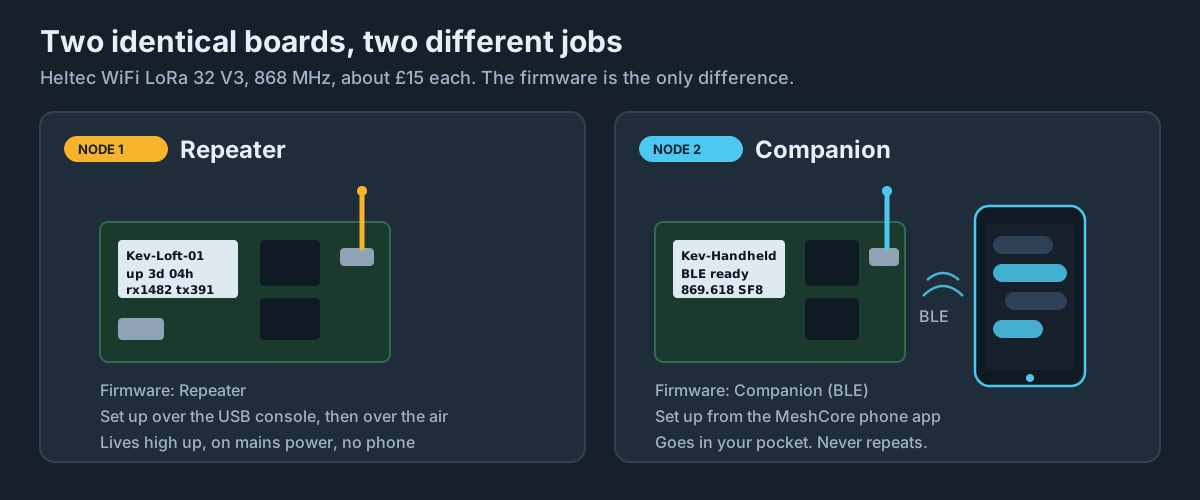
The Heltec WiFi LoRa 32 V3 is the board this course is built around. It is the most widely used MeshCore board in the world, it is well supported, and it is cheap.
Where to buy: The DollaTek listings on Amazon UK are the usual budget source, and typically land at around £15 per board. They also turn up on AliExpress for a pound or two less if you are happy to wait. Buying two is about £30 all in.
What you get for your £15:
| Part | Spec |
|---|---|
| MCU | ESP32-S3FN8, dual core Xtensa LX7 at up to 240MHz |
| LoRa radio | Semtech SX1262, around +21dBm transmit (Heltec quote 21 ±1dBm) |
| Display | 0.96 inch, 128x64 white OLED, built in |
| USB | USB-C, with a CP2102 serial converter on board |
| LoRa antenna | IPEX / U.FL connector |
| Battery | SH1.25 2-pin connector with onboard charging |
| Size | 50.2 x 25.5 x 10.2 mm |
The onboard OLED is genuinely useful - a repeater with a screen will show you its name, uptime and packet counts without you having to plug anything in.
The £15 mistake: buy the right frequency
This is the one thing to get right. The Heltec V3 is sold in different frequency variants, and they are not interchangeable:
- 863-928MHz - this is the one you want in the UK and Europe
- 470-510MHz - China
- 433MHz - amateur / other regions
The SX1262 front end and the matching network are tuned per variant. A 433MHz board will not usefully transmit on 868MHz, and you cannot fix it in software.
When you are on the Amazon listing, look for 868MHz or 915MHz in the variant selector - the 863-928MHz boards are usually sold as “868MHz” or “915MHz” and are the same hardware. If the listing only says “433MHz”, that is the wrong board.
The rest of the shopping list
Antennas (2x)
Your board almost certainly ships with a short stubby antenna. It will work, but it is the weakest part of the system. See the next lesson for what to look for.
Check the connector. Heltec V3 boards have an IPEX / U.FL socket - a tiny snap-on connector, not a screw-on SMA. Many cheap listings include a U.FL to SMA pigtail; if yours does not, buy a pair for a couple of pounds.
USB-C data cable
Get a proper data cable. Cheap USB-C cables bundled with power banks are often charge-only. If your computer does not see the board when you plug it in, this is the first thing to suspect - it catches almost everyone at least once.
Optional: a battery for the repeater
A 3.7V LiPo with an SH1.25 2-pin connector plugs straight into the board and charges over USB. A 2000mAh cell will run a repeater for a day or two. Watch the polarity - not all suppliers wire these the same way round, and reversed polarity will kill the board.
Optional: an enclosure
If the repeater is going outside, it needs a box. A cheap IP65 junction box from a DIY shop, with the antenna mounted through the lid on an SMA bulkhead, does the job nicely.
Total cost
| Item | Qty | Approx cost |
|---|---|---|
| Heltec WiFi LoRa 32 V3, 868MHz | 2 | £30 |
| U.FL to SMA pigtail | 2 | £4 |
| Better 868MHz antenna | 2 | £10 |
| USB-C data cable | 1 | £4 |
| Total | ~£48 |
You can start with just the two boards and their supplied antennas for £30 and upgrade later.
Alternatives worth knowing about
You are not locked to Heltec. MeshCore also runs on:
- Heltec T114 - nRF52 based, far lower power, better for solar repeaters
- RAK WisBlock - modular, industrial, more expensive
- Lilygo T-Deck - a complete handheld with a keyboard and screen, no phone needed
- Seeed Xiao variants - tiny, good for sensors
For a first build though, two Heltec V3s at £15 each is very hard to beat.
Try it Yourself
- Find the Heltec V3 on Amazon UK and confirm you can select an 868MHz variant before ordering.
- Check what connector your chosen antenna uses - U.FL or SMA - and order a pigtail if needed.
- Challenge: work out where in your house you would put a repeater, and whether there is a mains socket within reach of it.
Common Issues
Problem: My board arrived and the computer will not see it.
Solution: Try a different USB-C cable, then check Device Manager or ls /dev/tty.* for a CP2102 device.
Why: Charge-only cables have no data lines. This is the number one cause of “dead” boards.
Problem: I ordered the 433MHz version by mistake.
Solution: Return it if you can. Otherwise keep it for a 433MHz project.
Why: The RF matching network is tuned for the band. Transmitting well outside it wastes power and can damage the output stage.
You can use the arrows ← → on your keyboard to navigate between lessons.
Comments