KevsRobots Learning Platform
MeshCore Room Servers and Sensors
20% Percent Complete
Overview
The Room Server
The Sensor Node
Going Further
What is a Room Server?
How store-and-forward messaging works, and what a room server does that a channel cannot
By Kevin McAleer, 6 Minutes
A room server is the closest thing MeshCore has to an inbox. It is a node that keeps recent posts and hands them over to people who were not around when they were made.
The core idea: store and forward
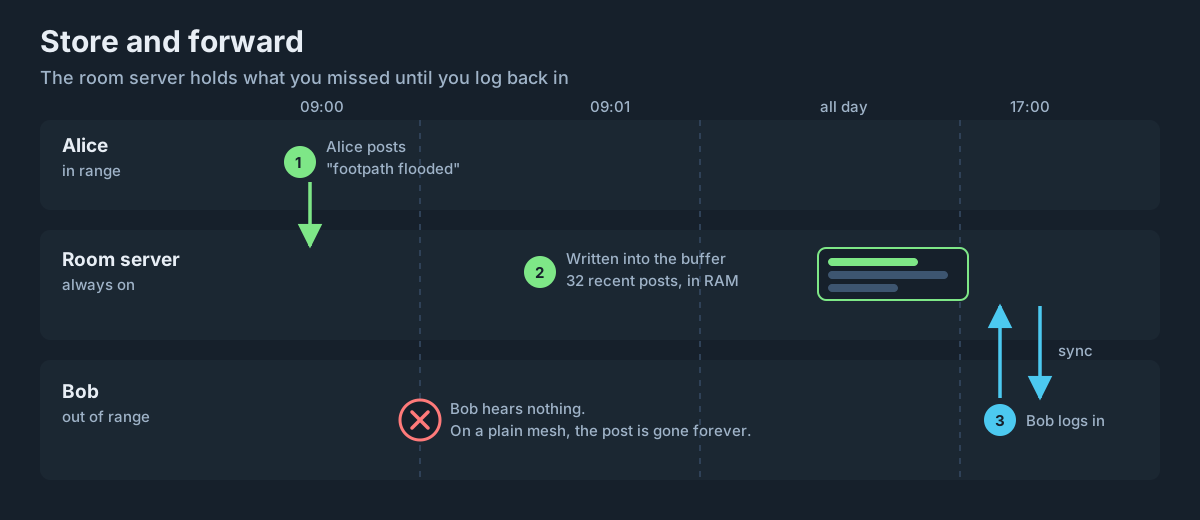
Everything else on a MeshCore network is live. A direct message goes from you to a specific node right now. A channel message floods across the mesh right now. If the recipient is not listening at that moment, the packet dissipates and that is the end of it.
A room server breaks that pattern. When someone posts to the room:
- The post travels to the room server like any other message
- The room server writes it into a buffer and keeps it
- Anyone currently logged in and in range receives it immediately
- Anyone out of range gets it the next time they log in
Step 4 is the whole point. That is the difference between a broadcast and a noticeboard.
What is actually stored
The room server keeps a fixed-size cyclic buffer of recent posts - 32 by default. When the buffer is full, each new post overwrites the oldest one.
Why this matters: a room server is not an archive. It is a rolling window of recent conversation. On a quiet village mesh, 32 posts might be a fortnight of history. On a busy group during an event, it might be an afternoon. Nobody gets to scroll back to last month.
Alongside the buffer, the server tracks a sync point per user. When you log in, it works out which posts are newer than the last time you synced and sends you those - and it skips your own posts, so you do not get an echo of things you wrote yourself.
The thing that will catch you out
Posts live in RAM. Pull the power and they are gone.
This is the single most important operational fact about running a room server, and it drives most of lesson 8. A room server on a wall socket during a power cut loses every post it was holding. A room server on a battery-backed supply does not.
It is worth being upfront with your group about this. “The room keeps the last few dozen posts, and it forgets everything if it reboots” sets expectations that a silent surprise reset never will.
Room server versus channel
You could reasonably ask why not just use a channel. Both are group conversation. Here is the difference:
| Channel | Room Server | |
|---|---|---|
| Needs dedicated hardware | No | Yes - a board |
| Delivers to people out of range | No | Yes |
| Keeps history | No | Yes, recent posts |
| Access control | Anyone with the key | Password tiers, ACL |
| Airtime cost | Floods the whole mesh | Point to point to the server |
| Works with nobody else online | Yes, nobody hears it | Yes, and it is kept |
The airtime point deserves attention. Channel messages always flood, because a channel has no single destination. A post to a room server is addressed to one specific node, so it can use a stored path and only the repeaters on that path forward it. On a busy mesh, a room is meaningfully cheaper than a channel carrying the same conversation.
Room server versus direct messages
Direct messages are already point to point and already encrypted. Why not just DM people?
Because a DM goes to one node, and it only arrives if that node is reachable. A room is for the group, and the group is never all reachable at once. If you want six people to see something and you have no idea which of them are in range, that is exactly the job a room does.
Who can do what
A room server has three tiers of access, and you will set them up in lesson 5:
| Tier | Gets in with | Can do |
|---|---|---|
| Read-only guest | No password, if enabled | Read posts |
| Guest | The guest password | Read and post |
| Admin | The admin password | Everything, plus reconfigure the node |
The defaults out of the box are password for admin and hello for guest. Both are published in the official documentation, which means both are effectively public. Changing them is lesson 5’s first job.
Can it repeat as well?
Yes, technically. A room server implements selective packet forwarding, and set repeat on enables it.
Room server firmware ships with forwarding off, which is the sensible default. The official guidance is to leave it that way: a room server with repeat on lacks the full set of repeater and remote administration features, and it puts two jobs on one point of failure. If you want a room and a repeater at the same site, use two boards - they are £15 each, which is cheap compared to the debugging.
We cover the trade-off properly in lesson 8.
Try it Yourself
- Count how many messages your group sends in a typical week. Would a 32-post buffer hold a useful amount of history for you?
- Think about where your room server would live. Is that socket on the same circuit as anything that trips?
- Challenge: write the one-paragraph explanation you would send your group to explain what the room is and how to join. Being able to explain it simply is the test of whether you understand it.
Common Issues
Problem: I posted to the room and my friend never saw it, even after coming back into range.
Solution: Check they are actually logged into the room, not just in range of it.
Why: Sync happens on login. A node that is nearby but has never authenticated has no sync point, so there is nothing for the server to catch it up on.
Problem: Older posts have vanished from the room.
Solution: Nothing is broken - that is the cyclic buffer doing its job.
Why: The server holds a fixed number of recent posts and overwrites the oldest as new ones arrive. It is a rolling window, not an archive.
You can use the arrows ← → on your keyboard to navigate between lessons.
Comments