KevsRobots Learning Platform
MeshCore Room Servers and Sensors
40% Percent Complete
Overview
The Room Server
The Sensor Node
Going Further
Permissions and Moderation
The three permission tiers, access control lists, and running a room other people use
By Kevin McAleer, 6 Minutes
The moment more than two people use your room, you are running shared infrastructure. This lesson is about the controls MeshCore gives you, and the fact that some of the problem is social rather than technical.
The three tiers
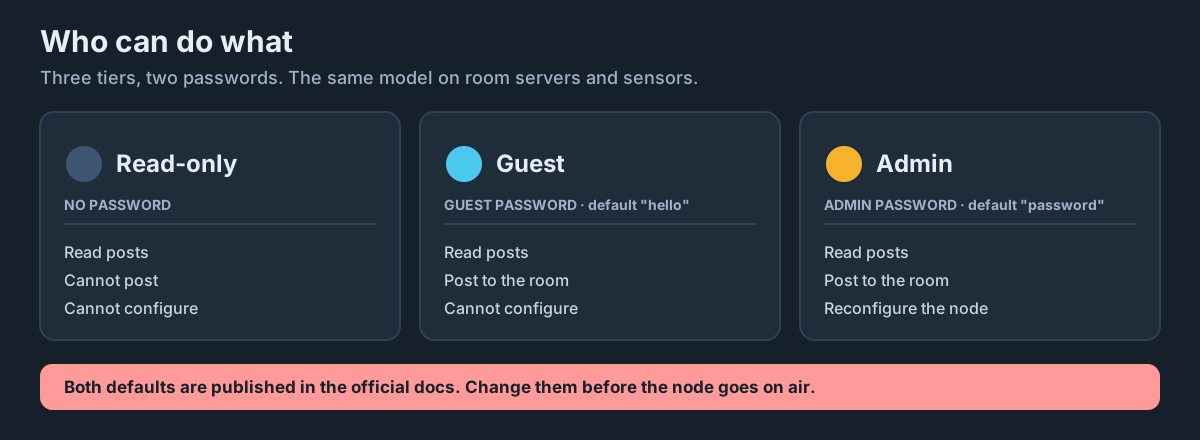
MeshCore’s permission model is refreshingly simple:
| Level | Value | Gets in with | Can |
|---|---|---|---|
| Guest | 0 | No password, when read-only access is enabled | Read only |
| Read-only | 1 | Granted via the ACL | Read only |
| Read-write | 2 | The guest password | Read and post |
| Admin | 3 | The admin password | Everything, including reconfiguring the node |
For day to day use you deal with three things: no password gets read-only access if you allowed it, the guest password gets posting rights, and the admin password gets the keys to the node.
Access control lists
Passwords are blunt - everyone who has one gets the same access. The ACL is the precise version: it grants a specific node’s public key a specific permission level.
setperm <public-key> <permission>
Where permission is 0 for guest, 1 for read-only, 2 for read-write, and 3 for admin.
Note the numbering: level 0 is named guest but it is the lowest tier - the passwordless one. The guest password grants level 2. It is a slightly confusing overlap of names and worth reading twice.
To see the current list:
get acl
get acl is serial-only on most builds, so you will need USB access to read it back.
When the ACL is worth the effort:
- Promoting a trusted person to admin without giving them the admin password
- Pinning one problem node to read-only without changing the group password
- Granting posting rights to someone without handing out the shared password at all
When it is not: a family of four. Just use the guest password.
Getting someone’s public key
To set a permission you need the node’s public key. The easiest routes:
- Ask them to share their contact from the app - the key travels with it
- Look at the room’s own view of who has logged in
- Have them run
get public.keyon their own node’s console if it has one
Why keys and not names: names are just labels and anyone can set any name. The public key is the actual cryptographic identity of the node. Permissions attach to the thing that cannot be faked.
Rotating the guest password
The most common moderation action is not banning one person - it is refreshing access for the group.
set guest.password <new-password>
Everyone who knew the old one is now locked out until you tell them the new one. That is blunt, but for small groups it is usually the right tool: nobody has to be singled out, and access naturally decays for people who have drifted away.
Do this when:
- Someone leaves the group on bad terms
- You suspect the password has been shared beyond the group
- It has been a year and you have no idea who still has it
What you cannot do
Be clear-eyed about the limits, because it shapes how you run the room.
You cannot delete a specific post remotely in any straightforward way. The buffer is cyclic - offending content ages out as new posts arrive, and a reboot clears everything. Those are your two blunt instruments.
You cannot mute a user in the way a chat app can. You can set their key to read-only via the ACL, or rotate the guest password.
You cannot see who read what. The server tracks sync points so it knows what to send, but this is not a read-receipt system.
You cannot stop someone in radio range from hearing traffic. Access control governs the room, not the airwaves.
The social layer
Most room servers are run by one person for a group of people who know each other. In that setting, the effective moderation tools are:
- A clear statement of what the room is for, posted when people join
- Being the person who says something when the room drifts off purpose
- Keeping the group small enough that everyone knows everyone
Technical controls are for the cases where that fails. On a village or club mesh, it usually does not.
A sensible default setup
For a typical group room:
password <a-long-admin-password-only-you-know>
set guest.password <a-speakable-group-password>
set allow.read.only off
set owner.info Kev - kevsrobots.com
For a public noticeboard:
password <a-long-admin-password-only-you-know>
set guest.password <a-speakable-group-password>
set allow.read.only on
set owner.info Kev - kevsrobots.com
The only difference is who can read without asking.
Try it Yourself
- Run
get aclon your room server. What is in it now? - Get your client’s public key and set it to read-only with
setperm. Confirm you can no longer post from it, then set it back. - Challenge: rotate the guest password while someone is logged in. What happens to their session, and what happens on their next login?
Common Issues
Problem: get acl returns nothing over the air.
Solution: Connect over USB serial.
Why: ACL reading is serial-only on most builds, deliberately - it is a list of who can do what, and that is not something to hand out over the radio.
Problem: I set someone to admin and now cannot demote them.
Solution: Connect over USB and use setperm with a lower level, or erase and reconfigure from scratch.
Why: An admin can change permissions, including yours. Grant level 3 sparingly and only to people you would hand the board to.
Problem: Someone is posting nonsense and I want it gone now.
Solution: Reboot the room server.
Why: Posts live in RAM. A reboot clears the buffer completely - which also clears everything else, so it is a genuinely blunt instrument. Warn the group first if you can.
You can use the arrows ← → on your keyboard to navigate between lessons.
Comments