KevsRobots Learning Platform
Overview
The Room Server
The Sensor Node
Going Further
What is a Sensor Node?
Pull-based telemetry, leaf nodes, and why MeshCore sensors sip power
By Kevin McAleer, 6 Minutes
Half way. The room server is built; now we turn to the role that lets your mesh measure things rather than just carry conversation.
The core idea: it waits to be asked
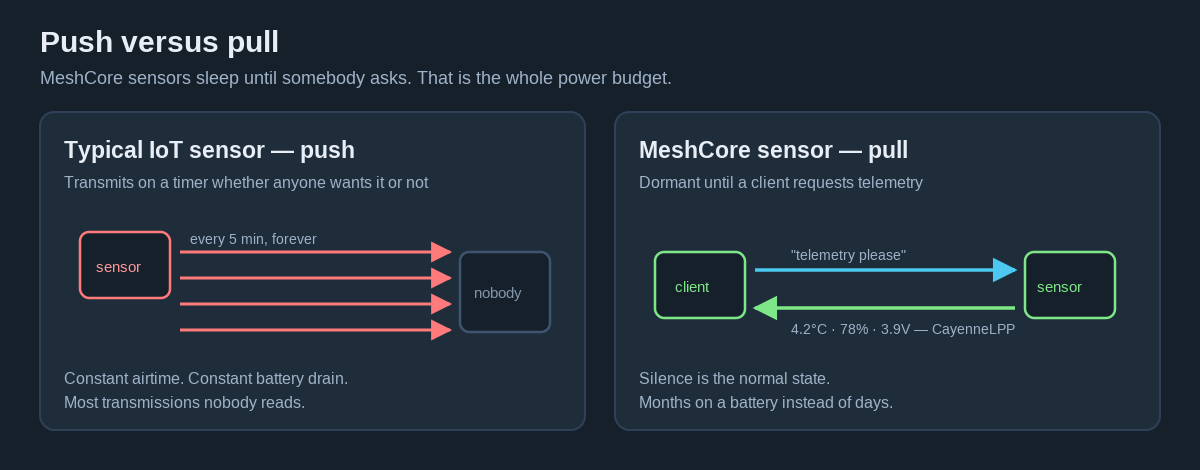
Most IoT sensors you have met are push devices. They wake on a timer, take a reading, transmit it whether anyone wants it or not, and go back to sleep. Simple, and it works well on WiFi where airtime is effectively free.
MeshCore sensors are pull devices. They read their sensors locally on a short timer into a rolling buffer, but they do not transmit until a client asks for telemetry. Measuring is cheap; transmitting is not.
Why this matters, and it is worth dwelling on:
- Airtime. A push sensor transmits on its own schedule regardless of whether anyone is listening. On a shared LoRa mesh with a legal duty cycle, that is expensive. Ten push sensors on a small mesh would be genuinely antisocial
- Power. Transmitting is the most expensive thing a LoRa node does. A sensor that only transmits when asked spends most of its life drawing almost nothing
- Relevance. You get the reading when you want it, not a log of readings you never looked at
The trade-off is honest: you do not get real-time data. If you want to know the greenhouse temperature, you ask, and you wait for the answer to come back across the mesh. That is fine for a greenhouse. It is not fine for a process control loop.
Sensors are leaf nodes
Sensor firmware ships with forwarding disabled. The node sits at the edge of the mesh, talks when spoken to, and does nothing else.
Why this matters: sensors are usually the most power-constrained things on the network - on a battery, at the bottom of a field, maybe on a small solar panel. Making them carry other nodes’ packets would be the fastest possible way to flatten them.
You can enable forwarding with set repeat on, since the setting exists on every role. On a battery-powered sensor, don’t.
If you need range to a sensor, that is a repeater’s job, not the sensor’s.
What a sensor node can report
| Category | Examples | Needs |
|---|---|---|
| Device health | Battery voltage, uptime, charge state | Nothing extra - built in |
| Environment | Temperature, humidity, pressure | An I2C sensor like a BME280 |
| Air quality | IAQ index, gas resistance | A BME680 |
| Power | Bus voltage, current, power | An INA219 / INA226 / INA3221 |
| Distance | Range to a surface | A VL53L0X |
| Soil | Moisture and soil temperature | A RAK12035 |
| Position | Latitude, longitude | A GPS module |
Note the first row. Battery voltage and uptime need no extra hardware at all. A bare Heltec V3 on sensor firmware is already a useful node - it tells you whether a remote installation is still alive and how its battery is doing. That alone justifies the role.
How the data is packed
Telemetry is encoded in CayenneLPP - a compact format designed for LoRa where every byte costs airtime.
You do not need to work with it directly; the app decodes it for you. It matters for two practical reasons:
- It is small. A handful of readings fits in a very short packet, which is why telemetry is cheap enough to be worth doing at all
- It is standard. If you later bridge your mesh data to MQTT, Home Assistant or InfluxDB, CayenneLPP is a format those tools already understand
Permissions apply here too
Sensor data is not automatically public. The firmware checks permission flags before it puts a reading into the response.
The general shape:
- Public - basic health like battery and uptime
- Guest / admin - the actual telemetry, and GPS position if fitted
Why this matters: GPS position in particular is not something you want handing out to anyone in radio range. The permission model is the same three-tier system you set up on the room server, which is one less thing to learn.
What sensors cannot do
Being clear about this saves disappointment:
They do not actuate. MeshCore sensors report. There is no “turn the pump on” in the stock firmware.
They are not fast. Requests travel at LoRa speeds, so expect seconds to answer, not milliseconds - and more if the reply crosses repeaters.
They mostly do not alert you unprompted. Sensor builds do include threshold alerts, but the thresholds are written into the firmware source rather than set from the CLI - so using them means building your own image. Do not design a safety system around it either way.
They do not store much history. There is a rolling time-series buffer supporting min / max / average over a window - the shipped example keeps about a day of battery readings in five-minute slots - not a database.
When to use something else
Genuinely, use the right tool:
| Situation | Better tool |
|---|---|
| The location has WiFi | An ESP32 posting to Home Assistant directly |
| You need readings every few seconds | Anything but LoRa |
| You need to control something | A different system entirely |
| You need months of logged history | Log at the receiving end, or use a data logger |
| It is 20 metres away in the garden | A cheap 2.4GHz or BLE sensor |
MeshCore sensors are for the places nothing else reaches. A field, a hilltop, a remote outbuilding, a boat. Used there, they are excellent. Used in the shed at the end of a garden with good WiFi, they are a fun but unnecessary complication.
Try it Yourself
- List every measurement you would like to have. Cross off everything with WiFi coverage. What is left is your real sensor list.
- Work out roughly how far the furthest one is from your repeater. Is it within reach?
- Challenge: estimate how long a 2000mAh cell would last on a node that transmits for one second every hour versus one that transmits for one second every minute. That ratio is the whole argument for pull-based telemetry.
Common Issues
Problem: My sensor does not report anything on its own.
Solution: That is the design. Request telemetry from the app - lesson 14.
Why: MeshCore sensors are pull-based. Silence is the normal, correct, power-saving state.
Problem: I want the sensor to also extend my range.
Solution: Use a separate repeater.
Why: Sensors are leaf nodes by design and do not forward traffic, precisely so they can stay asleep and keep their batteries.
You can use the arrows ← → on your keyboard to navigate between lessons.
Comments